


- Posts: 31
- Thank you received: 0
Kunena 7.1.1 & Kunena 6.4.17 – Security Updates Released
The Kunena team has announce the arrival of Kunena 7.1.1 [K 7.1.1] in stable which is now available for download as a native Joomla extension for J! 5.4.x/6.0.x./6.1.x./6.2.x This version addresses most of the issues that were discovered in K 6.2 / K 6.3 / K 6.4 / K7.0 and issues discovered during the last development stages of K 7.1
Just a reminder: K6.4.17 receives only securities fixes until end of 2026, so it's advised for users to upgrade to K7.1.
Topics that are moved into this category are generally considered to be closed. Users may want to add additional information but these topics should not be resurrected in order to discuss new problems or unrelated matters.
Question Upload avatar doesnt work
17 years 4 months ago #21794
by Joachim
Upload avatar doesnt work was created by Joachim
Hi on my forum at bigfishbuidler.com the avatar upload doesnt work. When me and my users select a file and press upload, the image doesnt get uploaded and we are sent to a page as shown below:

Please Log in or Create an account to join the conversation.


17 years 4 months ago - 17 years 4 months ago #21795
by xillibit
I don't provide support by PM, because this can be useful for someone else.
Replied by xillibit on topic Re:Upload avatar doesnt work
Hello,
try to do with the work around which is explained here : www.kunena.com/forum/139-solved--support...7-avatar-and-php-520
maybe this will don't work, so check the files permissions on your server, perhaps there is an error so go in joomla configuration panel and set php error on maximum and set debug mode on. I hope this help.
I don't provide support by PM, because this can be useful for someone else.
Last edit: 17 years 4 months ago by xillibit.
Please Log in or Create an account to join the conversation.
17 years 4 months ago #21802
by Joachim
Replied by Joachim on topic Re:Upload avatar doesnt work
no errors in admin panel.
I changed line 23 in components/com_kunena/lib/kunena.file.class.php as it said in the link you provided, but it didn't make a difference.
The link talks about php 5.2.0, I have 5.1.6.
All my folders are 755, all my files are 644.
Also the solution for the guy in the link was for some other guy to fix some small bugs in a file, but it never says what bugs.
Please Log in or Create an account to join the conversation.
17 years 4 months ago #21803
by Joachim
Replied by Joachim on topic Re:Upload avatar doesnt work
no wait, that last fix was for another error that occured after he changed the code on line 23, but for me i never got this error, the issue remained the same
Please Log in or Create an account to join the conversation.
17 years 4 months ago - 17 years 4 months ago #21805
by xillibit
I don't provide support by PM, because this can be useful for someone else.
Replied by xillibit on topic Re:Upload avatar doesnt work
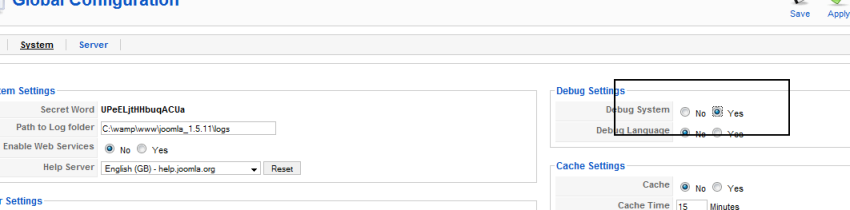
This kind of blank page mean that you have a php error, so in Joomla Global Configuration do like on the images, just for see an error message when you upolad an avatar :


I don't provide support by PM, because this can be useful for someone else.
Last edit: 17 years 4 months ago by xillibit.
Please Log in or Create an account to join the conversation.
17 years 4 months ago #21807
by Joachim
Replied by Joachim on topic Re:Upload avatar doesnt work
Im not sure what I did, but when I try and upload a avator now, I get a new message:
"Please select a file before uploading"
this is instead of that page I was sent to earlier.
using maximum error reporting didnt show any error messages
Please Log in or Create an account to join the conversation.
Time to create page: 0.129 seconds