
- Posts: 111
- Thank you received: 5
Kunena 7.0.4 Released
The Kunena team has announce the arrival of Kunena 7.0.4 [K 7.0.4] in stable which is now available for download as a native Joomla extension for J! 5.4.x/6.0.x. This version addresses most of the issues that were discovered in K 6.2 / K 6.3 / K 6.4 and issues discovered during the last development stages of K 7.0
Topics that are moved into this category are generally considered to be closed. Users may want to add additional information but these topics should not be resurrected in order to discuss new problems or unrelated matters.
Question Posts Bar on Kunena Site is left-aligned in Firefox
- joomlauser
-
 Topic Author
- Offline
- Senior Member
-

Less
More
15 years 10 months ago #50290
by joomlauser
Posts Bar on Kunena Site is left-aligned in Firefox was created by joomlauser
Hello
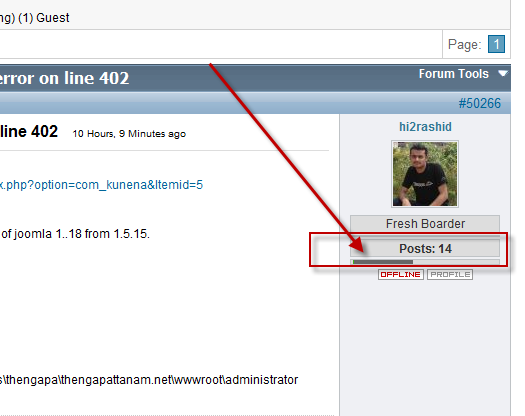
Browsing Kunena forum I noticed that points bar is left aligned?
Do you have the same?
See screen below

Is it an error?
Browsing Kunena forum I noticed that points bar is left aligned?
Do you have the same?
See screen below
Is it an error?
Please Log in or Create an account to join the conversation.


15 years 10 months ago #50297
by sozzled
Blue Eagle vs. Crypsis reference guide
Read my blog and

Replied by sozzled on topic Re: Posts Bar on Kunena Site is left-aligned in Firefox
I'm not sure if this is an error or not (yes, I see the same as you do). I find it curious that this "problem" has been in Kunena for such a long time and no-one has commented about it until now.
Perhaps this was not a deliberate mistake but it is possible to centre the graph, if that's what you want. You will need to modify ../components/com_kunea/template/default_ex/view.php at line 713 (assuming that you are using K 1.5.11 and the default_ex template, of course)
Change the 64 to 150 and see if that makes a difference.
Perhaps this was not a deliberate mistake but it is possible to centre the graph, if that's what you want. You will need to modify ../components/com_kunea/template/default_ex/view.php at line 713 (assuming that you are using K 1.5.11 and the default_ex template, of course)
Code:
$myGraph->SetGraphWidth(64); //should match column width in the <TD> above -5 pixels
Blue Eagle vs. Crypsis reference guide
Read my blog and
Please Log in or Create an account to join the conversation.


15 years 10 months ago #50336
by fxstein
We love stars on the Joomla Extension Directory .
Replied by fxstein on topic Re: Posts Bar on Kunena Site is left-aligned in Firefox
I believe this is due to the rank images missing here on kunena.com
The missing rank images cause various browsers to mess up the alignment. Still looking for a copy of the ones that got installed here a while ago. One of our prior admins uploaded them without ever storing a central copy on the svn or any other location. We either need to recreate them or switch back to the Kunena defaults.
The missing rank images cause various browsers to mess up the alignment. Still looking for a copy of the ones that got installed here a while ago. One of our prior admins uploaded them without ever storing a central copy on the svn or any other location. We either need to recreate them or switch back to the Kunena defaults.
We love stars on the Joomla Extension Directory .
Please Log in or Create an account to join the conversation.
- joomlauser
-
Topic Author
- Offline
- Senior Member
-
Less
More
- Posts: 111
- Thank you received: 5
15 years 10 months ago - 15 years 10 months ago #50337
by joomlauser
Replied by joomlauser on topic Re: Posts Bar on Kunena Site is left-aligned in Firefox
sozzled wrote:
No I have to do the same with statistic bar from AlphaUserPoint
Thanks, It made a difference. Now it looks much better. Now, statistic bar is stretched beetween edges of table.Change the 64 to 150 and see if that makes a difference.
No I have to do the same with statistic bar from AlphaUserPoint
Last edit: 15 years 10 months ago by sozzled. Reason: very minor change to user's BBcode to improve appearance
Please Log in or Create an account to join the conversation.


15 years 10 months ago #50363
by JoniJnm
Replied by JoniJnm on topic Re: Posts Bar on Kunena Site is left-aligned in Firefox
In lib/kunena.statsbar.php
echo '<div class="viewcover">';
By
echo '<div align="center" style="margin:0 5px">';
echo '<div class="viewcover">';
By
echo '<div align="center" style="margin:0 5px">';
Please Log in or Create an account to join the conversation.

15 years 6 months ago #63596
by C0n
Replied by C0n on topic Re: Posts Bar on Kunena Site is left-aligned in Firefox
Thanks fixed my issue 
Please Log in or Create an account to join the conversation.
Time to create page: 0.295 seconds