


- Posts: 14
- Thank you received: 0
Kunena 7.0.8 Released
The Kunena team has announce the arrival of Kunena 7.0.8 [K 7.0.8] in stable which is now available for download as a native Joomla extension for J! 5.4.x/6.0.x./6.1.x. This version addresses most of the issues that were discovered in K 6.2 / K 6.3 / K 6.4 and issues discovered during the last development stages of K 7.0
Topics that are moved into this category are generally considered to be closed. Users may want to add additional information but these topics should not be resurrected in order to discuss new problems or unrelated matters.
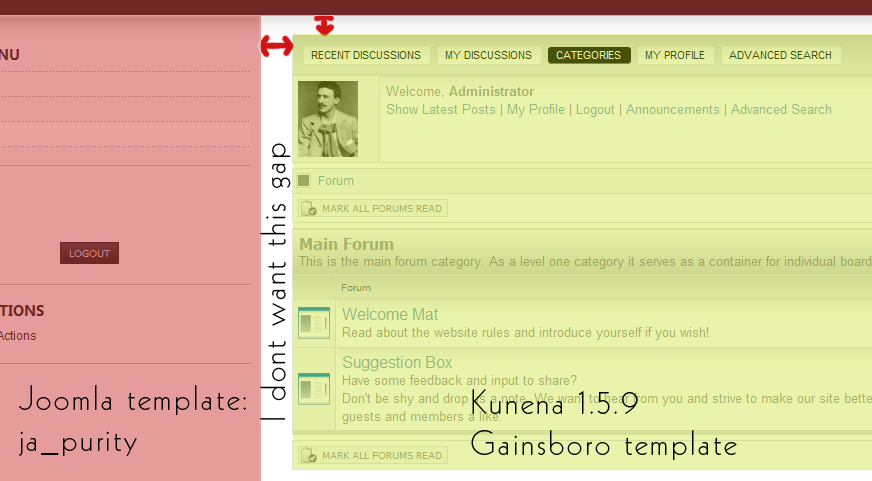
Question "expand" kunena to edges of template (the gap)
16 years 4 months ago #43677
by Ninjao
"expand" kunena to edges of template (the gap) was created by Ninjao
Hi,
I tried to find the solution using search and reading the documentation but I found nothing that worked for me
I saw the documentation and forum thread which said to change the width from a certain px value to a % value. However I have not found that line on the ja_purity.css
I tried guessing what to change by using photoshop to "measure the pixels in the gap" but I found no value.
I have attached a screenshot for you to examine.
Thanks a lot in advance!
-Ninjao

I tried to find the solution using search and reading the documentation but I found nothing that worked for me
I saw the documentation and forum thread which said to change the width from a certain px value to a % value. However I have not found that line on the ja_purity.css
I tried guessing what to change by using photoshop to "measure the pixels in the gap" but I found no value.
I have attached a screenshot for you to examine.
Thanks a lot in advance!
-Ninjao
Please Log in or Create an account to join the conversation.


16 years 4 months ago #43679
by sozzled
Blue Eagle vs. Crypsis reference guide
Read my blog and

Replied by sozzled on topic Re:"expand" kunena to edges of template (the gap)
Two points to make:
- The K 1.5.9 "Gainsboro" template is a user-contributed development; any problems that you have with user-submitted designs are best resolved with the developer. There is only one endorsed and supported Kunena template ... default_ex
- You might find the following topic helpful:
Before you ask for help with template issues ...

Blue Eagle vs. Crypsis reference guide
Read my blog and
Please Log in or Create an account to join the conversation.


16 years 4 months ago #43682
by Cerberus
Replied by Cerberus on topic Re:"expand" kunena to edges of template (the gap)
sozzled is right but you could always use firebug for firefox to find the code making the gap and remove it from the template 
Please Log in or Create an account to join the conversation.
16 years 4 months ago - 16 years 4 months ago #43703
by Ninjao
Replied by Ninjao on topic Re:"expand" kunena to edges of template (the gap)
Hi guys, thanks for the replies!
Obviously I read that post you mentioned sozzled and I know a lot of people post these questions I took the time to search the forums and didn't find a solution to my problem. Default-ex presents the same problem so it must be with the joomla template..?
I installed firebug and discovered that the gap is apparently from ja-content. There doesn't seem to be a value to edit!
Maybe I need to define it? I have no idea how to proceed
regards,
-Ninjao

Obviously I read that post you mentioned sozzled and I know a lot of people post these questions
I took the time to search the forums and didn't find a solution to my problem. Default-ex presents the same problem so it must be with the joomla template..?I installed firebug and discovered that the gap is apparently from ja-content. There doesn't seem to be a value to edit!
Maybe I need to define it? I have no idea how to proceed
regards,
-Ninjao

Last edit: 16 years 4 months ago by Ninjao.
Please Log in or Create an account to join the conversation.
16 years 4 months ago - 16 years 4 months ago #43706
by Cerberus
Replied by Cerberus on topic Re:"expand" kunena to edges of template (the gap)
template.css line 869
Padding: 0px 20px 0px 40px; <---- there she is change them all to 0px or 1px and ur sorted
The STYLE box in bottom left hand corner is best place to look for that kind of error in firebug
Padding: 0px 20px 0px 40px; <---- there she is change them all to 0px or 1px and ur sorted
The STYLE box in bottom left hand corner is best place to look for that kind of error in firebug
Last edit: 16 years 4 months ago by Cerberus.
Please Log in or Create an account to join the conversation.
16 years 4 months ago #43724
by Ninjao
Replied by Ninjao on topic Re:"expand" kunena to edges of template (the gap)
Hi again!
Thanks a lot that helped! However it did not remove the gap at the top
I now have the forum nested nicely on the left hand side but at the top there is still a gap.
Any suggestions?
-Ninjao
Thanks a lot that helped!
However it did not remove the gap at the top I now have the forum nested nicely on the left hand side but at the top there is still a gap.
Any suggestions?
-Ninjao
Please Log in or Create an account to join the conversation.
Time to create page: 0.316 seconds