


- Posts: 17
- Thank you received: 0
Kunena 7.0.4 Released
The Kunena team has announce the arrival of Kunena 7.0.4 [K 7.0.4] in stable which is now available for download as a native Joomla extension for J! 5.4.x/6.0.x. This version addresses most of the issues that were discovered in K 6.2 / K 6.3 / K 6.4 and issues discovered during the last development stages of K 7.0
Topics that are moved into this category are generally considered to be closed. Users may want to add additional information but these topics should not be resurrected in order to discuss new problems or unrelated matters.
Question [solved] Problem with width of kunena forum on my joomla template
16 years 10 months ago - 16 years 9 months ago #22262
by kamil_w
Hi there,
I have problem with width of kunena forum on my site. It looks like that and I would like make kunena to be on whole width of my template. How to delete this empty space on right side?
If it wolud help you to help me, HERE * is a package with movAMP (portable server with PHP and MySQL) with installed Joomla + kunena + theme I use.
*package is in Polish, but it should be no problem
user: admin
pass: admin
I have problem with width of kunena forum on my site. It looks like that and I would like make kunena to be on whole width of my template. How to delete this empty space on right side?
If it wolud help you to help me, HERE * is a package with movAMP (portable server with PHP and MySQL) with installed Joomla + kunena + theme I use.
*package is in Polish, but it should be no problem
user: admin
pass: admin
Last edit: 16 years 9 months ago by kamil_w.
Please Log in or Create an account to join the conversation.


16 years 10 months ago #22302
by Spock
Replied by Spock on topic Re: Problem with width of kunena forum on my joomla template
I couldn't access the package. This is definitely a problem caused by your Joomla! template. From the screenshot my guess is that the template right divs aren't collapsing when empty. That said, I would really have to see a working demo to know what exactly is causing the problem.
Please Log in or Create an account to join the conversation.
16 years 10 months ago #22351
by kamil_w
Replied by kamil_w on topic Re:Problem with width of kunena forum on my joomla template
There is correct link:
wimim.j11.pl/pliki/joomla1.5.11_and_kunena1.5.3_PL.rar
wimim.j11.pl/pliki/joomla1.5.11_and_kunena1.5.3_PL.rar
Please Log in or Create an account to join the conversation.
16 years 10 months ago - 16 years 10 months ago #22355
by Spock
Replied by Spock on topic Re:Problem with width of kunena forum on my joomla template
Hi again kamil_w,
I may need you try try a few things. First off try this it'll solve the initial and obvious gap on the right. In the local site Joomla! template css: templates123wd-j15-8csstemplate.css change
Other divs should be changed to the % widths except the main body div which can stay in pixels. Check for yourself and report any other problems
I may need you try try a few things. First off try this it'll solve the initial and obvious gap on the right. In the local site Joomla! template css: templates123wd-j15-8csstemplate.css change
to
div#maincolumn_full {template.css (line 340)
float:left;
padding:0 10px;
width:708px;
div#maincolumn_full {template.css (line 340)
float:left;
padding:0 10px;
width:98%;
Other divs should be changed to the % widths except the main body div which can stay in pixels. Check for yourself and report any other problems
Last edit: 16 years 10 months ago by Spock.
Please Log in or Create an account to join the conversation.
16 years 10 months ago - 16 years 10 months ago #22360
by kamil_w
Replied by kamil_w on topic Re:Problem with width of kunena forum on my joomla template
Thanks a lot! Works great.
EDIT: I have found another problem:
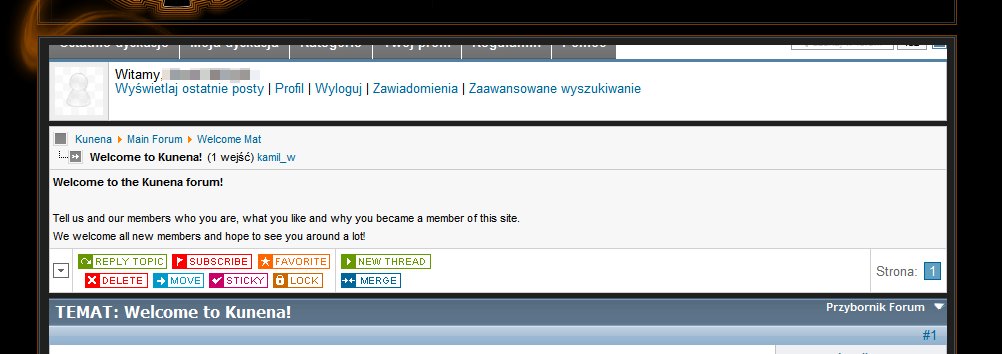
When I click on button moving page to the bottom, the kunena menu looks like on enclosed image.

EDIT2:
OK. I have changed template to MOC and everything is OK.
EDIT: I have found another problem:
When I click on button moving page to the bottom, the kunena menu looks like on enclosed image.
EDIT2:
OK. I have changed template to MOC and everything is OK.

Last edit: 16 years 10 months ago by kamil_w.
Please Log in or Create an account to join the conversation.
Time to create page: 0.251 seconds