


- Posts: 7
- Thank you received: 0
Kunena 7.0.4 Released
The Kunena team has announce the arrival of Kunena 7.0.4 [K 7.0.4] in stable which is now available for download as a native Joomla extension for J! 5.4.x/6.0.x. This version addresses most of the issues that were discovered in K 6.2 / K 6.3 / K 6.4 and issues discovered during the last development stages of K 7.0
Topics that are moved into this category are generally considered to be closed. Users may want to add additional information but these topics should not be resurrected in order to discuss new problems or unrelated matters.
Question Bad looking Kunena tabs menu
16 years 10 months ago - 16 years 10 months ago #21616
by YUB
Well, i do it by my self ... it's my first one.
You could find the zip file here
Edit: I just removed this because it is your work and not to release to everybody (spock)
I've tested it through the joomla installer, and the installation goes well
Except, with Kunena
THX
++
YUB
PS : looks fine under Firefox & Safari
Replied by YUB on topic Re:Bad looking Kunena tabs menu
can you tell me where you downloaded it?
Well, i do it by my self ... it's my first one.
You could find the zip file here
Edit: I just removed this because it is your work and not to release to everybody (spock)
I've tested it through the joomla installer, and the installation goes well
Except, with Kunena
THX
++
YUB
PS : looks fine under Firefox & Safari
Last edit: 16 years 10 months ago by Spock.
Please Log in or Create an account to join the conversation.


16 years 10 months ago #21626
by Spock
Replied by Spock on topic Re:Bad looking Kunena tabs menu
YUB wrote:
from the kunena template whereas other elements like the bottom kunena breadcrumbs are behaving like the standard default_ex should. The padding properties (either in your template or the kunena template) are causing an issue but i can't seem to find out the exact css line that are causing it(disabling one by one in firebug looks like the only solution).
It doesn't look good in my firefox either. Unfortunately i don't have a fix yet because it may be caused by index.php of your template(although i don't think so) . I'd suggest getting firebug and have a quick look yourself in the test site. Sorry for the general/unhelpful answer but if i do solve it (tomorrow) I'll put the solution here.
Quick note on firebug: You can edit, debug, and monitor CSS, HTML, and JavaScript live in any web page. getfirebug.com/
Yes that package installs fine. The problems are fairly widespread. Some categories/forums are wrapped by up to 5/6
Well, i do it by my self ... it's my first one.
I've tested it through the joomla installer, and the installation goes well
Except, with Kunena
PS : looks fine under Firefox & Safari
Code:
divs<div id="fb_block1" class="fb__bt_cvr1">
<div class="fb__bt_cvr2">
<div class="fb__bt_cvr3">
<div class="fb__bt_cvr4">
<div class="fb__bt_cvr5">
It doesn't look good in my firefox either. Unfortunately i don't have a fix yet because it may be caused by index.php of your template(although i don't think so) . I'd suggest getting firebug and have a quick look yourself in the test site. Sorry for the general/unhelpful answer but if i do solve it (tomorrow) I'll put the solution here.
Quick note on firebug: You can edit, debug, and monitor CSS, HTML, and JavaScript live in any web page. getfirebug.com/
Please Log in or Create an account to join the conversation.
16 years 10 months ago #21644
by YUB
Replied by YUB on topic Re:Bad looking Kunena tabs menu
OK Spock, i understand.
I've downloaded Firebug, and I'll try to debug with.
Thx for your appreciate help,
I'll forward u my analysis result soon (tonight or tomorrow).
Have a good day,
++
YUB
I've downloaded Firebug, and I'll try to debug with.
Thx for your appreciate help,
I'll forward u my analysis result soon (tonight or tomorrow).
Have a good day,
++
YUB
Please Log in or Create an account to join the conversation.
16 years 10 months ago - 16 years 10 months ago #21754
by YUB
Replied by YUB on topic Re:Bad looking Kunena tabs menu
@Spock :
I find something great for the tabs menu with disabling this in kunenan.forum.css :
#Kunena #Kunena_tab a {
background:transparent url(images/tabmenuright.gif) no-repeat scroll right top;
border:0 none;
display:block;
[strike]float:left;[/strike]
margin:0;
padding:0;
text-decoration:none;
}
I'm still look for the "table" problem,
Thx for the step up spock,
++
YUB
I find something great for the tabs menu with disabling this in kunenan.forum.css :
#Kunena #Kunena_tab a {
background:transparent url(images/tabmenuright.gif) no-repeat scroll right top;
border:0 none;
display:block;
[strike]float:left;[/strike]
margin:0;
padding:0;
text-decoration:none;
}
I'm still look for the "table" problem,
Thx for the step up spock,
++
YUB
Last edit: 16 years 10 months ago by YUB.
Please Log in or Create an account to join the conversation.
16 years 10 months ago #21757
by Spock
Replied by Spock on topic Re:Bad looking Kunena tabs menu
Glad to here that you're making progress (i only noticed now that the tabs were messed up too). The table issue looked like a padding or margin property was the culprit the kunena.forum.css properties for this are contained in the blocktable class but i think that the padding on your Joomla! template divs are causing an issue. I'm only speculating by the way because i haven't looked at it since i was talking to you last night - I hope this points you towards the solution. Best of luck with it
Please Log in or Create an account to join the conversation.
16 years 10 months ago - 16 years 10 months ago #21780
by YUB
Replied by YUB on topic Re:Bad looking Kunena tabs menu
Hello Spock,
Unfortunetly, i couldn't find the issue for the tables with disabling the properties line by line in the css files of kunena template and in mine.
Do U think the error could be in other files than css ? (in php files for example ?)
Unless, is there any solution to "isolate" the <jdoc:include type="component" /> ?
Thx Captain,
++
YUB
Edit : i'm close to the solution :
i've patched kunena.forum.css with :
#Kunena div {
margin : 0px;
}
and the tables look quite fine

but i think is not the right way ...
Unfortunetly, i couldn't find the issue for the tables with disabling the properties line by line in the css files of kunena template and in mine.
Do U think the error could be in other files than css ? (in php files for example ?)
Unless, is there any solution to "isolate" the <jdoc:include type="component" /> ?
Thx Captain,
++
YUB
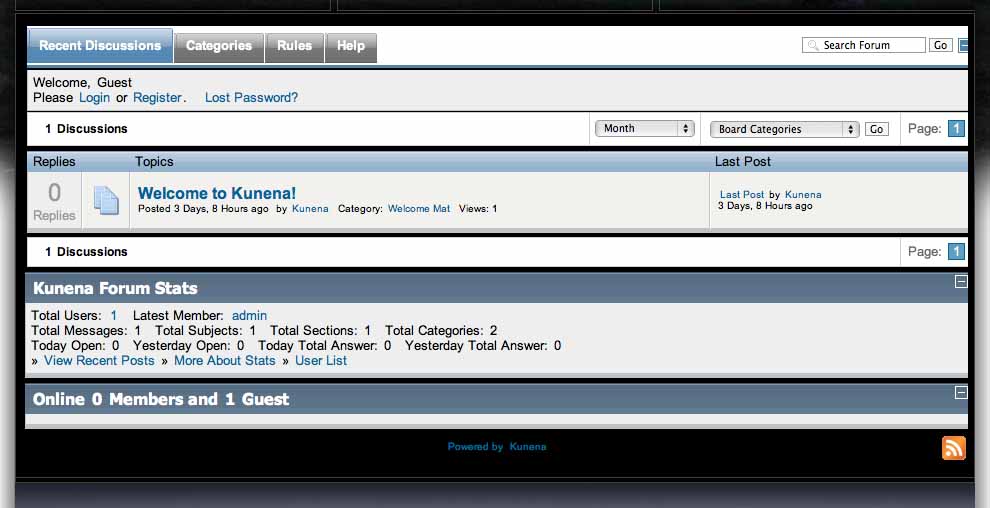
Edit : i'm close to the solution :
i've patched kunena.forum.css with :
#Kunena div {
margin : 0px;
}
and the tables look quite fine
but i think is not the right way ...
Last edit: 16 years 10 months ago by YUB.
Please Log in or Create an account to join the conversation.
Time to create page: 0.443 seconds