


- Posts: 8
- Thank you received: 1
Kunena 7.0.10 & Kunena 6.4.15 – Security Updates Released and K7.1 in RC1
The Kunena team has announce the arrival of Kunena 7.0.10 [K 7.0.10] as security release which is now available for download as a native Joomla extension for J! 5.4.x/6.0.x./6.1.x/6.2.x and 6.4.15 [K 6.4.15]. This version addresses most of the issues that were discovered in K 6.2 / K 6.3 / K 6.4 and issues discovered during the last development stages of K 7.0
Please read
Before you ask for help with template issues ...
Question Show Post Buttons once (on top only, not bottom)
16 years 6 months ago #43891
by pracket
Show Post Buttons once (on top only, not bottom) was created by pracket
When I'm viewing a thread, the buttons for Quick Reply, Quote, etc. show both (a) above the post, and (b) below the post.
I only want it on top, not the bottom. How do I change this?
Thanks.
I only want it on top, not the bottom. How do I change this?
Thanks.
The following user(s) said Thank You: dutton
Please Log in or Create an account to join the conversation.


16 years 6 months ago #43907
by sozzled
Replied by sozzled on topic Re:Show Post Buttons once (on top only, not bottom)
If you would like to turn off the display of the icons at the top, change your Kunena CSS as follows:
#Kunena .fb_list_actions {
background-color:#FFFFFF;
border:1px solid #D1D1D1;
color:#000000;
display:none;
margin-top:-1px;
width:100%;
}
If you would like to turn off the display of the icons at the bottom, change your Kunena CSS as follows:
#Kunena .fb_list_actions_bottom {
background-color:#FFFFFF;
border:1px solid #D1D1D1;
color:#000000;
display:none;
margin-bottom:-1px;
width:100%;
}
#Kunena .fb_list_actions {
background-color:#FFFFFF;
border:1px solid #D1D1D1;
color:#000000;
display:none;
margin-top:-1px;
width:100%;
}
If you would like to turn off the display of the icons at the bottom, change your Kunena CSS as follows:
#Kunena .fb_list_actions_bottom {
background-color:#FFFFFF;
border:1px solid #D1D1D1;
color:#000000;
display:none;
margin-bottom:-1px;
width:100%;
}
The following user(s) said Thank You: kennedyronald
Please Log in or Create an account to join the conversation.
16 years 1 month ago #59704
by Eloisa
Replied by Eloisa on topic Re:Show Post Buttons once (on top only, not bottom)
Heya Sozzled, 
Have been searching the forums and reading the guidelines on fiddling with the template for what feels like hours
Imagine my excitement, when I see exactly what I need here!!
Ran off quickly and made the changes you suggested... but it doesnt work Initially made the changes in the css file through the component, but when it didnt work, also checked the css file on ftp and sure enough the changes had been applied as so:
/* Menu */
/* B: all disc top */
#Kunena .fb_list_actions {
background-color:#FFFFFF;
color:#000000;
display:none;
border:1px solid #D1D1D1;
margin-top:-1px;
width:100%;
To be honest, I'm a complete css noob - but little scares me, so am trying to solve stuff myself. So am I missing something (probably obvious!)
Link to my forum page that is giving me problems: www.divine-retribution.eu/index.php?opti...=view&catid=2&id=2#2
Joomla 1.5.20
Kunena 1.5.12
Earlier today I did upgrade the whole forum to 1.6, but as you can see from my site, the default-ex template with joomla style gives a perfect integration of forum to website template, so I rolled back - but, is this what is causing me problems? If I could just have one set of actions buttons... and manage to align them into some kind of order, and then get rid of the reply boxes to every response, rather than just the last one (also shown on link) then I would be a very, very, very happy girl!
Just not sure which of the files I need to be editing
Hoping you can help point.. or push me in the right direction
Eloisa
PS Also tried firebug, but couldnt identify the reply box to the first reply to ths thread
Have been searching the forums and reading the guidelines on fiddling with the template for what feels like hours
Imagine my excitement, when I see exactly what I need here!!
Ran off quickly and made the changes you suggested... but it doesnt work
Initially made the changes in the css file through the component, but when it didnt work, also checked the css file on ftp and sure enough the changes had been applied as so:/* Menu */
/* B: all disc top */
#Kunena .fb_list_actions {
background-color:#FFFFFF;
color:#000000;
display:none;
border:1px solid #D1D1D1;
margin-top:-1px;
width:100%;
To be honest, I'm a complete css noob - but little scares me, so am trying to solve stuff myself. So am I missing something (probably obvious!)
Link to my forum page that is giving me problems: www.divine-retribution.eu/index.php?opti...=view&catid=2&id=2#2
Joomla 1.5.20
Kunena 1.5.12
Earlier today I did upgrade the whole forum to 1.6, but as you can see from my site, the default-ex template with joomla style gives a perfect integration of forum to website template, so I rolled back - but, is this what is causing me problems? If I could just have one set of actions buttons... and manage to align them into some kind of order, and then get rid of the reply boxes to every response, rather than just the last one (also shown on link) then I would be a very, very, very happy girl!
Just not sure which of the files I need to be editing
Hoping you can help point.. or push me in the right direction
Eloisa
PS Also tried firebug, but couldnt identify the reply box to the first reply to ths thread
Please Log in or Create an account to join the conversation.


16 years 1 month ago #59707
by Cerberus
Replied by Cerberus on topic Re:Show Post Buttons once (on top only, not bottom)
ok i have read this a few times and looked at your site but im still unsure what you are trying to do, can you do my a screen shot with note to explain what you want done
Please Log in or Create an account to join the conversation.
16 years 1 month ago #59711
by Eloisa
Replied by Eloisa on topic Re:Show Post Buttons once (on top only, not bottom)
Thanks for such a quick reply, sorry if I wasnt as clear as I could have been!
See attached.
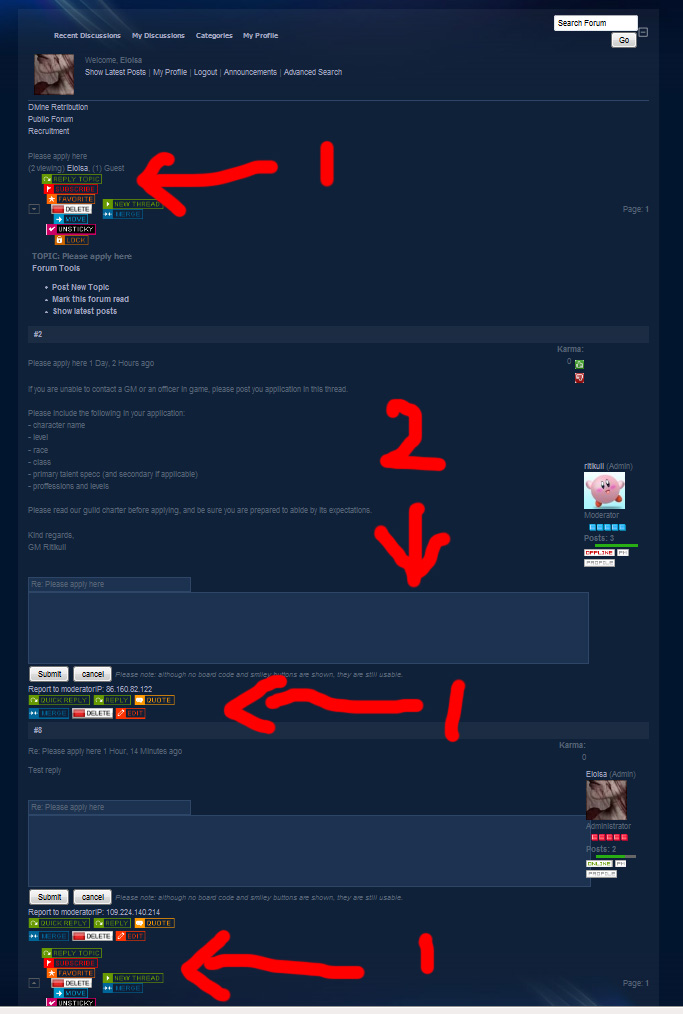
Marked as 1: I have 3 sets of edit/delete etc buttons here on one thread. Now one of them may disappear if problem marked 2 is resolved I am trying to remove the top set as sozzled suggested. I would also like to order them, because at the moment they are jumbled up a bit.
Now, I just did another test... and created a non-admin account and there are less buttons, but still 3 sets.
Marked as 2:
This is the screen I get if I click on ONE thread in a forum. This thread has a reply. Both the original post to start the thread, and the reply have the 'RE-Thread Name' box, so a reader could reply to either the original post, or the reply. I want one 'RE-Thread Name' per thread, not per reply.
Does that make sense?
Eloisa
See attached.
Marked as 1: I have 3 sets of edit/delete etc buttons here on one thread. Now one of them may disappear if problem marked 2 is resolved
I am trying to remove the top set as sozzled suggested. I would also like to order them, because at the moment they are jumbled up a bit.Now, I just did another test... and created a non-admin account and there are less buttons, but still 3 sets.
Marked as 2:
This is the screen I get if I click on ONE thread in a forum. This thread has a reply. Both the original post to start the thread, and the reply have the 'RE-Thread Name' box, so a reader could reply to either the original post, or the reply. I want one 'RE-Thread Name' per thread, not per reply.
Does that make sense?
Eloisa
Please Log in or Create an account to join the conversation.
16 years 1 month ago - 16 years 1 month ago #59715
by Cerberus
ok that what i thought can you provide me with a login so that i can see this live on your site and will give you exact part of code to edit.
extremely hard to do and would take alot of work to make this happen ( not something id even think about doing to K1.5 but maybe a feature request for a future version K2.0)
Replied by Cerberus on topic Re:Show Post Buttons once (on top only, not bottom)
Marked as 1: I have 3 sets of edit/delete etc buttons here on one thread. Now one of them may disappear if problem marked 2 is resolved
ok that what i thought
can you provide me with a login so that i can see this live on your site and will give you exact part of code to edit.Marked as 2:
This is the screen I get if I click on ONE thread in a forum. This thread has a reply. Both the original post to start the thread, and the reply have the 'RE-Thread Name' box, so a reader could reply to either the original post, or the reply. I want one 'RE-Thread Name' per thread, not per reply.
extremely hard to do and would take alot of work to make this happen ( not something id even think about doing to K1.5 but maybe a feature request for a future version K2.0)
Last edit: 16 years 1 month ago by Cerberus.
Please Log in or Create an account to join the conversation.
Time to create page: 0.141 seconds