


- Posts: 7
- Thank you received: 0
Kunena 7.0.4 Released
The Kunena team has announce the arrival of Kunena 7.0.4 [K 7.0.4] in stable which is now available for download as a native Joomla extension for J! 5.4.x/6.0.x. This version addresses most of the issues that were discovered in K 6.2 / K 6.3 / K 6.4 and issues discovered during the last development stages of K 7.0
Please read
Before you ask for help with template issues ...
Question How can i change table width and a lot more
16 years 1 month ago #42109
by Pete Rich
Replied by Pete Rich on topic Re:How can i change table width and a lot more
The Url of the website is
www.abnormity.de/cms2/
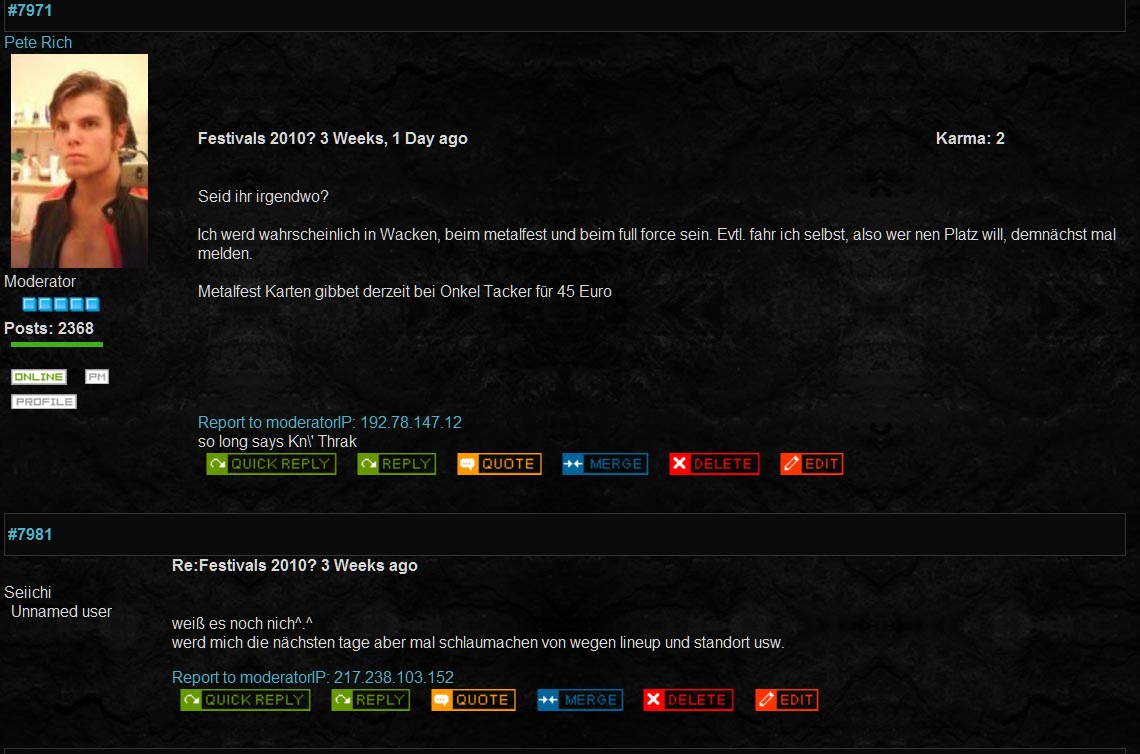
but it's the page of my band and for registered users only, so it won't help. I made another screenshot:

As you can see, there are 2 posts listed. My problem is, that the size of the msgtext ist a little bit too small and the same as the headliner. I just added 2 <br> and a <strong> to the title or headline, so it doesn't look like it's the same text block anymore.
I'd like to set the font of the msgtext a little bigger, so it would be a little highlighted and better to read. I tried a lot with the css files and found nothing. Most changes didn't have any effect at all. Beside that i found out, that it doesn't matter wether i choose the joomla look or not.
Don't worry, I have no extentions or toolbars or anything else of that crap in my browser
By the way, it is a very cool forum. it's just that little thing that gets me a headache.
As you can see, there are 2 posts listed. My problem is, that the size of the msgtext ist a little bit too small and the same as the headliner. I just added 2 <br> and a <strong> to the title or headline, so it doesn't look like it's the same text block anymore.
I'd like to set the font of the msgtext a little bigger, so it would be a little highlighted and better to read. I tried a lot with the css files and found nothing. Most changes didn't have any effect at all. Beside that i found out, that it doesn't matter wether i choose the joomla look or not.
Don't worry, I have no extentions or toolbars or anything else of that crap in my browser
By the way, it is a very cool forum. it's just that little thing that gets me a headache.
Please Log in or Create an account to join the conversation.


16 years 1 month ago - 16 years 1 month ago #42112
by sozzled
Blue Eagle vs. Crypsis reference guide
Read my blog and

Replied by sozzled on topic Re:How can i change table width and a lot more
Pete Rich wrote:
You may PM the account login details to me, if you wish.
Another suggestion, is to try the !important attribute:
#Kunena div.msgtext {
border-top:1px solid #DDDDDD;
margin-top:5px;
overflow:hidden;
padding:10px 0 0;
width:100%;
word-wrap:break-word;
font-size: 15pt !important;
}
You're right. It doesn't help. Neither does a screenshot help, either. I can't help you unless I can see your site.The Url of the website is www.abnormity.de/cms2/ but it's the page of my band and for registered users only, so it won't help.
You may PM the account login details to me, if you wish.
Another suggestion, is to try the !important attribute:
#Kunena div.msgtext {
border-top:1px solid #DDDDDD;
margin-top:5px;
overflow:hidden;
padding:10px 0 0;
width:100%;
word-wrap:break-word;
font-size: 15pt !important;
}
Blue Eagle vs. Crypsis reference guide
Read my blog and
Last edit: 16 years 1 month ago by sozzled.
Please Log in or Create an account to join the conversation.
16 years 1 month ago #42114
by Pete Rich
Replied by Pete Rich on topic Re:How can i change table width and a lot more
Thanks for that, but it doesn't change anything.
I'll PM you details of a testaccount.
Is it possible that i may have to wait for example 30min till changes aply? I don't think so, but i would try everything
I'll PM you details of a testaccount.
Is it possible that i may have to wait for example 30min till changes aply? I don't think so, but i would try everything
Please Log in or Create an account to join the conversation.
16 years 1 month ago #42116
by sozzled
Blue Eagle vs. Crypsis reference guide
Read my blog and
Replied by sozzled on topic Re:How can i change table width and a lot more
Your problem primarily stems from the Joomla template that you are using. You are using something called reset.css. You can make a difference if you change this CSS directive:
* {
border:0 none;
font-size:10.5pt;
margin:0;
padding:0;
}
But this may also have other implications elsewhere on your website.
Evidently, you are not using a Kunena CSS template. You have, instead, opted to use your default Joomla CSS (Kunena Configuration » Frontend » Use Joomla Style = Yes). Have I correctly diagnosed your situation? Although this approach may work (or may have worked in a limited way in Fireboard) this is not the preferred method. Speaking from personal experience, I have never been able to get this method to succeed!
Therefore, any changes that you make to font sizes for Kunena will have global repercussions across your website and, conversely, any changes that you make elsewhere on your website will have repercussions on your Kunena forum. That's the way it goes when you do what you have done.
There are other options that you might be able to use, if you are interested in them, but they will inevitably require work on your part.
* {
border:0 none;
font-size:10.5pt;
margin:0;
padding:0;
}
But this may also have other implications elsewhere on your website.
Evidently, you are not using a Kunena CSS template. You have, instead, opted to use your default Joomla CSS (Kunena Configuration » Frontend » Use Joomla Style = Yes). Have I correctly diagnosed your situation? Although this approach may work (or may have worked in a limited way in Fireboard) this is not the preferred method. Speaking from personal experience, I have never been able to get this method to succeed!
Therefore, any changes that you make to font sizes for Kunena will have global repercussions across your website and, conversely, any changes that you make elsewhere on your website will have repercussions on your Kunena forum. That's the way it goes when you do what you have done.
There are other options that you might be able to use, if you are interested in them, but they will inevitably require work on your part.
Blue Eagle vs. Crypsis reference guide
Read my blog and
Please Log in or Create an account to join the conversation.
16 years 1 month ago #42117
by Pete Rich
Replied by Pete Rich on topic Re:How can i change table width and a lot more
yeah thanks, i found that reset.css
But when i choose a standard template inside of Kenuna, i have still the same problems.
that's why i thought, that it had nothing to do with the joomla template
Anyway, it'll also work in this size.
Thank You very much for your efforts!
ans as i said, it's still i very cool forum component.
But when i choose a standard template inside of Kenuna, i have still the same problems.
that's why i thought, that it had nothing to do with the joomla template
Anyway, it'll also work in this size.
Thank You very much for your efforts!
ans as i said, it's still i very cool forum component.
Please Log in or Create an account to join the conversation.
16 years 1 month ago - 16 years 1 month ago #42118
by sozzled
Blue Eagle vs. Crypsis reference guide
Read my blog and
Replied by sozzled on topic Re:How can i change table width and a lot more
Pete Rich wrote:
If you change that setting to Use Joomla Style = No, then you will be able to control the font size in your forum. It's worth looking at, I think.
When you say "standard template" I assume that you mean the default_ex template, correct? Even if you select the default_ex template, it will have no effect until you turn off the Kunena setting that I think you have selected: Kunena Configuration » Frontend » Use Joomla Style = Yes.But when i choose a standard template inside of Kenuna, i have still the same problems.
If you change that setting to Use Joomla Style = No, then you will be able to control the font size in your forum. It's worth looking at, I think.
Blue Eagle vs. Crypsis reference guide
Read my blog and
Last edit: 16 years 1 month ago by sozzled.
Please Log in or Create an account to join the conversation.
Time to create page: 0.306 seconds