


- Posts: 3
- Thank you received: 0
Kunena 7.0.4 Released
The Kunena team has announce the arrival of Kunena 7.0.4 [K 7.0.4] in stable which is now available for download as a native Joomla extension for J! 5.4.x/6.0.x. This version addresses most of the issues that were discovered in K 6.2 / K 6.3 / K 6.4 and issues discovered during the last development stages of K 7.0
Please read
Before you ask for help with template issues ...
Question Kunena shows in joomla content area
16 years 1 month ago - 16 years 1 month ago #41610
by fcognito
Kunena shows in joomla content area was created by fcognito
Hi,
I am having a huge problem...
I have successfully installed kunena. And have added a link to the main menu "Forum" the link is index.php?option=com_kunena&Itemid=71
the problem is as you see in the picture that kunena shows only in my content area of joomla which is about 600px wide. I want to show kunena as a new browser window that is independant of joomla and will show only kunena forum.
I have already set the "On Click, open in: New windows with browser navigation" but its the same...

The only option that partially works is when I set New window without browser navigation, that shows only kunena in a new window, but when I click on any link in it it loads the whole joomla site again with forum in the content are...
How do I achieve behavior like on this forum where we have domain.com/forum/etc...
Any help greatly appreciated!
Thank you!
I am having a huge problem...
I have successfully installed kunena. And have added a link to the main menu "Forum" the link is index.php?option=com_kunena&Itemid=71
the problem is as you see in the picture that kunena shows only in my content area of joomla which is about 600px wide. I want to show kunena as a new browser window that is independant of joomla and will show only kunena forum.
I have already set the "On Click, open in: New windows with browser navigation" but its the same...
The only option that partially works is when I set New window without browser navigation, that shows only kunena in a new window, but when I click on any link in it it loads the whole joomla site again with forum in the content are...
How do I achieve behavior like on this forum where we have domain.com/forum/etc...
Any help greatly appreciated!
Thank you!
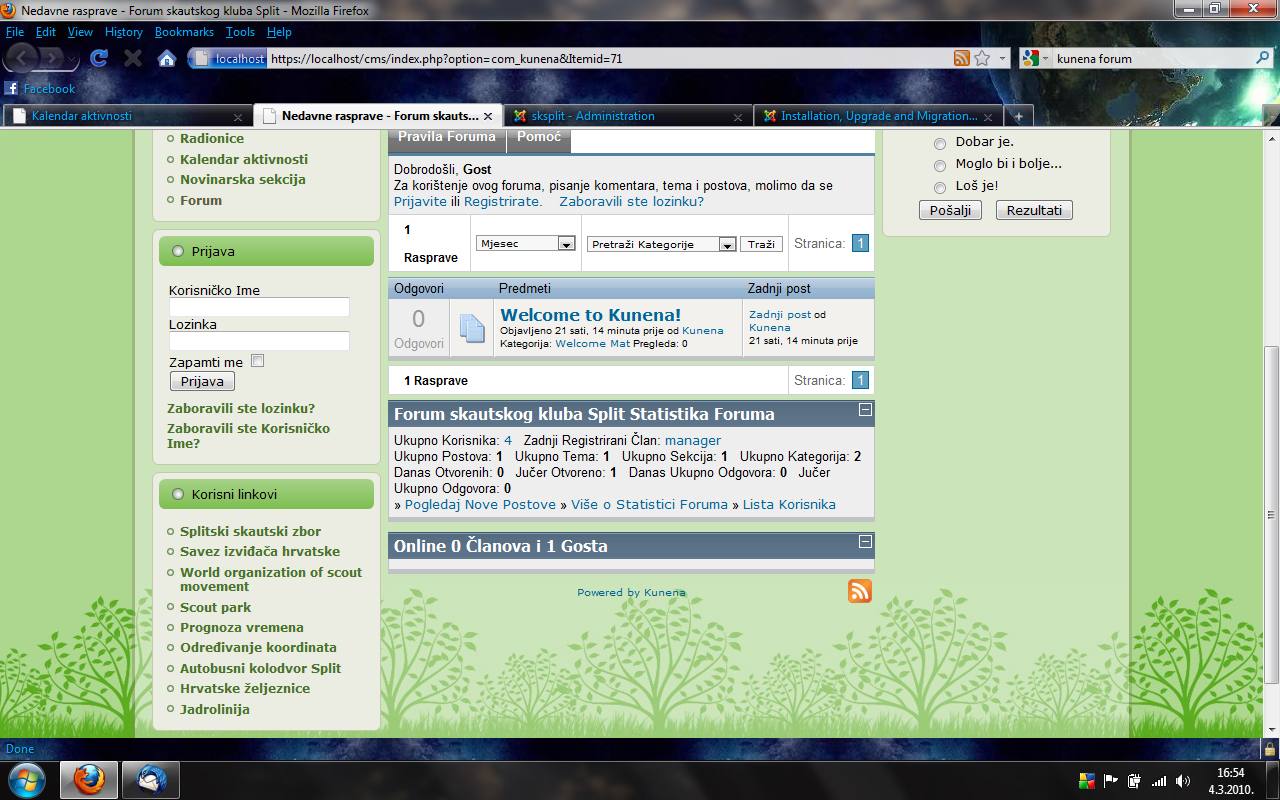
Last edit: 16 years 1 month ago by fcognito.
Please Log in or Create an account to join the conversation.


16 years 1 month ago #41643
by sozzled
Blue Eagle vs. Crypsis reference guide
Read my blog and

Replied by sozzled on topic Re:Kunena shows in joomla content area
Thank you. This is a really good question - I only wish I had a really good answer for you. :S
I tried to do something similar to what you've attempted: I tried to set the menu item that runs Kunena and to open it in a new window without browser navigation. As you also have found, when you move to a different Kunena page, all the Joomla stuff reappears.
There are other ways you can approach the problem. Perhaps the easiest way is to remove any unnecessary left and right modules from your Kunena page and allow the Kunena forum to use as much "component space" as your Joomla template allows. For instance, in your case, do you really need the right module on that page? What if you replaced the menus on the left side with horizontal menus on the top or bottom of the page? What if you removed the login module on the left, or placed the login module at the top of the page, or used one of many other ideas to insert the login module within the Kunena template itself?
I tried to do something similar to what you've attempted: I tried to set the menu item that runs Kunena and to open it in a new window without browser navigation. As you also have found, when you move to a different Kunena page, all the Joomla stuff reappears.
There are other ways you can approach the problem. Perhaps the easiest way is to remove any unnecessary left and right modules from your Kunena page and allow the Kunena forum to use as much "component space" as your Joomla template allows. For instance, in your case, do you really need the right module on that page? What if you replaced the menus on the left side with horizontal menus on the top or bottom of the page? What if you removed the login module on the left, or placed the login module at the top of the page, or used one of many other ideas to insert the login module within the Kunena template itself?
Blue Eagle vs. Crypsis reference guide
Read my blog and
Please Log in or Create an account to join the conversation.
16 years 1 month ago #41893
by fcognito
Replied by fcognito on topic Re:Kunena shows in joomla content area
Thank you for your reply!
I thought there is some kind of flag or something that says, open in New window and show only in now window like a standalone forum, but it seems there is isn't...
It seems I will have to put some JavaScript in index.php that will have a flag that sets to true if Kunena is shown, and if it is true I will remove with JS all other elements on the page...
Sucks, I would definitely suggest to Kunena developers to implement this feature in future releases, ah well.
I thought there is some kind of flag or something that says, open in New window and show only in now window like a standalone forum, but it seems there is isn't...
It seems I will have to put some JavaScript in index.php that will have a flag that sets to true if Kunena is shown, and if it is true I will remove with JS all other elements on the page...
Sucks, I would definitely suggest to Kunena developers to implement this feature in future releases, ah well.
Please Log in or Create an account to join the conversation.
Time to create page: 0.347 seconds