
Kunena 7.0.4 Released
The Kunena team has announce the arrival of Kunena 7.0.4 [K 7.0.4] in stable which is now available for download as a native Joomla extension for J! 5.4.x/6.0.x. This version addresses most of the issues that were discovered in K 6.2 / K 6.3 / K 6.4 and issues discovered during the last development stages of K 7.0
Question And Again!


Another css problem and I am guessing another conflict with the template.
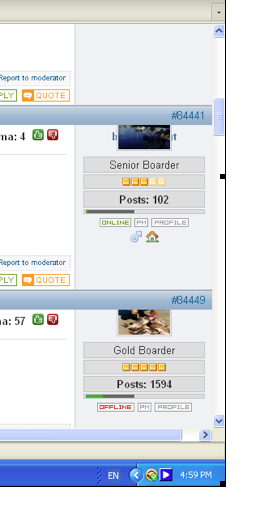
Had this image sent through from a user, using the latest Firefox on XP.
I am using FFox on OSX and not having any problems so I am guessing its just a windows FFox issue.
Is there a way to make sure Kunena uses its own CSS so the Joomla template's CSS doesn't cause any conflicts or are there aspects of the Kunena template that need to use the Joomla template's css?
Another question, how do you go in testing other browsers especially Internet Explorer when you use a mac and don't have access to a windows machine. Is there a trade secret???


Please Log in or Create an account to join the conversation.


Yes, you can ensure that one or another CSS takes precedence: use the !important directive.Is there a way to make sure Kunena uses its own CSS so the Joomla template's CSS doesn't cause any conflicts or are there aspects of the Kunena template that need to use the Joomla template's css?
For example:
... {
...
width: 100% !important;
...
}
irradiate wrote:
Virtualisation (i.e. load Windows for Mac over Mac OS) or buy an "el cheapo" PC for a couple of hundred dollars.How do you go in testing other browsers especially Internet Explorer when you use a mac and don't have access to a windows machine. Is there a trade secret???
Blue Eagle vs. Crypsis reference guide
Read my blog and

Please Log in or Create an account to join the conversation.
Virtualisation (i.e. load Windows for Mac over Mac OS) or buy an "el cheapo" PC for a couple of hundred dollars.
Had a funny thought you would say that!
With using the !important code, is there a way to add it once to the whole css file or does it have to be added to each piece throughout?
Please Log in or Create an account to join the conversation.
I really don't know without thumbing through a CSS manual. Sorry, mate, I can't answer that question.With using the !important code, is there a way to add it once to the whole css file or does it have to be added to each piece throughout?

Blue Eagle vs. Crypsis reference guide
Read my blog and
Please Log in or Create an account to join the conversation.
Does anyone have FFox on windows that could have a look for me?
Cheers

Please Log in or Create an account to join the conversation.
I've looked at your website with Internet Explorer 8 on Windows 7, Firefox 3.5.7 on Windows 7, Internet Explorer 7 on Windows Vista and Firefox 3.5.1 on Vista. No problems like you've shown.Does anyone have FFox on windows that could have a look for me?
Blue Eagle vs. Crypsis reference guide
Read my blog and
Please Log in or Create an account to join the conversation.