


- Posts: 6
- Thank you received: 0
Kunena 7.0.4 Released
The Kunena team has announce the arrival of Kunena 7.0.4 [K 7.0.4] in stable which is now available for download as a native Joomla extension for J! 5.4.x/6.0.x. This version addresses most of the issues that were discovered in K 6.2 / K 6.3 / K 6.4 and issues discovered during the last development stages of K 7.0
Please read
Before you ask for help with template issues ...
Question problem with space between joomla and k-forum
16 years 4 months ago #35534
by neptunia
Replied by neptunia on topic Re:problem with space between joomla and k-forum
@quila here is the link
cml-foundation.org/icmlf-forum
then just click on a topic.
thank you for checking!
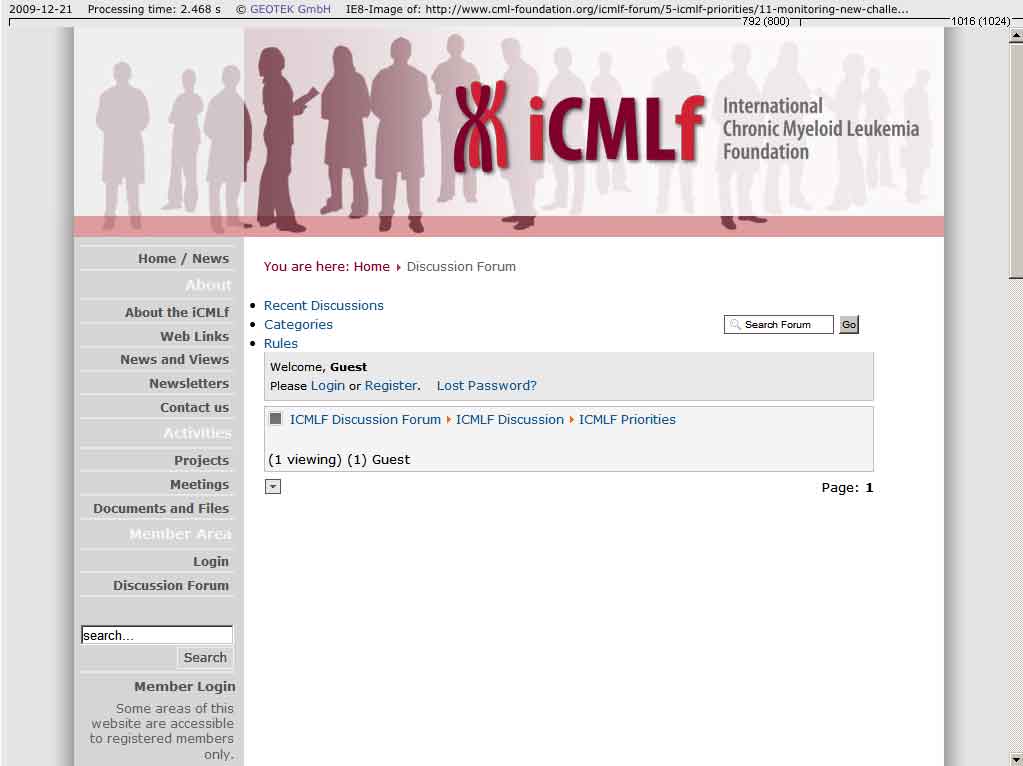
@810 i updated it this weekend - but the ie8-problem seems to remain ...
could it be a problem with the joomla-template?
thanks for testing!
thank you for checking!
@810 i updated it this weekend - but the ie8-problem seems to remain ...
could it be a problem with the joomla-template?
thanks for testing!
Please Log in or Create an account to join the conversation.


16 years 4 months ago - 16 years 4 months ago #35535
by Lintzy
Replied by Lintzy on topic Re:problem with space between joomla and k-forum
Hi, switch your template to default_ex. This will fix it.
The template default, that you are using, does not work anymore, it is deprecated since Kunena 1.5.7 ->
docs.kunena.com/index.php/Kunena_1.5.7_R...rty_Kunena_Templates
The template default, that you are using, does not work anymore, it is deprecated since Kunena 1.5.7 ->
docs.kunena.com/index.php/Kunena_1.5.7_R...rty_Kunena_Templates
Last edit: 16 years 4 months ago by Lintzy.
Please Log in or Create an account to join the conversation.
16 years 4 months ago - 16 years 4 months ago #35536
by neptunia
Replied by neptunia on topic Re:problem with space between joomla and k-forum
thanks lintzy - i tried but still ... look at the screenshot. i will keep the default-ex until you were able to check 


Last edit: 16 years 4 months ago by neptunia.
Please Log in or Create an account to join the conversation.
16 years 4 months ago - 16 years 4 months ago #35537
by Lintzy
Replied by Lintzy on topic Re:problem with space between joomla and k-forum
This is odd. You have not the newest kunena.forum.css installed. However this happened.
In the newer kunena.forum.css (of template default_ex) all css-tags are wrapped with #Kunena. So that the most conflicts with Joomla templates are prevented.
If you look in your actually css, you will see, that you have css tags without #Kunena, like (for example)
it should be
Upload the kunena.forum.css (and check, if the upload was successfull) of Kunena 1.5.8. Unzip the download file and find the kunena.forum.css file in folder -> template/default_ex and upload this css to /components/com_kunena/template/default_ex and override the old one.
In the newer kunena.forum.css (of template default_ex) all css-tags are wrapped with #Kunena. So that the most conflicts with Joomla templates are prevented.
If you look in your actually css, you will see, that you have css tags without #Kunena, like (for example)
Code:
td.fb_profileboxcnt
Code:
#Kunena td.fb_profileboxcnt
Upload the kunena.forum.css (and check, if the upload was successfull) of Kunena 1.5.8. Unzip the download file and find the kunena.forum.css file in folder -> template/default_ex and upload this css to /components/com_kunena/template/default_ex and override the old one.
Last edit: 16 years 4 months ago by Lintzy.
Please Log in or Create an account to join the conversation.
16 years 4 months ago #35540
by neptunia
Replied by neptunia on topic Re:problem with space between joomla and k-forum
wao - seems that the css-files weren't changed while updating the forum-files ...
thank you so much, lintzy, now i can work with the recent css and change colors maybe fonts but nothing else anymore ... i'm so glad it works now!
warm regards
with a light heart!
neptunia
thank you so much, lintzy, now i can work with the recent css and change colors maybe fonts but nothing else anymore ... i'm so glad it works now!
warm regards
with a light heart!
neptunia
Please Log in or Create an account to join the conversation.
- FreeThinker
-

- Offline
- Senior Member
-

Less
More
- Posts: 121
- Thank you received: 0
16 years 3 months ago #37533
by FreeThinker
Replied by FreeThinker on topic Re:problem with space between joomla and k-forum
not intending to start a new topic...and since it's related...
I wanted to know if anyone knows how come, when displaying some Modules along with Forum...it creates a space between the forum header and the Forum sections!?
*it increases the "gap" / space...if i put more modules to show with forum...!?

I wanted to know if anyone knows how come, when displaying some Modules along with Forum...it creates a space between the forum header and the Forum sections!?
*it increases the "gap" / space...if i put more modules to show with forum...!?

Please Log in or Create an account to join the conversation.
Time to create page: 0.272 seconds