
Kunena 7.0.10 & Kunena 6.4.15 – Security Updates Released and K7.1 in RC1
The Kunena team has announce the arrival of Kunena 7.0.10 [K 7.0.10] as security release which is now available for download as a native Joomla extension for J! 5.4.x/6.0.x./6.1.x/6.2.x and 6.4.15 [K 6.4.15]. This version addresses most of the issues that were discovered in K 6.2 / K 6.3 / K 6.4 and issues discovered during the last development stages of K 7.0
Please read
Before you ask for help with template issues ...
Question IE8 problem


16 years 11 months ago - 16 years 11 months ago #32558
by irradiate
IE8 problem was created by irradiate
Hi All,
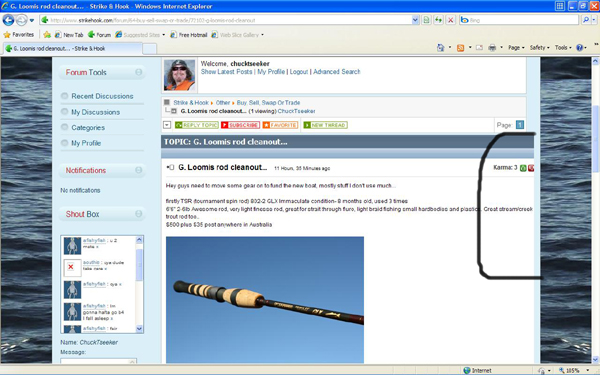
Some of my users using Internet Explorer 8 are having a few problems. On some posts, and it is only random, the right hand side seems to be extending causing the text to continue and cut of so people cant read posts properly.
As far as I can gather, it seems to happen on a few posts that have images.
I am using 1.5.6.
The problem is fixed if you use 'Compatibility Mode' but stuff up the rest of my RT template.
Any ideas on how to fix? image missing http://www.kunena.com/media/kunena/attachments/legacy/images/again3.JPG
image missing http://www.kunena.com/media/kunena/attachments/legacy/images/again4.JPG
Some of my users using Internet Explorer 8 are having a few problems. On some posts, and it is only random, the right hand side seems to be extending causing the text to continue and cut of so people cant read posts properly.
As far as I can gather, it seems to happen on a few posts that have images.
I am using 1.5.6.
The problem is fixed if you use 'Compatibility Mode' but stuff up the rest of my RT template.
Any ideas on how to fix? image missing http://www.kunena.com/media/kunena/attachments/legacy/images/again3.JPG
image missing http://www.kunena.com/media/kunena/attachments/legacy/images/again4.JPG

Last edit: 16 years 11 months ago by irradiate.
Please Log in or Create an account to join the conversation.


16 years 11 months ago - 16 years 11 months ago #32564
by John
My websites: AquaInfo.org | AquaInfo.nl
Replied by John on topic Re:IE8 problem
IE8 has a problem keeping the standards, i had the same problem. Just add this code at the bottem of your CSS (thanx to lintzy):
Just change the 700 px to what ever you need.
Still don't get why it isn't included in standard Kunena? Seems that it isn't just us having this problem.
Code:
/* Fix for Internet Explorer 6*/
#Kunena *html div.msgtext {
width:700px;
overflow:hidden!important;
word-wrap: break-word;
}
/*Fix for Internet Explorer 8*/
#Kunena div.msgtext {
width:/*\**/700px\9;
overflow:/*\**/hidden!important\9;
word-wrap:/*\**/break-word\9;
}
Just change the 700 px to what ever you need.
Still don't get why it isn't included in standard Kunena? Seems that it isn't just us having this problem.
My websites: AquaInfo.org | AquaInfo.nl
Last edit: 16 years 11 months ago by John.
Please Log in or Create an account to join the conversation.
16 years 11 months ago #32565
by irradiate
Replied by irradiate on topic Re:IE8 problem
Cheers for that John, was hoping I wasn't the only one or was losing my mind!
When you say change the width, change it to the width of the template or to the width the board is?
When you say change the width, change it to the width of the template or to the width the board is?
Please Log in or Create an account to join the conversation.
16 years 11 months ago - 16 years 11 months ago #32632
by irradiate
Replied by irradiate on topic Re:IE8 problem
Tried the fix and it works with the text, but the avatar column is still extending to the right and is not visible.
With the release of Windows 7, all these new machines are going to have IE8 installed and forums that don't display properly.
Is it going to be addressed in the next release??
With the release of Windows 7, all these new machines are going to have IE8 installed and forums that don't display properly.
Is it going to be addressed in the next release??
Last edit: 16 years 11 months ago by irradiate.
Please Log in or Create an account to join the conversation.
16 years 11 months ago #32640
by John
My websites: AquaInfo.org | AquaInfo.nl
Replied by John on topic Re:IE8 problem
Forgot to mention, don't use internal CSS editor, use FTP to download kunena.forum.css in the template folder, edit it and re-upload to your site. (Some editors break the code).
My websites: AquaInfo.org | AquaInfo.nl
Please Log in or Create an account to join the conversation.
16 years 11 months ago #32641
by irradiate
Replied by irradiate on topic Re:IE8 problem
That's the way I tried, always prefer playing with the ftp't copy 
It did fix the text thing, but seemed to keep the avatar column way out to the right and not visible. I set it to 500px but use a fixed width template at 1024 with a side menu and thought that could be the prob after reading this.
www.kunena.com/forum/136-templates-and-d...lem-with-width#31630
It did fix the text thing, but seemed to keep the avatar column way out to the right and not visible. I set it to 500px but use a fixed width template at 1024 with a side menu and thought that could be the prob after reading this.
www.kunena.com/forum/136-templates-and-d...lem-with-width#31630
Please Log in or Create an account to join the conversation.
Time to create page: 0.212 seconds