


- Posts: 7
- Thank you received: 0
Kunena 7.1.1 & Kunena 6.4.17 – Security Updates Released
The Kunena team has announce the arrival of Kunena 7.1.1 [K 7.1.1] in stable which is now available for download as a native Joomla extension for J! 5.4.x/6.0.x./6.1.x./6.2.x This version addresses most of the issues that were discovered in K 6.2 / K 6.3 / K 6.4 / K7.0 and issues discovered during the last development stages of K 7.1
Just a reminder: K6.4.17 receives only securities fixes until end of 2026, so it's advised for users to upgrade to K7.1.
Question Default URL?
16 years 10 months ago #36791
by kbm
Default URL? was created by kbm
What is the default URL to your Kunena install?
Please Log in or Create an account to join the conversation.


16 years 10 months ago - 16 years 10 months ago #36794
by sozzled
Blue Eagle vs. Crypsis reference guide
Read my blog and

Replied by sozzled on topic Re:Default URL?
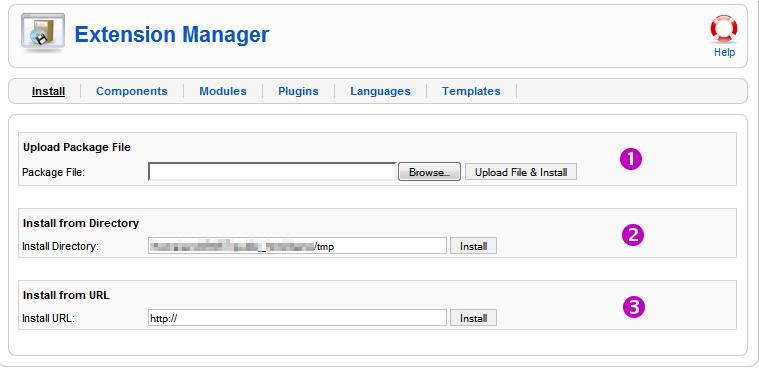
I'm sorry, I'm not sure I understand the question. Kunena installs just like any other Joomla component. Referring to the image below, you have three options to install a component:

Most people use the first option, i.e. they download the installation package (.ZIP format) to their computer and use that file to install the component on their website. The second option requires you to upload the installation package to a folder on your website before you install from there. The third option allows you to install the component from another website. Are you asking a question about one of these options?
Most people use the first option, i.e. they download the installation package (.ZIP format) to their computer and use that file to install the component on their website. The second option requires you to upload the installation package to a folder on your website before you install from there. The third option allows you to install the component from another website. Are you asking a question about one of these options?
Blue Eagle vs. Crypsis reference guide
Read my blog and
Last edit: 16 years 10 months ago by sozzled.
Please Log in or Create an account to join the conversation.
16 years 10 months ago #36833
by kbm
Replied by kbm on topic Re:Default URL?
Hi and thanks for the reply.
I'm actually looking for the url after the install. for example the forum here is located at kunena.com/forum
but when I install kunena on my own site what is the url address mysite.com/??????
I'm actually looking for the url after the install. for example the forum here is located at kunena.com/forum
but when I install kunena on my own site what is the url address mysite.com/??????
Please Log in or Create an account to join the conversation.


16 years 10 months ago #36835
by xillibit
I don't provide support by PM, because this can be useful for someone else.
Replied by xillibit on topic Re:Default URL?
Hello,
it on the menu that you have created into joomla! menu manager and if you use sef.
it on the menu that you have created into joomla! menu manager and if you use sef.
I don't provide support by PM, because this can be useful for someone else.
Please Log in or Create an account to join the conversation.
16 years 10 months ago #36856
by kbm
Replied by kbm on topic Re:Default URL?
xillibit wrote:
Thanks for the reminder. I chose it from the list when building the menu.
Hello,
it on the menu that you have created into joomla! menu manager and if you use sef.
Thanks for the reminder. I chose it from the list when building the menu.
Please Log in or Create an account to join the conversation.
Time to create page: 0.132 seconds