


- Posts: 2
- Thank you received: 0
Kunena 7.0.4 Released
The Kunena team has announce the arrival of Kunena 7.0.4 [K 7.0.4] in stable which is now available for download as a native Joomla extension for J! 5.4.x/6.0.x. This version addresses most of the issues that were discovered in K 6.2 / K 6.3 / K 6.4 and issues discovered during the last development stages of K 7.0
Question new forum not visible only when access is set to "everybody"
16 years 7 months ago #29235
by terzo
hello all,
my problem is that:
i updated joomla from 1.5.10 to 1.5.14 --> no problems occured
then i updated cb to the latest version --> no problems occured
at least i updated to the latest kunena version
i did all migration settings. installed the dark army template...
everything worked fine as far as i could see.
but then i wanted to make new forum set public access level to editor
and admin access level to administrator.
i was logged in as superadministrator and couldn't see the forum.
all old forums i can see but no new ones if public access level
is not set to "everybody"!??
i hope someone can help me
thx in adv
TerZo
my problem is that:
i updated joomla from 1.5.10 to 1.5.14 --> no problems occured
then i updated cb to the latest version --> no problems occured
at least i updated to the latest kunena version
i did all migration settings. installed the dark army template...
everything worked fine as far as i could see.
but then i wanted to make new forum set public access level to editor
and admin access level to administrator.
i was logged in as superadministrator and couldn't see the forum.
all old forums i can see but no new ones if public access level
is not set to "everybody"!??
i hope someone can help me
thx in adv
TerZo
Please Log in or Create an account to join the conversation.


16 years 7 months ago #29242
by rich
Important! Always create a backup before you make any changes to your website!
Replied by rich on topic Re:new forum not visible only when access is set to "everybody"
Welcome terzo!
"Backend/ Kunena Forum Administration > Edit Category / Forum"
Set "Include Child Groups:" to yes
www.kunena.com/forum/50-german-solved-or...8-adminbereich#20683
Regards
"Backend/ Kunena Forum Administration > Edit Category / Forum"
Set "Include Child Groups:" to yes
www.kunena.com/forum/50-german-solved-or...8-adminbereich#20683
Regards
Important! Always create a backup before you make any changes to your website!
Please Log in or Create an account to join the conversation.
16 years 7 months ago #29436
by terzo
Replied by terzo on topic Re:new forum not visible only when access is set to "everybody"
ya thankyou very much rich! works 
but dont understand it :blush:
i, as superadmin, must of course see every forum or not?
for all old forums (before update) i didnt set "include childgroups" and i see them all! so what has happened?
thx in adv
TerZo
but dont understand it :blush:
i, as superadmin, must of course see every forum or not?
for all old forums (before update) i didnt set "include childgroups" and i see them all! so what has happened?
thx in adv
TerZo
Please Log in or Create an account to join the conversation.
16 years 7 months ago - 16 years 7 months ago #29440
by rich
Important! Always create a backup before you make any changes to your website!
Replied by rich on topic Re:new forum not visible only when access is set to "everybody"
Hi terzo,
Quote from (backend) Forum Administration:
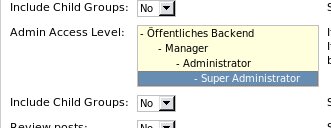
You can also to configure this (see image).
Then admin cannot see this forum.

management is better now.for all old forums (before update) i didnt set "include childgroups"
Quote from (backend) Forum Administration:
If you create a forum with Public Access restrictions, you can specify here an additional Administration Access Level.
If you restrict the access to the Forum to a special Public Frontend user group and don't specify a Public Backend Group here, administrators will not be able to enter/view the forum.
You can also to configure this (see image).
Then admin cannot see this forum.
Important! Always create a backup before you make any changes to your website!
Last edit: 16 years 7 months ago by rich.
Please Log in or Create an account to join the conversation.


16 years 7 months ago #30256
by Matias
Replied by Matias on topic Re:new forum not visible only when access is set to "everybody"
Actually admin should see all the published forums, but by fixing ACL we seem to have hit another bug (which wasn't shown because of the slightly broken ACL).
I've done the same in my own forum. :blush:
I've done the same in my own forum. :blush:
Please Log in or Create an account to join the conversation.
Time to create page: 0.252 seconds