


- Posts: 3
- Thank you received: 0
Kunena 7.0.5 & Kunena 6.4.11 – Security Updates Released
The Kunena team has announce the arrival of Kunena 7.0.5 [K 7.0.5] in stable which is now available for download as a native Joomla extension for J! 5.4.x/6.0.x. This version addresses most of the issues that were discovered in K 6.2 / K 6.3 / K 6.4 and issues discovered during the last development stages of K 7.0.
The Kunena team is also pleased to announce the eleventh version of Kunena 6.4, a native Joomla extension for Joomla! 5.0, 5.1, 5.2, 5.3, 5.4 and 6.0.
Topics that are moved into this category are generally considered to be closed. Users may want to add additional information but these topics should not be resurrected in order to discuss new problems or unrelated matters.
Question Uploading pics,everyone knows this, but me :-(
15 years 11 months ago - 15 years 11 months ago #50382
by Natasha
Uploading pics,everyone knows this, but me :-( was created by Natasha
Hi
Really sorry to take your time up.
I've spent ages looking, but can not find info.
Please tell me how i can upload a pic (from my desktop) into this white box. Sounds simple, but its not working for me ((
((
I press CHOOSE FILE, then i select (small pic) then press preview, but no pic is their,
Plz tell me what i'm doing wrong pleaseeeeee.
MANY THANKS xxxx
Natahsa.
oh, i'm using joomla 1.5.14 and i downloaded this forum about xmas time.
Really sorry to take your time up.
I've spent ages looking, but can not find info.
Please tell me how i can upload a pic (from my desktop) into this white box. Sounds simple, but its not working for me
((I press CHOOSE FILE, then i select (small pic) then press preview, but no pic is their,
Plz tell me what i'm doing wrong pleaseeeeee.
MANY THANKS xxxx
Natahsa.
oh, i'm using joomla 1.5.14 and i downloaded this forum about xmas time.
Last edit: 15 years 11 months ago by Natasha. Reason: new info
Please Log in or Create an account to join the conversation.


15 years 11 months ago #50387
by Cerberus
Replied by Cerberus on topic Re: Uploading pics,everyone knows this, but me :-(
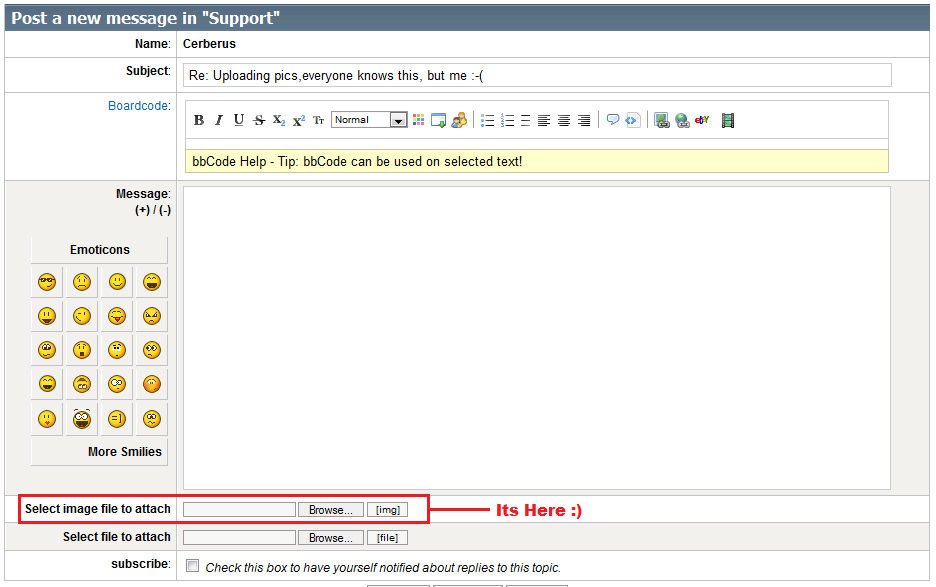
click browse then path to ur image appears in box then write your message and click submit and your image is uploaded and added to your post 

Please Log in or Create an account to join the conversation.
15 years 11 months ago #50388
by Natasha
Replied by Natasha on topic Re: Uploading pics,everyone knows this, but me :-(
yes i know that bit thanks.... this what i do.
I click on CHOOSE FILE
my desktop box opens up... i choose small pic JPG Click OPEN
Then Press preview.
Then all i see is the text i've written and no pic.
Please tell me the step i must be missing pleaseeee
Thanks Natasha xxxxxxxxxxxxxxxxxxxxxxxxxxxxxxx
I click on CHOOSE FILE
my desktop box opens up... i choose small pic JPG Click OPEN
Then Press preview.
Then all i see is the text i've written and no pic.
Please tell me the step i must be missing pleaseeee
Thanks Natasha xxxxxxxxxxxxxxxxxxxxxxxxxxxxxxx
Please Log in or Create an account to join the conversation.

15 years 11 months ago #50389
by Hurr1c4n3
Replied by Hurr1c4n3 on topic Re: Uploading pics,everyone knows this, but me :-(
In the preview the picture isn't yet visible. It will be visible when you submit your message.
Please Log in or Create an account to join the conversation.
15 years 11 months ago - 15 years 11 months ago #50390
by Cerberus
Replied by Cerberus on topic Re: Uploading pics,everyone knows this, but me :-(
Natasha wrote:
click browse then path to your image appears in box then write your message and CLICK SUBMIT and your image is uploaded and added to your post
yes i know that bit thanks.... this what i do.
I click on CHOOSE FILE
my desktop box opens up... i choose small pic JPG Click OPEN
Then Press preview.
Then all i see is the text i've written and no pic.
Please tell me the step i must be missing pleaseeee
Thanks Natasha xxxxxxxxxxxxxxxxxxxxxxxxxxxxxxx
click browse then path to your image appears in box then write your message and CLICK SUBMIT and your image is uploaded and added to your post
Last edit: 15 years 11 months ago by Cerberus.
Please Log in or Create an account to join the conversation.
15 years 11 months ago #50391
by Natasha
Replied by Natasha on topic Re: Uploading pics,everyone knows this, but me :-(
It works hun XXXXXXXXXXXXXXXXXXXXX
Love you ! XXXXXXXXXXXXXXXX
Thanks Natahsa xxxxxxxxxxxxxxxxxxxxxx
Love you ! XXXXXXXXXXXXXXXX
Thanks Natahsa xxxxxxxxxxxxxxxxxxxxxx
Please Log in or Create an account to join the conversation.
Time to create page: 0.211 seconds