The Kunena team has announce the arrival of Kunena 7.0.5 [K 7.0.5] in stable which is now available for download as a native Joomla extension for J! 5.4.x/6.0.x. This version addresses most of the issues that were discovered in K 6.2 / K 6.3 / K 6.4 and issues discovered during the last development stages of K 7.0.
The Kunena team is also pleased to announce the eleventh version of Kunena 6.4, a native Joomla extension for Joomla! 5.0, 5.1, 5.2, 5.3, 5.4 and 6.0.
Topics that are moved into this category are generally considered to be closed. Users may want to add additional information but these topics should not be resurrected in order to discuss new problems or unrelated matters.
Spotted something else - but you may know about this.
I've read through the bug fix for having images show and that works a treat. I also note that you can't preview an image as yet.
The problem I have is that if you hand code [img]cxcxccx[/img] into a new post with nothing else added, it will display happily.
However, if you click on the 'Select image file to attach' button and then select the file but have nothing else in the post, the forum throws it back saying that nothing has been entered in the post and to use the back button to add some content.
I assume the the first method works as the system picks up you have typed in the bbcode, whereas using the upload button it does not detect any content as being added and thus throws up a null value.
*** I've just realised I've posted this in the wrong place. It should be for 1.5.5. Sorry - it's 1.15am and my brain has shut down ***
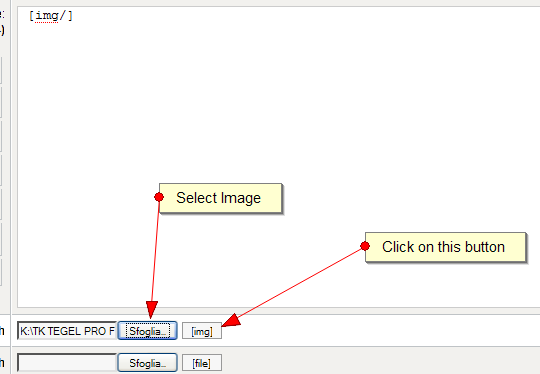
when you want to insert only image in the post you must click to button "[img]" look image
[img]http://www.kunena.com/media/kunena/attachments/legacy/images/ima.png[/img]
P.S. The post was moved by moderator to appropriate area, don't need to recreated another one