Kunena 7.1.1 & Kunena 6.4.17 – Security Updates Released

The Kunena team has announce the arrival of Kunena 7.1.1 [K 7.1.1] in stable which is now available for download as a native Joomla extension for J! 5.4.x/6.0.x./6.1.x./6.2.x This version addresses most of the issues that were discovered in K 6.2 / K 6.3 / K 6.4 / K7.0 and issues discovered during the last development stages of K 7.1
Just a reminder: K6.4.17 receives only securities fixes until end of 2026, so it's advised for users to upgrade to K7.1.

Topics that are moved into this category are generally considered to be closed. Users may want to add additional information but these topics should not be resurrected in order to discuss new problems or unrelated matters.

Question post images

More
17 years 2 months ago - 17 years 2 months ago #28174 by freshboarder
post images was created by freshboarder
ok I know this is a very basic of basic questions but it is really doing my head in ...

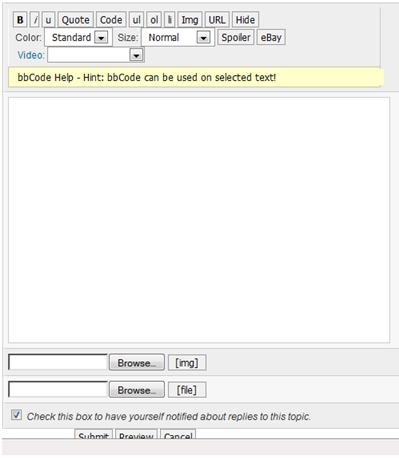
how do I post images that sit on my computer rather than having to provide a URL. Is there a way users can directly post images or do these have to be uploaded somewhere first.

I know it is possible :unsure: :angry: :S

If i browse for an image and select the [img] option it doesnt do anything ... Thanks in advance [img]http://www.kunena.com/media/kunena/attachments/legacy/images/Untitled-20090903.jpg[/img]


EDIT: ok .. interesting ... when I preview for an image it doesn't show the image but upon post it does??
Last edit: 17 years 2 months ago by freshboarder.

Please Log in or Create an account to join the conversation.

  • cXc
  • cXc's Avatar
  • New Member
  • New Member
More
17 years 2 months ago - 17 years 2 months ago #28192 by cXc
Replied by cXc on topic Re: post images
It doesn't upload the attached image until the post is actually sent, until then its just sitting on your PC and can't be accessed directly with the browser. They were considering having it upload with the preview button I think but right now its not possible. Its not broken ;) the only way to see the images you are going to post in the preview is if they already reside online somewhere and you use the img tag with their url.
Last edit: 17 years 2 months ago by cXc.

Please Log in or Create an account to join the conversation.

Time to create page: 0.101 seconds