


- Posts: 21
- Thank you received: 0
Kunena 7.0.8 Released
The Kunena team has announce the arrival of Kunena 7.0.8 [K 7.0.8] in stable which is now available for download as a native Joomla extension for J! 5.4.x/6.0.x./6.1.x. This version addresses most of the issues that were discovered in K 6.2 / K 6.3 / K 6.4 and issues discovered during the last development stages of K 7.0
Question registed users only message
15 years 9 months ago #67384
by chicaloca
registed users only message was created by chicaloca
hi
quick question. ive looked through the language file kunena.english.php thats been suggested elsewhere in the forum.
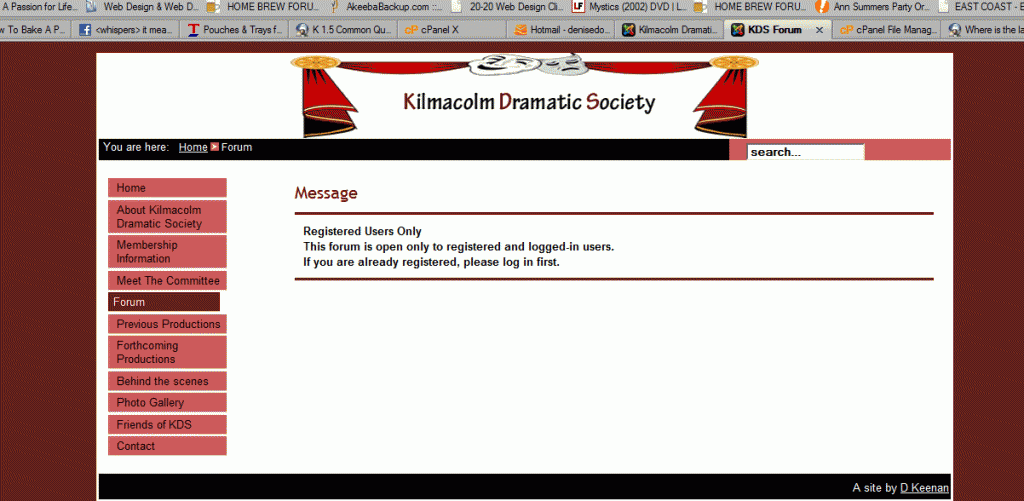
Message
* Registered Users Only
This forum is open only to registered and logged-in users.
If you are already registered, please log in first.
is what i can see in the site i am designing. i cant see where to change the word "message" to somewhere more meaningul i've tried to look for help but can only see advice for how to change the registered users only text so a pointer would be appreciated
quick question. ive looked through the language file kunena.english.php thats been suggested elsewhere in the forum.
Message
* Registered Users Only
This forum is open only to registered and logged-in users.
If you are already registered, please log in first.
is what i can see in the site i am designing. i cant see where to change the word "message" to somewhere more meaningul i've tried to look for help but can only see advice for how to change the registered users only text so a pointer would be appreciated
Please Log in or Create an account to join the conversation.


15 years 9 months ago #67416
by sozzled
Blue Eagle vs. Crypsis reference guide
Read my blog and

Replied by sozzled on topic Re: registed users only message
You can change most of the text strings used in Kunena. See
Where is the language file?
in the Wiki. Search these files to find the current text strings and replace them to your specific tastes.
Blue Eagle vs. Crypsis reference guide
Read my blog and
Please Log in or Create an account to join the conversation.
15 years 9 months ago #67706
by chicaloca
Replied by chicaloca on topic Re: registed users only message
thanks sozzled, i did look there before but had another look after your reply and found the part GEN_MESSAGE (line 1455) so i changed the text in inverted commas and saved the page but it doesnt seem to have made a difference. Is there anything else that i might have missed?
Please Log in or Create an account to join the conversation.
15 years 9 months ago #67732
by sozzled
Blue Eagle vs. Crypsis reference guide
Read my blog and
Replied by sozzled on topic Re: registed users only message
It will take me about 15 minutes to find the source code in K 1.5. Can you help us please? Can you please provide us with (a) the name of the file that you changed and (b) the line(s) you changed, how things looked before the change and how things looked after the change. Thanks.
When you say you "saved the page", did you actually replace the original file on your webserver with the changed file?
When you say you "saved the page", did you actually replace the original file on your webserver with the changed file?
Blue Eagle vs. Crypsis reference guide
Read my blog and
Please Log in or Create an account to join the conversation.
15 years 9 months ago #68729
by chicaloca
DEFINE('_GEN_MESSAGE', 'Oops, something went wrong (it said 'MESSAGE' before)
thanks
Replied by chicaloca on topic Re: registed users only message
yeah i followed the link you gave me above....so i changed kunena.english.php (under administrator)Can you please provide us with (a) the name of the file that you changed
yeah as i said above, line 1455 it now looks like:and (b) the line(s) you changed,
DEFINE('_GEN_MESSAGE', 'Oops, something went wrong (it said 'MESSAGE' before)
its the same appearance before and after i made the change to the file.how things looked before the change and how things looked after the change. .
yeah i did.When you say you "saved the page", did you actually replace the original file on your webserver with the changed file?
thanks
Please Log in or Create an account to join the conversation.
15 years 9 months ago #68743
by sozzled
Blue Eagle vs. Crypsis reference guide
Read my blog and
Replied by sozzled on topic Re: registed users only message
You changed the wrong line!
You changed line 1498 (using the language file for K 1.5.12) that was
to
Of course, that will not affect what you want to do. The text that you showed in your images is constructed from the following three lines in the kunena.english.php.
At line 1407:
And at lines 1671-1672:
You changed line 1498 (using the language file for K 1.5.12) that was
Code:
DEFINE('_GEN_MESSAGE', 'Message');
Code:
DEFINE('_GEN_MESSAGE', 'Oops, something went wrong')
At line 1407:
Code:
DEFINE('_COM_A_REGISTERED_ONLY', 'Registered Users Only');
Code:
DEFINE('_FORUM_UNAUTHORIZIED', 'This forum is open only to registered and logged-in users.');
DEFINE('_FORUM_UNAUTHORIZIED2', 'If you are already registered, please log in first.');
Blue Eagle vs. Crypsis reference guide
Read my blog and
Please Log in or Create an account to join the conversation.
Time to create page: 0.267 seconds