
- Posts: 7
- Thank you received: 0
Kunena 7.0.4 Released
The Kunena team has announce the arrival of Kunena 7.0.4 [K 7.0.4] in stable which is now available for download as a native Joomla extension for J! 5.4.x/6.0.x. This version addresses most of the issues that were discovered in K 6.2 / K 6.3 / K 6.4 and issues discovered during the last development stages of K 7.0
Solved First Kunena Statistics modul in footer changes language
- mustaphaturk
-
 Topic Author
- Offline
- New Member
-

Less
More
8 years 7 months ago - 8 years 7 months ago #195761
by mustaphaturk
Hi,
on my test site (Joomla 3.8+ Kunena 5.0.11 + Community Builder 2.1.3+build.2017.09.13.16.14.19.ba9d1f686) in footer area first Kunena statistics modul become automatically English but others are still in Turkish which is in footer.
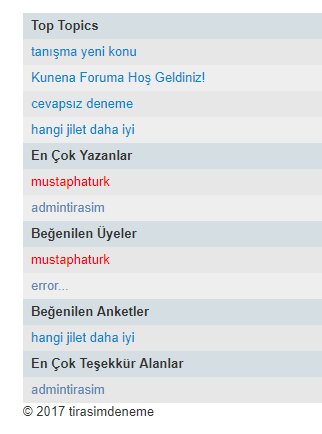
When i change position it becomes Turkish but this time first in footer becomes in English.
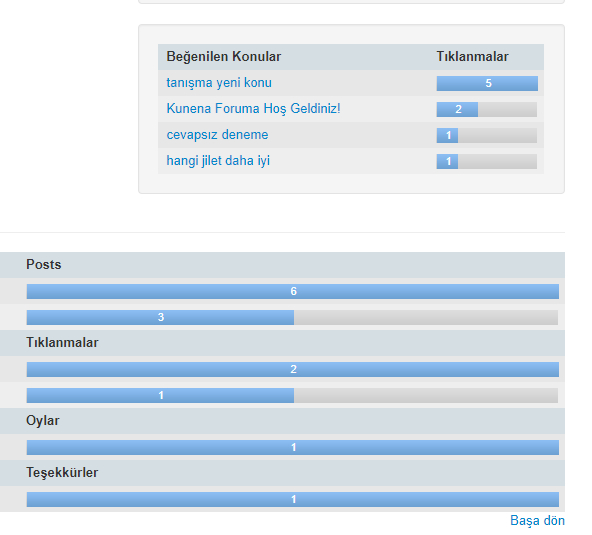
what can i do for this?
on my test site (Joomla 3.8+ Kunena 5.0.11 + Community Builder 2.1.3+build.2017.09.13.16.14.19.ba9d1f686) in footer area first Kunena statistics modul become automatically English but others are still in Turkish which is in footer.
When i change position it becomes Turkish but this time first in footer becomes in English.
what can i do for this?
Last edit: 8 years 7 months ago by mustaphaturk.
Please Log in or Create an account to join the conversation.


8 years 7 months ago #195771
by rich
Important! Always create a backup before you make any changes to your website!
Replied by rich on topic First Kunena Statistics modul in footer changes language
Please unzip this file and add the included ini file in the folder "language/tr-TR"
Important! Always create a backup before you make any changes to your website!
Please Log in or Create an account to join the conversation.
- mustaphaturk
-
Topic Author
- Offline
- New Member
-
Less
More
- Posts: 7
- Thank you received: 0
8 years 7 months ago - 8 years 7 months ago #195799
by mustaphaturk
Replied by mustaphaturk on topic First Kunena Statistics modul in footer changes language
@rich
thanks alot.
i have 1 more issue on there
www.kunena.org/forum/migrate-to-kunena/1...way-is-better#195758
i will be glad if you can help me about that.
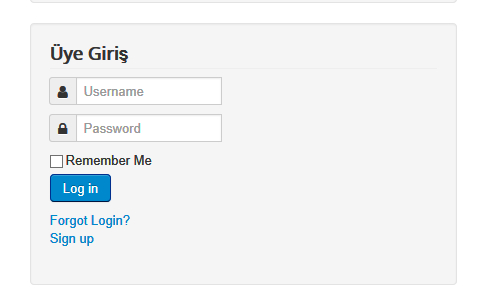
i found different ini between turkish and english then i translated them too (mod kunena login, mod kunena latest.sys, mod kunena search) but1 more issue: login modul do not translate
thanks alot.
i have 1 more issue on there
www.kunena.org/forum/migrate-to-kunena/1...way-is-better#195758
i will be glad if you can help me about that.
i found different ini between turkish and english then i translated them too (mod kunena login, mod kunena latest.sys, mod kunena search) but1 more issue: login modul do not translate
Last edit: 8 years 7 months ago by mustaphaturk.
Please Log in or Create an account to join the conversation.
8 years 7 months ago - 8 years 7 months ago #195810
by rich
Important! Always create a backup before you make any changes to your website!
Replied by rich on topic First Kunena Statistics modul in footer changes language
Download this extension and unzip the file. Go to the language folder tr-TR and copy the included ini file in your page to "language/tr-TR". The file with the ending sys.ini you don't need. Only the other file.
Important! Always create a backup before you make any changes to your website!
Last edit: 8 years 7 months ago by rich.
Please Log in or Create an account to join the conversation.
- mustaphaturk
-
Topic Author
- Offline
- New Member
-
Less
More
- Posts: 7
- Thank you received: 0
8 years 7 months ago - 8 years 7 months ago #195867
by mustaphaturk
Replied by mustaphaturk on topic First Kunena Statistics modul in footer changes language
ok i did them all but still
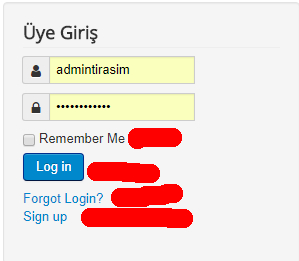
but i couldn't find where are translation of "remember me", "login", log out", "forgot login" and "sign up"?
in (gb mod kunena login page) file says:
and i already put Turkish one but still it is in English. I think login module may takes from another place.
and one more thing: where should i ftp com_kunena_tr-TR file?
but i couldn't find where are translation of "remember me", "login", log out", "forgot login" and "sign up"?
in (gb mod kunena login page) file says:
Code:
; Front-end
MOD_KUNENALOGIN_HINAME="Welcome, %s"
MOD_KUNENALOGIN_PASSWORD="Password"
MOD_KUNENALOGIN_USERNAME="Username"
MOD_KUNENALOGIN_REMEMBER_ME="Remember Me"
MOD_KUNENALOGIN_BUTTON_LOGIN="Log in"
MOD_KUNENALOGIN_BUTTON_LOGOUT="Log out"
MOD_KUNENALOGIN_FORGOT_PASSWORD="Forgot your password?"
MOD_KUNENALOGIN_FORGOT_USERNAME="Forgot your username?"
MOD_KUNENALOGIN_CREATE_ACCOUNT="Create an account"
MOD_KUNENALOGIN_KUNENA_NOT_INSTALLED="ERROR: mod_kunenalogin: Kunena %s (or later) is not installed on your system!"
MOD_KUNENALOGIN_KUNENA_OFFLINE="The forum is actually offline"
MOD_KUNENALOGIN_NEW_MESSAGE="New message"
and i already put Turkish one but still it is in English. I think login module may takes from another place.
and one more thing: where should i ftp com_kunena_tr-TR file?
Last edit: 8 years 7 months ago by mustaphaturk.
Please Log in or Create an account to join the conversation.
8 years 7 months ago #195871
by rich
Important! Always create a backup before you make any changes to your website!
Replied by rich on topic First Kunena Statistics modul in footer changes language
Install the languge package from here : www.kunena.org/downloadI think login module may takes from another place.
Paste the file to "language/tr-TR".and one more thing: where should i ftp com_kunena_tr-TR file?
Important! Always create a backup before you make any changes to your website!
Please Log in or Create an account to join the conversation.
Time to create page: 0.275 seconds