


- Posts: 5
- Thank you received: 0
Kunena 7.0.9 & Kunena 6.4.14 – Security Updates Released
The Kunena team has announce the arrival of Kunena 7.0.9 [K 7.0.9] in stable which is now available for download as a native Joomla extension for J! 5.4.x/6.0.x./6.1.x. This version addresses most of the issues that were discovered in K 6.2 / K 6.3 / K 6.4 and issues discovered during the last development stages of K 7.0
Topics must relate to a currently supported version of Kunena. If you are unsure what is the current supported version of Kunena, please go to the
download
page.
If you are having problems then, for your own benefit, it would save us all a lot of time if you would kindly post your configuration report when you ask for help from this forum. If you do not post your configuration report we will not ask you for it but you will probably not get your problem solved, either.
If you are having problems then, for your own benefit, it would save us all a lot of time if you would kindly post your configuration report when you ask for help from this forum. If you do not post your configuration report we will not ask you for it but you will probably not get your problem solved, either.
Question Blank/Invisible Template Text
5 years 10 months ago #214496
by Thanatos
Blank/Invisible Template Text was created by Thanatos
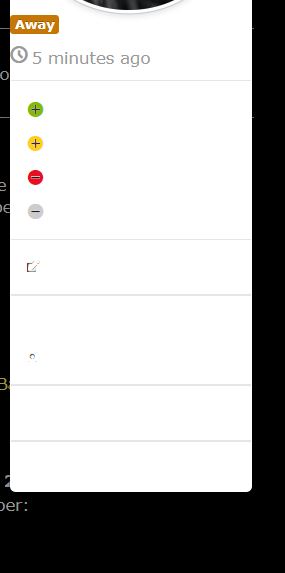
Attached is an image.
So, the menu works perfectly if I use the default Joomla template.
but if I switch to a 3rd party black template, then the result is it goes blank.
The text is there and if I highlight it, I get white text in a black box.
I'm new to Joomla, so I'm not sure if this is a forum template I need to look at or a Joomla template that's referenced...and then where to go to try and fix it. Nor am I entirely sure how to fix it, but that may be a different post somewhere else
If someone would take a little pity on me and point me in the right direction, I'd certainly appreciate it.
thanks.
So, the menu works perfectly if I use the default Joomla template.
but if I switch to a 3rd party black template, then the result is it goes blank.
The text is there and if I highlight it, I get white text in a black box.
I'm new to Joomla, so I'm not sure if this is a forum template I need to look at or a Joomla template that's referenced...and then where to go to try and fix it. Nor am I entirely sure how to fix it, but that may be a different post somewhere else
If someone would take a little pity on me and point me in the right direction, I'd certainly appreciate it.
thanks.
Please Log in or Create an account to join the conversation.


5 years 10 months ago #214497
by Leen
With kind regards
Leen
Replied by Leen on topic Blank/Invisible Template Text
Hello,
It would be useful if you also tell us which Template
you then use on your website.
It would be useful if you also tell us which Template
you then use on your website.
With kind regards
Leen
The following user(s) said Thank You: Thanatos
Please Log in or Create an account to join the conversation.
5 years 10 months ago #214502
by Thanatos
Replied by Thanatos on topic Blank/Invisible Template Text
Sorry!
it's called a4joomla-dark-free - Default
and then the built in defaults
Beeze3 - Default (seems okay in this one)
protostar - Default
it's called a4joomla-dark-free - Default
and then the built in defaults
Beeze3 - Default (seems okay in this one)
protostar - Default
Please Log in or Create an account to join the conversation.
5 years 10 months ago - 5 years 10 months ago #214508
by Leen
With kind regards
Leen
Replied by Leen on topic Blank/Invisible Template Text
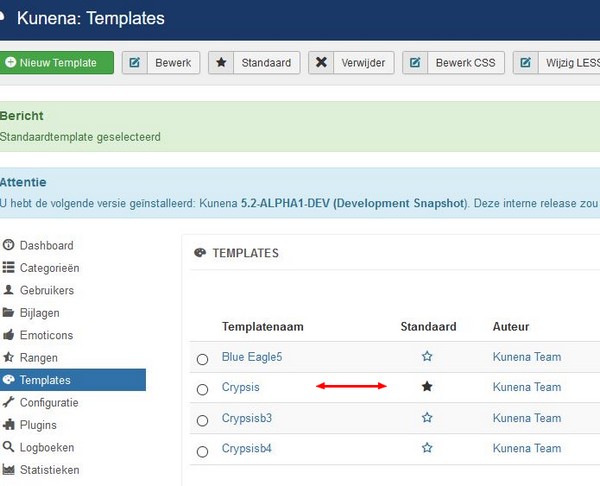
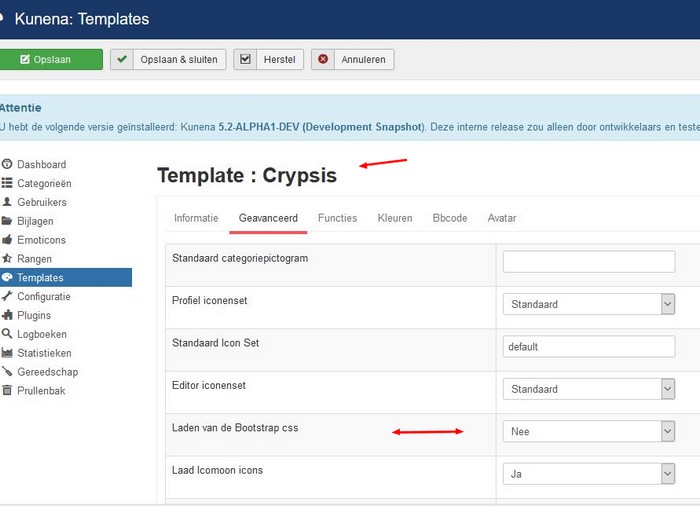
Don't know which kunena template you have chosen as standard, but try loading the setting there from bootstrap.css on or off and also try another default kunena template in my test it was only get right at crypsis
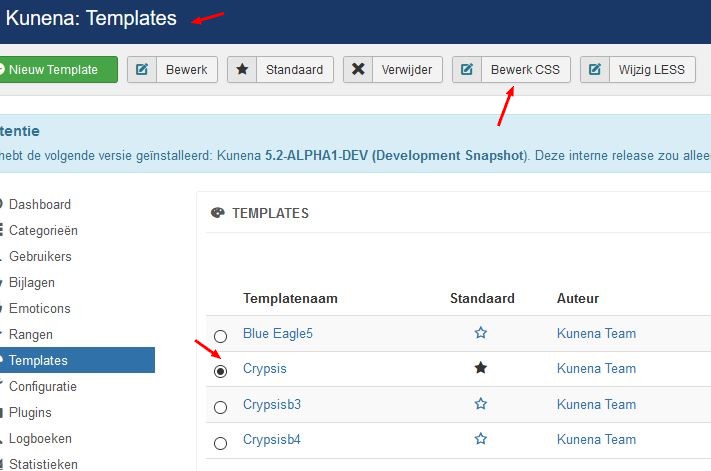
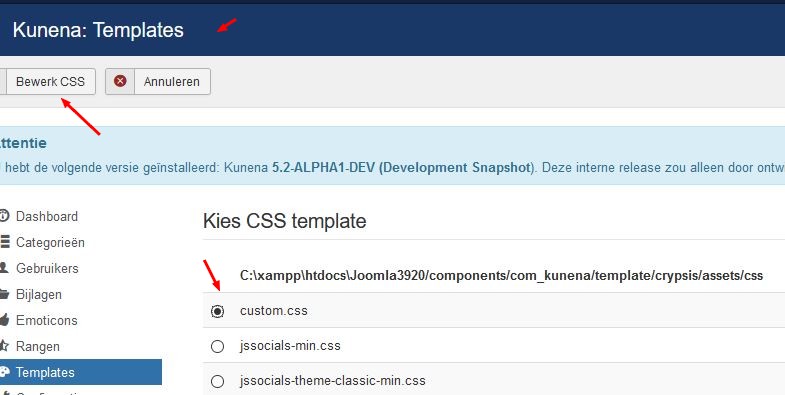
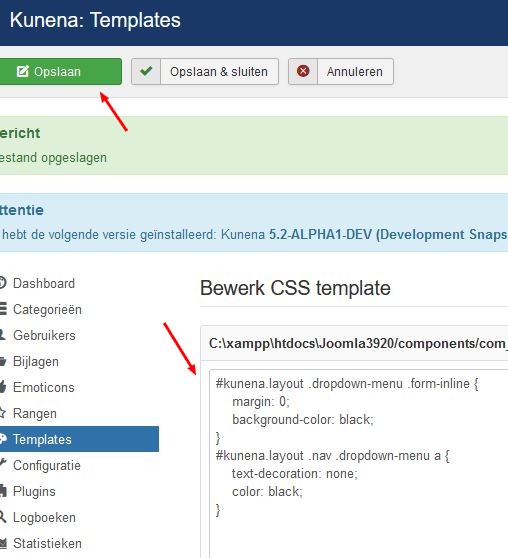
and I am not an expert but go to your kunena template and choose your template the circle and click on the button at the top of edit cssand next screen choose custom.css and there you canpaste your own code eg this one
and I am not an expert but go to your kunena template and choose your template the circle and click on the button at the top of edit cssand next screen choose custom.css and there you canpaste your own code eg this one
Code:
#kunena.layout .dropdown-menu .form-inline {
margin: 0;
background-color: black;
}
#kunena.layout .nav .dropdown-menu a {
text-decoration: none;
color: black;
}
With kind regards
Leen
Last edit: 5 years 10 months ago by Leen.
The following user(s) said Thank You: Thanatos
Please Log in or Create an account to join the conversation.
5 years 10 months ago #214511
by Thanatos
Replied by Thanatos on topic Blank/Invisible Template Text
I've resolved the problem.
searching around, I figured out that navbar was the keyword I needed for the menu system.
I found this link
www.kunena.org/forum/general-user-contri...late?start=10#181060
and then I basically just deleted sections of the code until I had something that fixed the menu. I have a really VAGUE sense of how css works as I'm not any kind of programmer...but I can kind of hack things down to make them work...at least sometimes.
I'd like to change the color of the drop down and menu...but, at least it's working for now.
Took me a while how to figure out where the custom.css file was for the forum...the layout of Joomla and it's plugins are very foreign to me.
Anyway, thanks for at least replying.
searching around, I figured out that navbar was the keyword I needed for the menu system.
I found this link
www.kunena.org/forum/general-user-contri...late?start=10#181060
and then I basically just deleted sections of the code until I had something that fixed the menu. I have a really VAGUE sense of how css works as I'm not any kind of programmer...but I can kind of hack things down to make them work...at least sometimes.
Code:
.fa-rss { color: orange !important; }
#kunena, layout {
.navbar-inner {
border-top: none;
border-left: none;
border-right: none;
border-bottom: 4px solid #6f6c6c;
min-height: 12px !important;
background-image: none;
background-color: transparent;
}
.navbar .nav > li > a {
background-color: #6f6c6c;
border-top-left-radius: 7px;
border-top-right-radius: 7px;
margin-right: 1px;
color: #fff;
text-shadow: none;
padding: 8px 8px 11px !important;
max-height: 12px !important;
}
.navbar .active > a {
background-color: #3c728e !important;
}
.navbar a:hover {
background-color: #3c728e !important;
color: #fff !important;
}
.navbar .nav li.dropdown > .dropdown-toggle .caret {
border-top-color: #fff !important;
}
}
.fa-fw { color: #fff; }
a:hover {
text-decoration: underline;
}
.fa-rss:before {
color: orange;
}
th.span5, th.span1, th.span2, th.span6, th.span3, th.span4 {
background-color: #3c728e !important;
color: #fff;
}
th.span5 a, th.span1 a, th.span2 a, th.span6 a {
color: #fff;
}
.layout h1 .fa-2x {
font-size: 1.2em !important;
}
.form-search .input-append .search-query {
height: 19px;
}
.btn:first-child {
color: #424753;
}
button.btn.btn-primary {
/* color: #fff !important; */
}
.btn-group > .btn:first-child {
/* color: #fff !important; */
}
.btn-group > .btn:last-child, .btn-group > .dropdown-toggle {
color: #424753 !important;
}
.dropdown-menu > li > a:hover, .dropdown-menu > li > a:focus, .dropdown-submenu:hover > a, .dropdown-submenu:focus > a {
background: #3c728e !important;
}
I'd like to change the color of the drop down and menu...but, at least it's working for now.
Took me a while how to figure out where the custom.css file was for the forum...the layout of Joomla and it's plugins are very foreign to me.
Anyway, thanks for at least replying.
Please Log in or Create an account to join the conversation.
5 years 10 months ago #214512
by Thanatos
Replied by Thanatos on topic Blank/Invisible Template Text
Leen
That sort of work - it turns the menu partly black.
this may ultimately get me to where I want if I can figure out how to combine it with the code snippets I found in my previous post.
I attached an image to show you.
thank you again...your CSS is better than mine lol
That sort of work - it turns the menu partly black.
this may ultimately get me to where I want if I can figure out how to combine it with the code snippets I found in my previous post.
I attached an image to show you.
thank you again...your CSS is better than mine
lol 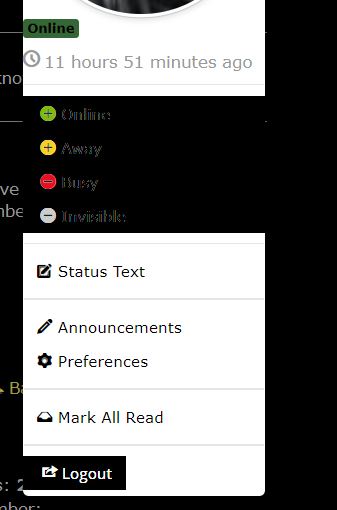
Please Log in or Create an account to join the conversation.
Time to create page: 0.223 seconds