


- Posts: 11
- Thank you received: 0
Kunena 7.0.4 Released
The Kunena team has announce the arrival of Kunena 7.0.4 [K 7.0.4] in stable which is now available for download as a native Joomla extension for J! 5.4.x/6.0.x. This version addresses most of the issues that were discovered in K 6.2 / K 6.3 / K 6.4 and issues discovered during the last development stages of K 7.0
Question Missing Container Icon
10 years 11 months ago #165446
by heinzo
Missing Container Icon was created by heinzo
Hi,
I installed Kunena 4.0 today (thanks a lot guys, it's awesome) and now I'm missing the container icon next to the forum category (or doesn't crysis have one?). I attached a screenshot to show which one I mean. Any suggestions?
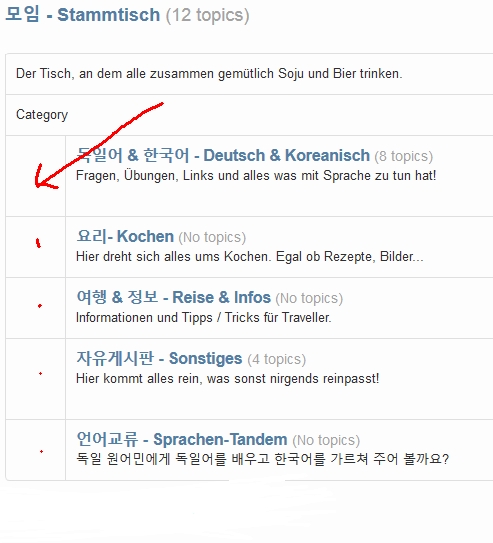
I installed Kunena 4.0 today (thanks a lot guys, it's awesome) and now I'm missing the container icon next to the forum category (or doesn't crysis have one?). I attached a screenshot to show which one I mean. Any suggestions?
Please Log in or Create an account to join the conversation.


10 years 11 months ago #165447
by ruud
sharing = caring
Replied by ruud on topic Missing Container Icon
Hi, Crypsis does have category icons 
What do you have configured in the crypsis template for:
* Basic Settings > Default category icon? (should be: icon-folder
* Colors > Select color for categories icons? (should not be empty)
What do you have configured in the crypsis template for:
* Basic Settings > Default category icon? (should be: icon-folder
* Colors > Select color for categories icons? (should not be empty)
sharing = caring
Please Log in or Create an account to join the conversation.
10 years 11 months ago #165449
by heinzo
Replied by heinzo on topic Missing Container Icon
Default category icon is indeed "icon-folder" and I tried several colors but no success.
Actually I just found out that my "menu" is not displayed correctly,too. Sometimes (I cannot reproduce when) the menu items are displayed, most of the times they are not and the menu is just empty (except of the online-status icon).
Is my installation corrupt? I just installed 4.0 on top of a quite recent 3.x version (via extension->install)
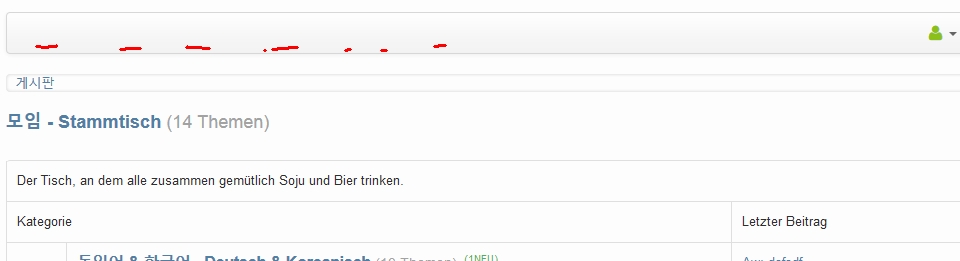
Actually I just found out that my "menu" is not displayed correctly,too. Sometimes (I cannot reproduce when) the menu items are displayed, most of the times they are not and the menu is just empty (except of the online-status icon).
Is my installation corrupt? I just installed 4.0 on top of a quite recent 3.x version (via extension->install)
Please Log in or Create an account to join the conversation.
10 years 11 months ago #165451
by ruud
sharing = caring
Replied by ruud on topic Missing Container Icon
Hi, maybe a clear cache and ctrl-f5 does the trick?
sharing = caring
Please Log in or Create an account to join the conversation.


10 years 11 months ago #165452
by 810
Replied by 810 on topic Missing Container Icon
then your template doesn't work with icomoon icons, you should search the website from your template builder, and see what kind off images its supported. and add the image class on the option.
For the menu, I think the menu is broken. Try to recreate it, on backend - kunena -tools - menu - recreate menu.
Please add the kunena report.
For the menu, I think the menu is broken. Try to recreate it, on backend - kunena -tools - menu - recreate menu.
Please add the kunena report.
Please Log in or Create an account to join the conversation.
10 years 11 months ago #165454
by ruud
sharing = caring
Replied by ruud on topic Missing Container Icon
If you are using meet_gavern (also not supporting icomoon icons but fontawesome), I have created a custom.less file for Kunena to fully work with meet_gavern template (implementing the icomoon icons and more )
you can find it here: github.com/Ruud68/Kunena_meetgavern_custom.less
)you can find it here: github.com/Ruud68/Kunena_meetgavern_custom.less
sharing = caring
Please Log in or Create an account to join the conversation.
Time to create page: 0.257 seconds