
Kunena 7.0.11 & Kunena 6.4.16 – Security Updates Released and K7.1 in RC1 2
The Kunena team has announce the arrival of three simultaneous security release : K6.4.16, K7.0.11 and K7.1 RC2. Just a reminder K6.4.16 receives only securities fixes untill end of 2026, so it's advised for users to upgrade to K7.0.11. K7.0.11 is the last release of the K7.0 because it's replaced by K7.1 branch with the stable release in the corner. The translations for K7.1 on crowdin.com/project/kunena-forum-7-1 needs to be checked or improved becasue it has been generated by TM (Translation Machine).
Solved [implemented] Login functionality (just bear with me :)))


Just testing beta3 and although the login form is not modal any more it still doesn’t work.
But now I know why
 ))
))in the plugin 'Kunena - Joomla' I have set [Enable Joomla login] to [No] :woohoo:
so just to try to get this discussion started:
If this parameter is set to no: it should just show the message like stated in case 1 and 2 and NOT the login url (which doesn't work)
There are 3 scenarios:
1. not logged in (guest) and guest reply enabled on forum
2. not logged in (guest) and no guest reply enabled on forum
3. logged in
case 1. display message like "you are not logged in, your reply will be placed as guest"
case 2. display message like "you are not allowed to reply, please login first"
case 3. display no message
sharing = caring
Please Log in or Create an account to join the conversation.


Please Log in or Create an account to join the conversation.
sharing = caring
Please Log in or Create an account to join the conversation.
github.com/Kunena/Kunena-Forum/pull/3077
For the other things I want to show all options
like a other forum software, but I can't find it quickly
Please Log in or Create an account to join the conversation.
is it possible to when login is disabled and guest access is possible show a message that the reply will be placed as a guest > (like in these suggested use cases: www.kunena.org/forum/k-4-0-support-archi...tton-floating#163494 )?
I have this currently 'hacked' into KunenaDiscuss and my users 'love it' > it is for them a nice reminder that they should login first if they want to have the reply under their account or just continue and reply as a guest. It saves me a great deal of moderating > changing the useridś in the kunena-tables in the sql database

sharing = caring
Please Log in or Create an account to join the conversation.
ruud wrote: ...
I think the best use case is as follows:
- Guest post allowed AND Kunena login disabled > message stating that topic or reply will be posted as guest unless user logs in first.
- Guest post allowed AND Kunena login enabled > message with login 'button' (current implementation)
- Guest post disabled > current implementation
- already logged in: no message (current implementation)
So only change to current implementation is 1.
does this make sense?
EDIT: this should also be mimicked in KunenaDiscuss as this plugin shows on joomla content rather then on the forum (with Kunena menu bar / login button)
Hi, just made some very small code changes (even I could do it :woohoo: ) to implement use case 1. Guest post allowed AND user not logged in / Kunena login disabled.
in file: components/com_kunena/template/crypsis/layouts/topic/edit/default.php
replace
in language file: components/com_kunena/language/en-GB/en-GB.com_kunena.templates.ini
add
This change displays the warning when in the reply / new topic form when guest access is enabled. When a use is logged in, the text is hidden (as is the name field)
Does this make any sense?
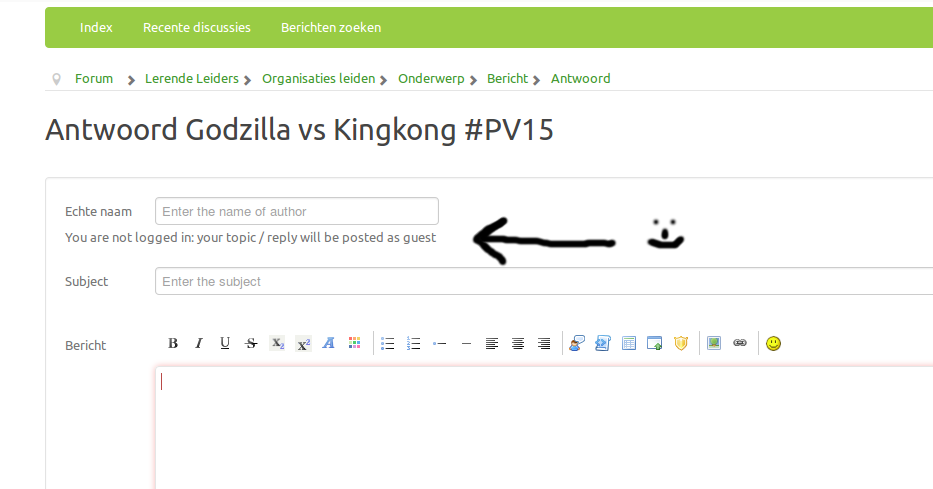
sharing = caring
Please Log in or Create an account to join the conversation.