
- Posts: 3
- Thank you received: 0
Kunena 7.0.5 & Kunena 6.4.11 – Security Updates Released
The Kunena team has announce the arrival of Kunena 7.0.5 [K 7.0.5] in stable which is now available for download as a native Joomla extension for J! 5.4.x/6.0.x. This version addresses most of the issues that were discovered in K 6.2 / K 6.3 / K 6.4 and issues discovered during the last development stages of K 7.0.
The Kunena team is also pleased to announce the eleventh version of Kunena 6.4, a native Joomla extension for Joomla! 5.0, 5.1, 5.2, 5.3, 5.4 and 6.0.
Question Kunena 3.0.6 update fails from 3.0.1 with Joomla 3.3.3 from extensions manager
- sagaryadav
-
 Topic Author
- Offline
- New Member
-

Less
More
11 years 9 months ago #158687
by sagaryadav
Kunena 3.0.6 update fails from 3.0.1 with Joomla 3.3.3 from extensions manager was created by sagaryadav
I also have an issue and I am afraid to uninstall and reinstall Kunena as I have already many users in the community.
Attaching the screenshot
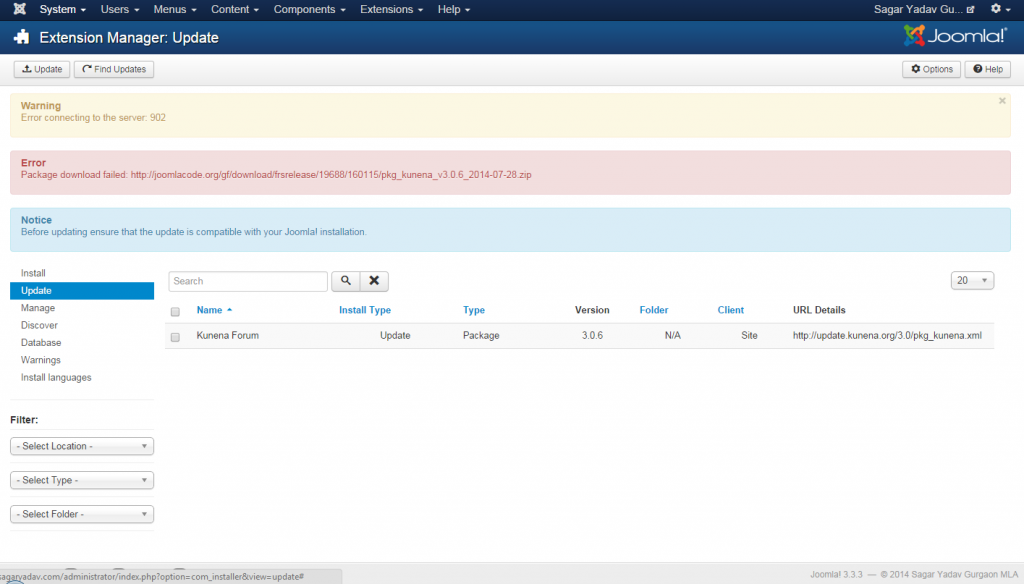
Attaching the screenshot
Please Log in or Create an account to join the conversation.


11 years 9 months ago #158688
by Shimei
I have been having issues with installing various extensions Kunena included with Joomla 3.3.3. I was successful with Kunena by going to the downloads section of this site. Right clicking on the package, copying the url, and installing by url in Joomla backend... just by pasting the url in there.
Replied by Shimei on topic Kunena 3.0.6 update fails from 3.0.1 with Joomla 3.3.3
sagaryadav wrote: I also have an issue and I am afraid to uninstall and reinstall Kunena as I have already many users in the community.
Attaching the screenshot
I have been having issues with installing various extensions Kunena included with Joomla 3.3.3. I was successful with Kunena by going to the downloads section of this site. Right clicking on the package, copying the url, and installing by url in Joomla backend... just by pasting the url in there.
Please Log in or Create an account to join the conversation.


11 years 9 months ago - 11 years 9 months ago #158690
by xillibit
I don't provide support by PM, because this can be useful for someone else.
Replied by xillibit on topic Kunena 3.0.6 update fails from 3.0.1 with Joomla 3.3.3
Hello,
There is an issue in Joomla! which prevent to get the update in some specific server configuration, if you can you should enable curl extension in your php.ini
This should fix the issue : issues.joomla.org/tracker/joomla-cms/3616 in case of someone want to test it and write if it works
There is an issue in Joomla! which prevent to get the update in some specific server configuration, if you can you should enable curl extension in your php.ini
This should fix the issue : issues.joomla.org/tracker/joomla-cms/3616 in case of someone want to test it and write if it works
I don't provide support by PM, because this can be useful for someone else.
Last edit: 11 years 9 months ago by xillibit.
Please Log in or Create an account to join the conversation.

11 years 9 months ago #158694
by tarundas
Help conservation by travelling. themeindia.org
Replied by tarundas on topic Kunena 3.0.6 update fails from 3.0.1 with Joomla 3.3.3
Having same issue.
Help conservation by travelling. themeindia.org
Please Log in or Create an account to join the conversation.
11 years 9 months ago #158708
by xillibit
I don't provide support by PM, because this can be useful for someone else.
Replied by xillibit on topic Kunena 3.0.6 update fails from 3.0.1 with Joomla 3.3.3
If you have the same issue, like sagaryadav, check under System -> System Information -> PHP Information and then search for Curl, if you find nothing try to enable curl extension by modifying your php.ini or ask your host to do that. If you can i advise to switch to another host which provide by default curl extension.
I don't provide support by PM, because this can be useful for someone else.
Please Log in or Create an account to join the conversation.
- sagaryadav
-
Topic Author
- Offline
- New Member
-
Less
More
- Posts: 3
- Thank you received: 0
11 years 9 months ago - 11 years 9 months ago #158751
by sagaryadav
Replied by sagaryadav on topic Kunena 3.0.6 update fails from 3.0.1 with Joomla 3.3.3
My curl seems to be enabled but the error I showed in the previous screenshot remains.
Is it possible that the file present at the address it is seeking is missing and needs to be reput
Is it possible that the file present at the address it is seeking is missing and needs to be reput
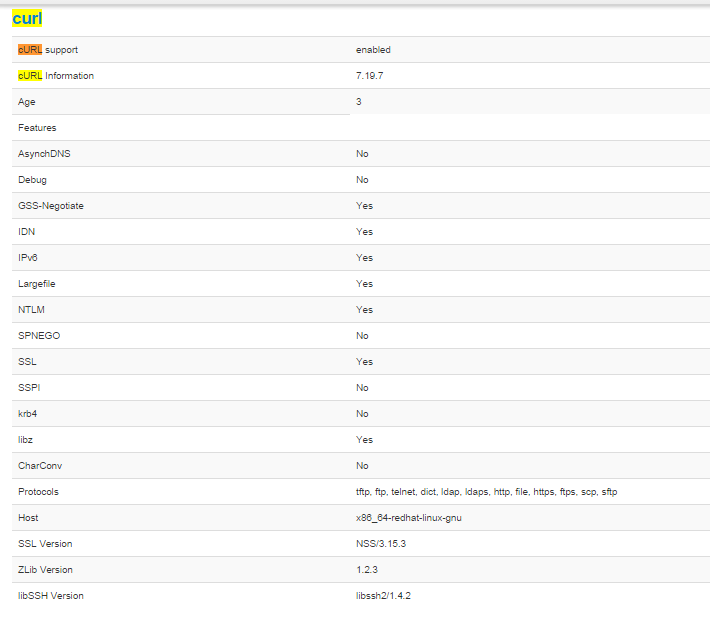
Last edit: 11 years 9 months ago by sagaryadav. Reason: forgot to attach file
Please Log in or Create an account to join the conversation.
Time to create page: 0.251 seconds