
- Posts: 78
- Thank you received: 5
Kunena 7.0.5 & Kunena 6.4.11 – Security Updates Released
The Kunena team has announce the arrival of Kunena 7.0.5 [K 7.0.5] in stable which is now available for download as a native Joomla extension for J! 5.4.x/6.0.x. This version addresses most of the issues that were discovered in K 6.2 / K 6.3 / K 6.4 and issues discovered during the last development stages of K 7.0.
The Kunena team is also pleased to announce the eleventh version of Kunena 6.4, a native Joomla extension for Joomla! 5.0, 5.1, 5.2, 5.3, 5.4 and 6.0.
Topics that are moved into this category are generally considered to be closed. Users may want to add additional information but these topics should not be resurrected in order to discuss new problems or unrelated matters.
Solved Can I remove the Kunena "profile box"?
- jimrowland
-
 Topic Author
- Offline
- Senior Member
-

Less
More
12 years 3 months ago #153369
by jimrowland
Can I remove the Kunena "profile box"? was created by jimrowland
I'd like to remove that box from being displayed. It's the box directly below the menu with the "welcome username" message, as well as a login/logout button.
Please Log in or Create an account to join the conversation.


12 years 3 months ago #153373
by sozzled
Blue Eagle vs. Crypsis reference guide
Read my blog and

Replied by sozzled on topic Can I remove the Kunena "profile box"?
This question is answered in the
Wiki
and in the featured topic
Hide / disable login
.
Blue Eagle vs. Crypsis reference guide
Read my blog and
The following user(s) said Thank You: jimrowland
Please Log in or Create an account to join the conversation.
- jimrowland
-
Topic Author
- Offline
- Senior Member
-
Less
More
- Posts: 78
- Thank you received: 5
12 years 3 months ago #153381
by jimrowland
Replied by jimrowland on topic Can I remove the Kunena "profile box"?
I really promise that I search before I post. :^/
(sigh)
Thanks, sozzled.
(sigh)
Thanks, sozzled.
Please Log in or Create an account to join the conversation.
- jimrowland
-
Topic Author
- Offline
- Senior Member
-
Less
More
- Posts: 78
- Thank you received: 5
12 years 3 months ago - 12 years 3 months ago #153382
by jimrowland
Replied by jimrowland on topic Can I remove the Kunena "profile box"?
I followed these instrcutions from the wiki:
I edited this file:"/css/template.css" in template "fse_template". (fse_template) is my front-end template, which is a copy of the default J3.2.1 Protostar template (copied so that I can hose it up)
But that results in this: (not a complete removal of the box).
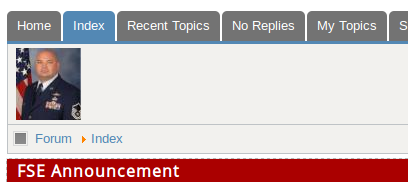
All of the text is gone, but as you can see, the profile pic is still there along with the rest of the box.
Hide the profilebox completely
Add the following lines to the end of your Joomla site template CSS file[2]:
Code:#Kunena td.kprofileboxcnt { display: none; }
I edited this file:"/css/template.css" in template "fse_template". (fse_template) is my front-end template, which is a copy of the default J3.2.1 Protostar template (copied so that I can hose it up)
But that results in this: (not a complete removal of the box).
All of the text is gone, but as you can see, the profile pic is still there along with the rest of the box.
Last edit: 12 years 3 months ago by jimrowland.
Please Log in or Create an account to join the conversation.
12 years 3 months ago #153385
by sozzled
Blue Eagle vs. Crypsis reference guide
Read my blog and
Replied by sozzled on topic Can I remove the Kunena "profile box"?
I would need to see your config. report and have online access to your site before I could assess the situation better. Can do?
Blue Eagle vs. Crypsis reference guide
Read my blog and
Please Log in or Create an account to join the conversation.


Less
More
- Posts: 12285
- Thank you received: 2535
12 years 3 months ago - 12 years 3 months ago #153386
by rich
Important! Always create a backup before you make any changes to your website!
Replied by rich on topic Can I remove the Kunena "profile box"?
Code:
#Kunena td.kprofileboxcnt, .kprofilebox-left {
display: none;
}
Important! Always create a backup before you make any changes to your website!
Last edit: 12 years 3 months ago by rich.
The following user(s) said Thank You: jimrowland
Please Log in or Create an account to join the conversation.
Time to create page: 0.295 seconds