


- Posts: 35
- Thank you received: 1
Kunena 7.0.5 & Kunena 6.4.11 – Security Updates Released
The Kunena team has announce the arrival of Kunena 7.0.5 [K 7.0.5] in stable which is now available for download as a native Joomla extension for J! 5.4.x/6.0.x. This version addresses most of the issues that were discovered in K 6.2 / K 6.3 / K 6.4 and issues discovered during the last development stages of K 7.0.
The Kunena team is also pleased to announce the eleventh version of Kunena 6.4, a native Joomla extension for Joomla! 5.0, 5.1, 5.2, 5.3, 5.4 and 6.0.
Topics that are moved into this category are generally considered to be closed. Users may want to add additional information but these topics should not be resurrected in order to discuss new problems or unrelated matters.
Solved Сut large topics into smaller. Works for me only once.
12 years 6 months ago - 12 years 6 months ago #150982
by mecenat
Сut large topics into smaller. Works for me only once. was created by mecenat
Hi
I want to cut big topic with 5000 posts into few smaller ones. :woohoo:
The problem is, when i cut topic first time, i pick some post, click moderation, and i have an option there, to cut topic from that post. So i create new topic, where this post is main one.
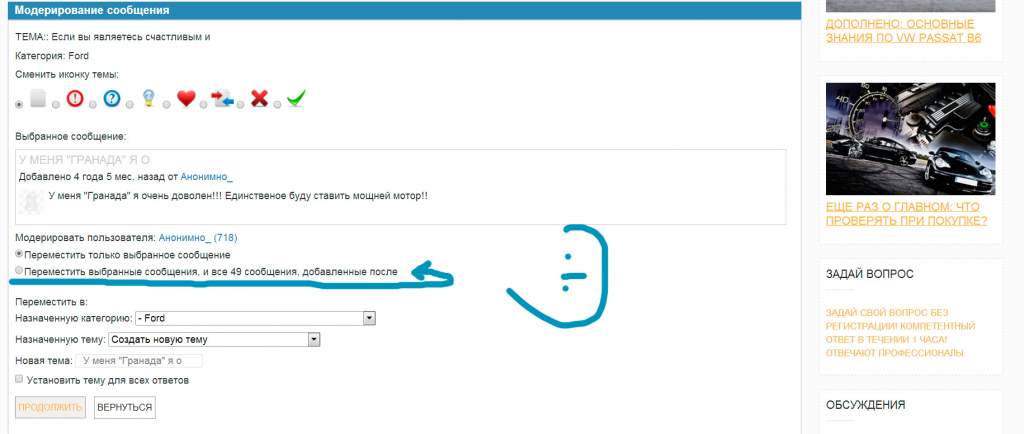
But when i go into the new, just created topic (created from other topic with that option) - i dont have this option any more, i mean option to cut it again and move picked post and posts after it to new topic...
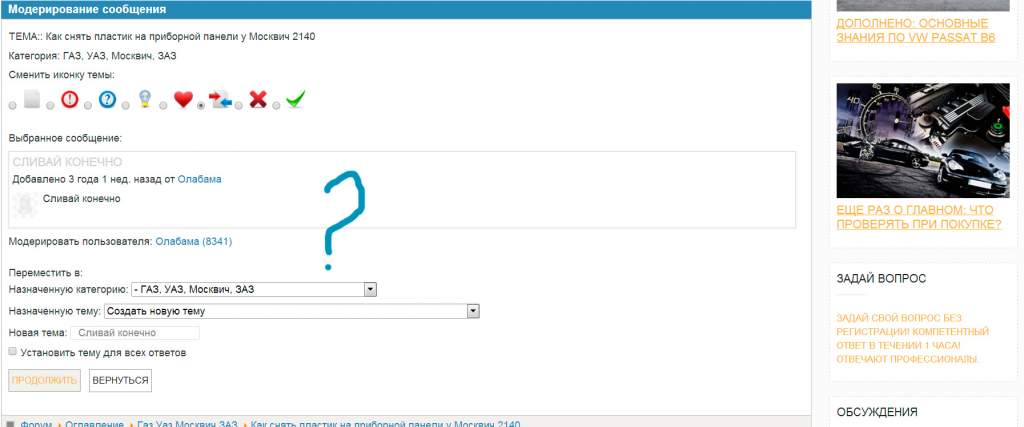
So is it not possible to cut topic as many times as needed? I can not move posts one by one :whistle: Is it a bug or wanted thing?
I want to cut big topic with 5000 posts into few smaller ones. :woohoo:
The problem is, when i cut topic first time, i pick some post, click moderation, and i have an option there, to cut topic from that post. So i create new topic, where this post is main one.
But when i go into the new, just created topic (created from other topic with that option) - i dont have this option any more, i mean option to cut it again and move picked post and posts after it to new topic...
So is it not possible to cut topic as many times as needed? I can not move posts one by one :whistle: Is it a bug or wanted thing?
Last edit: 12 years 6 months ago by mecenat.
Please Log in or Create an account to join the conversation.


12 years 6 months ago #151031
by xillibit
I don't provide support by PM, because this can be useful for someone else.
Replied by xillibit on topic Сut large topics into smaller. Works for me only once.
Hello,
It's possible to cut topics as many times that you want
Can-you put here your Kunena report configuration settings ?
It's possible to cut topics as many times that you want
Can-you put here your Kunena report configuration settings ?
I don't provide support by PM, because this can be useful for someone else.
The following user(s) said Thank You: mecenat
Please Log in or Create an account to join the conversation.
12 years 6 months ago - 12 years 6 months ago #151038
by mecenat
Replied by mecenat on topic Сut large topics into smaller. Works for me only once.
This message contains confidential information
Database collation check: The collation of your table fields are correct
Joomla! SEF: Enabled | Joomla! SEF rewrite: Enabled | FTP layer: Disabled |
This message contains confidential informationhtaccess: Exists | PHP environment: Max execution time: 600 seconds | Max execution memory: 1000M | Max file upload: 600M
Kunena menu details:
Warning: Spoiler!
ID Name Menutype Link Path 678 Базы знаний mainmenu view=topics&mode=topics bazy-znanij 798 Отзывы mainmenu view=topics&mode=replies otzyvy 892 Форум mainmenu Itemid=973 kunena-2013-11-22 973 Форум kunenamenu view=home&defaultmenu=974 forum 974 Оглавление kunenamenu view=category&layout=list forum/index 922 Автомобили BMW kunenamenu view=category&catid=6 forum/index/avtomobili-bmw 923 База знаний BMW (E39) kunenamenu view=category&catid=89 forum/index/avtomobili-bmw/baza-znanij-bmw-e39 924 Автомобили Ford kunenamenu view=category&catid=8 forum/index/avtomobili-ford 925 База знаний Ford kunenamenu view=category&catid=57 forum/index/avtomobili-ford/baza-znanij-ford 926 База знаний Ford Focus 1 kunenamenu view=category&catid=58 forum/index/avtomobili-ford/baza-znanij-ford/baza-znanij-ford-focus-1 927 База знаний Ford Focus 2 kunenamenu view=category&catid=59 forum/index/avtomobili-ford/baza-znanij-ford/baza-znanij-ford-focus-2 928 База знаний Ford Focus 3 kunenamenu view=category&catid=60 forum/index/avtomobili-ford/baza-znanij-ford/baza-znanij-ford-focus-3 918 Газ Уаз Москвич ЗАЗ kunenamenu view=category&catid=45 forum/index/gaz-uaz-moskvich-zaz 929 Автомобили Mercedes kunenamenu view=category&catid=13 forum/index/avtomobili-mercedes 930 Автомобили Opel kunenamenu view=category&catid=90 forum/index/avtomobili-opel 931 База знаний Opel kunenamenu view=category&catid=91 forum/index/avtomobili-opel/baza-znanij-opel 932 База Opel Vectra B kunenamenu view=category&catid=92 forum/index/avtomobili-opel/baza-znanij-opel/baza-opel-vectra-b 933 База Opel Omega B kunenamenu view=category&catid=93 forum/index/avtomobili-opel/baza-znanij-opel/baza-opel-omega-b 908 ВАЗ kunenamenu view=category&catid=27 forum/index/vaz 909 Лада Приора kunenamenu view=category&catid=80 forum/index/vaz/lada-priora 910 Кузов Лада Приора kunenamenu view=category&catid=81 forum/index/vaz/lada-priora/kuzov-lada-priora 911 Двигатель Лада Приора kunenamenu view=category&catid=82 forum/index/vaz/lada-priora/dvigatel-lada-priora 912 Трансмиссия Лада Приора kunenamenu view=category&catid=83 forum/index/vaz/lada-priora/transmissiya-lada-priora 913 Рулевое Лада Приора kunenamenu view=category&catid=84 forum/index/vaz/lada-priora/rulevoe-lada-priora 914 Ходовая Лада Приора kunenamenu view=category&catid=85 forum/index/vaz/lada-priora/khodovaya-lada-priora 915 Тормоза Лада Приора kunenamenu view=category&catid=86 forum/index/vaz/lada-priora/tormoza-lada-priora 916 Электрика Лада Приора kunenamenu view=category&catid=87 forum/index/vaz/lada-priora/elektrika-lada-priora 917 Техобслуживание Лада Приора kunenamenu view=category&catid=88 forum/index/vaz/lada-priora/tekhobsluzhivanie-lada-priora 975 Последнее kunenamenu view=topics&mode=replies forum/recent 976 Новая тема kunenamenu view=topic&layout=create forum/newtopic 977 Без ответов kunenamenu view=topics&mode=noreplies forum/noreplies 978 Мои темы kunenamenu view=topics&layout=user&mode=default forum/mylatest 979 Профиль kunenamenu view=user forum/profile 980 Помощь kunenamenu view=misc forum/help 981 Поиск kunenamenu view=search forum/search
Joomla default template details : gk_msocial | author: GavickPro | version: 3.9 | creationdate: Unknown
Kunena default template details : Blue Eagle | author: Kunena Team | version: 3.0.3 | creationdate: 2013-10-20
Kunena version detailed: Kunena 3.0.3 | 2013-10-20 [ Bifrost ]
| Kunena detailed configuration:| Kunena integration settings:Warning: Spoiler!
Kunena config settings: board_offline 0 enablerss 1 threads_per_page 40 messages_per_page 15 messages_per_page_search 30 showhistory 1 historylimit 6 shownew 1 disemoticons 0 template blue_eagle showannouncement 1 avataroncat 1 catimagepath category_images/ showchildcaticon 1 rtewidth 450 rteheight 300 enableforumjump 1 reportmsg 1 username 1 askemail 0 showemail 0 showuserstats 1 showkarma 1 useredit 1 useredittime 0 useredittimegrace 600 editmarkup 0 allowsubscriptions 1 subscriptionschecked 1 allowfavorites 1 maxsubject 255 maxsig 500 regonly 0 pubwrite 1 floodprotection 0 mailmod -1 mailadmin -1 captcha 0 mailfull 1 allowavatarupload 1 allowavatargallery 1 avatarquality 90 avatarsize 1000 imageheight 700 imagewidth 700 imagesize 4000 filetypes txt,rtf,pdf,zip,tar.gz,tgz,tar.bz2 filesize 2000 showranking 1 rankimages 1 userlist_rows 30 userlist_online 1 userlist_avatar 1 userlist_name 1 userlist_posts 1 userlist_karma 1 userlist_email 0 userlist_joindate 1 userlist_lastvisitdate 1 userlist_userhits 1 latestcategory showstats 1 showwhoisonline 1 showgenstats 1 showpopuserstats 1 popusercount 5 showpopsubjectstats 1 popsubjectcount 5 usernamechange 0 showspoilertag 1 showvideotag 1 showebaytag 1 trimlongurls 1 trimlongurlsfront 40 trimlongurlsback 20 autoembedyoutube 1 autoembedebay 1 ebaylanguagecode en-us sessiontimeout 1800 highlightcode 0 rss_type topic rss_timelimit month rss_limit 100 rss_included_categories rss_excluded_categories rss_specification rss2.0 rss_allow_html 1 rss_author_format name rss_author_in_title 1 rss_word_count 0 rss_old_titles 1 rss_cache 900 defaultpage recent default_sort asc sef 1 showimgforguest 1 showfileforguest 1 pollnboptions 4 pollallowvoteone 1 pollenabled 1 poppollscount 5 showpoppollstats 1 polltimebtvotes 00:15:00 pollnbvotesbyuser 100 pollresultsuserslist 1 maxpersotext 50 ordering_system mesid post_dateformat ago post_dateformat_hover datetime hide_ip 0 imagetypes jpg,jpeg,gif,png checkmimetypes 1 imagemimetypes image/jpeg,image/jpg,image/gif,image/png imagequality 80 thumbheight 500 thumbwidth 500 hideuserprofileinfo put_empty boxghostmessage 0 userdeletetmessage 0 latestcategory_in 1 topicicons 1 debug 0 catsautosubscribed 0 showbannedreason 0 version_check 1 showthankyou 1 showpopthankyoustats 1 popthankscount 5 mod_see_deleted 1 bbcode_img_secure text listcat_show_moderators 1 lightbox 1 show_list_time 720 show_session_type 0 show_session_starttime 0 userlist_allowed 1 userlist_count_users 0 enable_threaded_layouts 0 category_subscriptions post topic_subscriptions every pubprofile 0 thankyou_max 10 email_recipient_count 0 email_recipient_privacy bcc captcha_post_limit 0 keywords 0 userkeywords 0 image_upload everybody file_upload everybody topic_layout flat time_to_create_page 0 show_imgfiles_manage_profile 1 hold_newusers_posts 0 hold_guest_posts 0 attachment_limit 50 pickup_category 0 article_display intro send_emails 1 fallback_english 1 cache 0 cache_time 60 iptracking 1 rss_feedburner_url autolink 1 access_component 0 changename 0 userlist_usertype 0 sefutf8 0 enablepdf 1 jmambot 0 annmodid 62 userlist_username 1 rules_infb 1 help_infb 1 onlineusers 1 | Joomla! detailed language files installed:Warning: Spoiler!Kunena - AlphaUserPoints Enabled: activity=1 avatar=1 profile=1 activity_points_limit=0
Kunena - Community Builder Enabled: access=1 login=1 activity=1 avatar=1 profile=1 private=1
Kunena - Gravatar Disabled
Kunena - JomSocial Enabled: access=1 login=1 activity=1 avatar=1 profile=1 private=1 activity_points_limit=0 activity_stream_limit=0
Kunena - Joomla Enabled: access=1 login=1
Kunena - Kunena Enabled: avatar=1 profile=1
Kunena - UddeIM Enabled: private=1
Warning: Spoiler!
Joomla! languages installed: en-GB English (United Kingdom) ru-RU Russian
Third-party components: None
Third-party SEF components: None
Plugins: None
Modules: Kunena Latest 3.0.1 | Kunena Stats 3.0.1 | Kunena Login 3.0.1
Last edit: 12 years 6 months ago by mecenat.
Please Log in or Create an account to join the conversation.


12 years 6 months ago #151039
by Mortti
Replied by Mortti on topic Сut large topics into smaller. Works for me only once.
In
What information should I include when I ask for help (including how to post my configuration report)?
is also:
Please do not edit that report. By including your original, unedited configuration report you will save your time and our time in answering your questions.
Please Log in or Create an account to join the conversation.


Less
More
- Posts: 12285
- Thank you received: 2535
12 years 6 months ago - 12 years 6 months ago #151041
by rich
Important! Always create a backup before you make any changes to your website!
Replied by rich on topic Сut large topics into smaller. Works for me only once.
If I have understood your question correctly, then it is a lot of work. You can work only backward from the last post.
Go into the configuration and set the history limit higher, then you have more overview (Configuration > Frontend > History Limit).
Start with the last post and check the messages backward.
Example:
Messages from 5000 - 4050 belong together, then moderate message 4050.
"Move selected message and all 49 messages posted after it" (and so on)
Go into the configuration and set the history limit higher, then you have more overview (Configuration > Frontend > History Limit).
Start with the last post and check the messages backward.
Example:
Messages from 5000 - 4050 belong together, then moderate message 4050.
"Move selected message and all 49 messages posted after it" (and so on)
Important! Always create a backup before you make any changes to your website!
Last edit: 12 years 6 months ago by rich.
Please Log in or Create an account to join the conversation.
12 years 6 months ago #151042
by mecenat
Backward. Thank you brother. This is works) Quite hard to do this in backward way but i can manage)
Replied by mecenat on topic Сut large topics into smaller. Works for me only once.
rich wrote: If I have understood your question correctly, then it is a lot of work. You can work only backward from the last post.
Go into the configuration and set the history limit higher, then you have more overview (Configuration > Frontend > History Limit).
Start with the last post and check the messages backward.
Example:
Messages from 5000 - 4050 belong together, then moderate message 4050.
"Move selected message and all 49 messages posted after it" (and so on)
Backward. Thank you brother. This is works) Quite hard to do this in backward way but i can manage)
Please Log in or Create an account to join the conversation.
Time to create page: 0.276 seconds