
Kunena 7.0.9 & Kunena 6.4.14 – Security Updates Released
The Kunena team has announce the arrival of Kunena 7.0.9 [K 7.0.9] in stable which is now available for download as a native Joomla extension for J! 5.4.x/6.0.x./6.1.x. This version addresses most of the issues that were discovered in K 6.2 / K 6.3 / K 6.4 and issues discovered during the last development stages of K 7.0
This category contains miscellaneous, uncategorised user contributions, (templates, modules, plugins and hacks) relating to older versions of Kunena that are no longer supported.
The topics in this category are for historical interest only. Owing to the structural changes that occurred in K 2.0, many of the ideas in these topics will not work with later versions and, for that reason, the topics are locked.
The topics in this category are for historical interest only. Owing to the structural changes that occurred in K 2.0, many of the ideas in these topics will not work with later versions and, for that reason, the topics are locked.
Solved Quick Reply with bbCode editor at page bottom 2.0 + Name quoting in built-in Quick Reply


14 years 3 weeks ago - 13 years 1 month ago #132762
by ChaosHead
Quick Reply with bbCode editor at page bottom 2.0 + Name quoting in built-in Quick Reply was created by ChaosHead
How it looks:
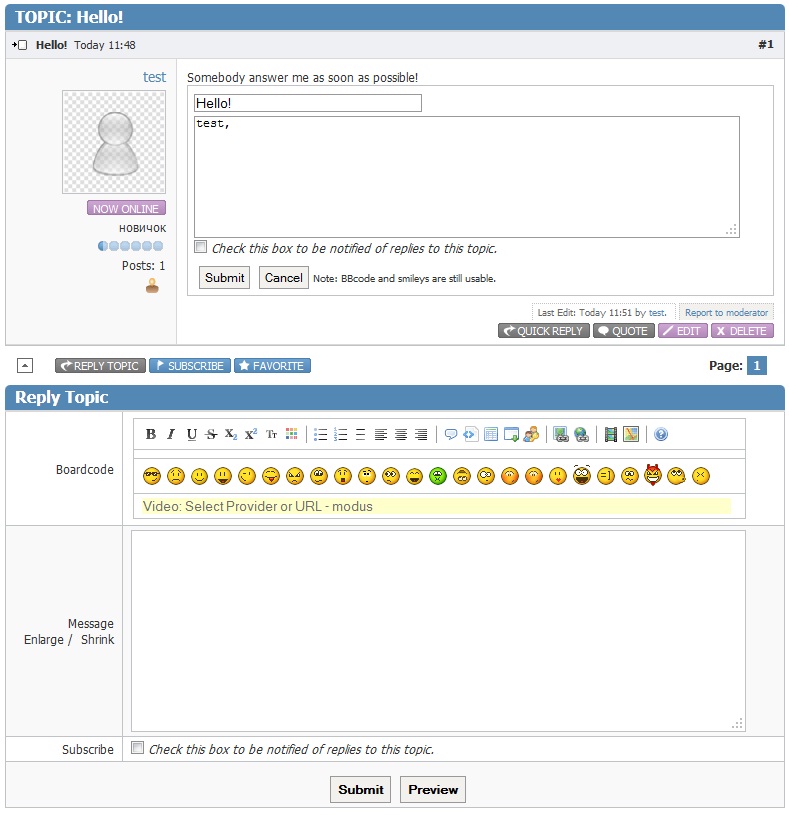
Installation like other templates:
Download. Extract to ...\components\com_kunena\template
In Kunena template manager select "Fast Reply at page bottom 2.0"
Or replace these files in your own template.
(!) New Feature: In built-in Quick Reply added name quoting, as in social networks.
If you do not need this Feature, then delete file html\topic\default_message.php in this template.
Download for Kunena 2.x - 3.0.x
Installation like other templates:
Download. Extract to ...\components\com_kunena\template
In Kunena template manager select "Fast Reply at page bottom 2.0"
Or replace these files in your own template.
(!) New Feature: In built-in Quick Reply added name quoting, as in social networks.
If you do not need this Feature, then delete file html\topic\default_message.php in this template.
Download for Kunena 2.x - 3.0.x
Last edit: 13 years 1 month ago by ChaosHead.
Please Log in or Create an account to join the conversation.
13 years 11 months ago #134533
by ChaosHead
Replied by ChaosHead on topic Fast Reply with bbCode editor at page bottom 2.0 + Name quoting in built-in Quick Reply
Updated: corrected a mistake - signatures of users weren't displayed. Please update a template.
The following user(s) said Thank You: SlayerM
Please Log in or Create an account to join the conversation.

13 years 5 months ago #142477
by ilonioum
Replied by ilonioum on topic Fast Reply with bbCode editor at page bottom 2.0 + Name quoting in built-in Quick Reply
Perfect, thank you!
Please Log in or Create an account to join the conversation.
13 years 1 month ago - 13 years 1 month ago #147162
by niou142
Replied by niou142 on topic Add a quick reply zone
Hi,
I have installed the last version of Kunena. I would like to know how to add a quick reply zone ?
I would like to add this zone because users have to clic on: Quick reply. I would like to show this zone directly.
How to do this please ?
edit: I would like something like this
I have installed the last version of Kunena. I would like to know how to add a quick reply zone ?
I would like to add this zone because users have to clic on: Quick reply. I would like to show this zone directly.
How to do this please ?
edit: I would like something like this
Last edit: 13 years 1 month ago by niou142.
Please Log in or Create an account to join the conversation.
13 years 1 month ago #147187
by ChaosHead
Replied by ChaosHead on topic Add a quick reply zone
The following user(s) said Thank You: niou142
Please Log in or Create an account to join the conversation.
13 years 1 month ago #147197
by niou142
Replied by niou142 on topic Add a quick reply zone
Yeah it's work weel, good job !  Thank's !
Thank's ! Please Log in or Create an account to join the conversation.
Time to create page: 0.377 seconds