


- Posts: 5
- Thank you received: 0
Kunena 7.0.6 & Kunena 6.4.12 – Security Updates Released
The Kunena team has announce the arrival of Kunena 7.0.6 [K 7.0.6] in stable which is now available for download as a native Joomla extension for J! 5.4.x/6.0.x. This version addresses most of the issues that were discovered in K 6.2 / K 6.3 / K 6.4 and issues discovered during the last development stages of K 7.0.
The Kunena team is also pleased to announce the twelfth version of Kunena 6.4, a native Joomla extension for Joomla! 5.0, 5.1, 5.2, 5.3, 5.4 and 6.0.
Themen, die in diesen Bereich verschoben wurden, gelten allgemein als beendet. Falls es dazu noch zusätzliche Fragen gibt, können diese zwar noch gestellt werden, aber diese alten Themen sollten auf keinen Fall wieder auferstehen, um neue Probleme zu erörtern.
Eröffnet dazu bitte ein eigenes neues Thema.
Eröffnet dazu bitte ein eigenes neues Thema.
Question Über dem Forum Grafik einfügen
14 years 4 months ago #117395
by TK1990
Über dem Forum Grafik einfügen was created by TK1990
Hallo.
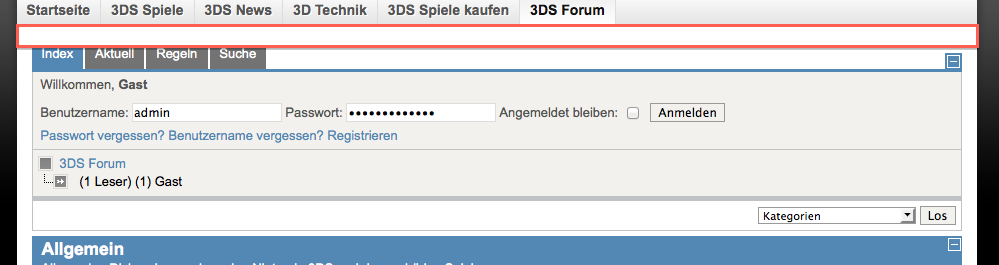
Ist es möglich über dem Forum eine Grafik einzufügen? Ich habe die gemeinte Stelle mal rot markiert. Da möchte ich gerne eine Art Willkommensbanner einfügen, welcher - bestmöglich - für Gäste erscheint.
Viele Grüße,
Theo
Ist es möglich über dem Forum eine Grafik einzufügen? Ich habe die gemeinte Stelle mal rot markiert. Da möchte ich gerne eine Art Willkommensbanner einfügen, welcher - bestmöglich - für Gäste erscheint.
Viele Grüße,
Theo
Please Log in or Create an account to join the conversation.
- MajorSnakeFox
-

- Offline
- Senior Member
-

Less
More
- Posts: 91
- Thank you received: 6
14 years 4 months ago #117397
by MajorSnakeFox
Replied by MajorSnakeFox on topic Re: Über dem Forum Grafik einfügen
Guck mal:
docs.kunena.org/index.php/Module_Positio...1.6_Module_Positions
(gilt nach meiner Erfahrung auch für K1.7)
Please Log in or Create an account to join the conversation.
14 years 4 months ago #117432
by TK1990
Das hilft mir nicht wirklich weiter. Zumal ich kein Modul einfügen will, sondern einfach eine Grafik. Dazu müsste ich lediglich wissen, wo im Quellcode der Anfang des Forums ist, sodass ich das Bild quasi davor setzen kann.
Gruß,
Theo
Replied by TK1990 on topic Re: Über dem Forum Grafik einfügen
Hallo.MajorSnakeFox wrote: Guck mal: docs.kunena.org/index.php/Module_Positio...1.6_Module_Positions (gilt nach meiner Erfahrung auch für K1.7)
Das hilft mir nicht wirklich weiter. Zumal ich kein Modul einfügen will, sondern einfach eine Grafik. Dazu müsste ich lediglich wissen, wo im Quellcode der Anfang des Forums ist, sodass ich das Bild quasi davor setzen kann.
Gruß,
Theo
Please Log in or Create an account to join the conversation.


Less
More
- Posts: 12287
- Thank you received: 2535
14 years 4 months ago #117442
by rich
Important! Always create a backup before you make any changes to your website!
Replied by rich on topic Aw: Über dem Forum Grafik einfügen
Mit
#Kunena {
padding-top: xxx.px;
}
kannst du dir oben den nötigen Platz schaffen. Dort kannst dann du das Image einbinden. Schreibe diesen Code am Ende in deine Joomla! template.css hinein.
#Kunena {
padding-top: xxx.px;
}
kannst du dir oben den nötigen Platz schaffen. Dort kannst dann du das Image einbinden. Schreibe diesen Code am Ende in deine Joomla! template.css hinein.
Important! Always create a backup before you make any changes to your website!
The following user(s) said Thank You: TK1990
Please Log in or Create an account to join the conversation.
14 years 4 months ago - 14 years 4 months ago #117475
by TK1990
Replied by TK1990 on topic Re: Aw: Über dem Forum Grafik einfügen
Danke, das klappt soweit! Leider kann ich dort keine Grafik einbinden  Kann ich das außerhalb des CSS machen?
EDIT: Okay, habe es komplett einfacher gemacht:
/components/com_kunena/template/default/menu.php und dann ganz oben bevor das Menü anfängt meine Grafiken eingefügt.
Gibt es aber eine Möglichkeit, dass die Grafik nur für registrierte User erscheint?
Gruß,
Theo
Kann ich das außerhalb des CSS machen?EDIT: Okay, habe es komplett einfacher gemacht:
/components/com_kunena/template/default/menu.php und dann ganz oben bevor das Menü anfängt meine Grafiken eingefügt.
Gibt es aber eine Möglichkeit, dass die Grafik nur für registrierte User erscheint?
Gruß,
Theo
Last edit: 14 years 4 months ago by TK1990.
Please Log in or Create an account to join the conversation.
Less
More
- Posts: 12287
- Thank you received: 2535
14 years 4 months ago - 14 years 4 months ago #117481
by rich
Important! Always create a backup before you make any changes to your website!
Replied by rich on topic Aw: Über dem Forum Grafik einfügen
Es hätte auch mit CSS geklappt. Aber warum machst du es dir so schwer? Joomla bietet doch alles was du brauchst.
Wenn du den Tipp von MajorSnakeFox befolgst und das Banner-Modul verwendest, dann kannst du oberhalb von Kunena jederzeit ein Bild einfügen.
Wenn du den Tipp von MajorSnakeFox befolgst und das Banner-Modul verwendest, dann kannst du oberhalb von Kunena jederzeit ein Bild einfügen.
Mit dem Banner-Modul ja, indem du es nur für registrierte Benutzer frei gibst. Ohne Modul wird es sicher schwer umzusetzen sein.Gibt es aber eine Möglichkeit, dass die Grafik nur für registrierte User erscheint?
Important! Always create a backup before you make any changes to your website!
Last edit: 14 years 4 months ago by rich.
Please Log in or Create an account to join the conversation.
Time to create page: 0.257 seconds