
- Posts: 127
- Thank you received: 0
Kunena 7.0.9 & Kunena 6.4.14 – Security Updates Released
The Kunena team has announce the arrival of Kunena 7.0.9 [K 7.0.9] in stable which is now available for download as a native Joomla extension for J! 5.4.x/6.0.x./6.1.x. This version addresses most of the issues that were discovered in K 6.2 / K 6.3 / K 6.4 and issues discovered during the last development stages of K 7.0
Solved Change Avatar
- OldCharlie
-
 Topic Author
- Offline
- Senior Member
-

Less
More
4 years 7 months ago #222029
by OldCharlie
Change Avatar was created by OldCharlie
How do I change the Avatar? If I put in a photo for the avatar and want to delete or change it how is it done. I can't find anything in forum or help.
Thanks
Thanks
Please Log in or Create an account to join the conversation.


4 years 7 months ago - 4 years 7 months ago #222031
by Leen
With kind regards
Leen
Replied by Leen on topic Change Avatar
login at the front of your kunena forum.
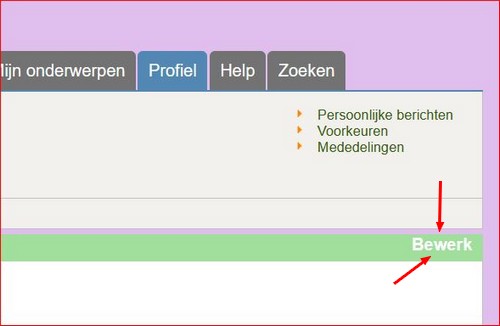
then click on the profile tab and then on the edit button.
in new image click on avatar image tab.
and you could go on with that.
it could still be that in the kunena configuration tab avatar you have to set the Default avatar type on image
my pictures are in dutch language sorry
then click on the profile tab and then on the edit button.
in new image click on avatar image tab.
and you could go on with that.
it could still be that in the kunena configuration tab avatar you have to set the Default avatar type on image
my pictures are in dutch language sorry
With kind regards
Leen


Last edit: 4 years 7 months ago by Leen.
Please Log in or Create an account to join the conversation.
- OldCharlie
-
Topic Author
- Offline
- Senior Member
-
Less
More
- Posts: 127
- Thank you received: 0
4 years 7 months ago #222041
by OldCharlie
Replied by OldCharlie on topic Change Avatar
Thanks for helping with trying to change my profile avatar. Still can't here is a video of what I see:
billcory-pictures.s3.us-west-2.amazonaws...angeAvatarKunena.mp4
billcory-pictures.s3.us-west-2.amazonaws...angeAvatarKunena.mp4
Please Log in or Create an account to join the conversation.


Less
More
- Posts: 12291
- Thank you received: 2538
4 years 7 months ago #222042
by rich
Important! Always create a backup before you make any changes to your website!
Replied by rich on topic Change Avatar
In the backend, go to Kunena Dashboard -> Plugins and disable the Gravatar integration plugin. Then you can add or change your avatar in your profile in the frontend.
Important! Always create a backup before you make any changes to your website!
Please Log in or Create an account to join the conversation.
- OldCharlie
-
Topic Author
- Offline
- Senior Member
-
Less
More
- Posts: 127
- Thank you received: 0
4 years 7 months ago - 4 years 7 months ago #222090
by OldCharlie
Replied by OldCharlie on topic Change Avatar
Thanks,,, I did as you say, but still can't change the Avatar. Click to view my video:
Still can't change Avatar
Still can't change Avatar
Last edit: 4 years 7 months ago by OldCharlie.
Please Log in or Create an account to join the conversation.
4 years 7 months ago #222091
by Leen
With kind regards
Leen
Replied by Leen on topic Change Avatar
Hi You forget that the Avatar change has to be done through the Frontside of Your website .
With kind regards
Leen



Please Log in or Create an account to join the conversation.
Time to create page: 0.247 seconds