


- Posts: 18
- Thank you received: 0
Kunena 7.1.1 & Kunena 6.4.17 – Security Updates Released
The Kunena team has announce the arrival of Kunena 7.1.1 [K 7.1.1] in stable which is now available for download as a native Joomla extension for J! 5.4.x/6.0.x./6.1.x./6.2.x This version addresses most of the issues that were discovered in K 6.2 / K 6.3 / K 6.4 / K7.0 and issues discovered during the last development stages of K 7.1
Just a reminder: K6.4.17 receives only securities fixes until end of 2026, so it's advised for users to upgrade to K7.1.
Topics must relate to a currently supported version of Kunena. If you are unsure what is the current supported version of Kunena, please go to the
download
page.
If you are having problems then, for your own benefit, it would save us all a lot of time if you would kindly post your configuration report when you ask for help from this forum. If you do not post your configuration report we will not ask you for it but you will probably not get your problem solved, either.
If you are having problems then, for your own benefit, it would save us all a lot of time if you would kindly post your configuration report when you ask for help from this forum. If you do not post your configuration report we will not ask you for it but you will probably not get your problem solved, either.
Question 7.0.11 (and earlier versions) Error in the editor - saving: Forbidden!
2 weeks 5 days ago - 2 weeks 5 days ago #235549
by Shuffle
Dear guys,
the same error appears on three websites with kunena. It was likely present in previous versions of Kunena as well. I have now finally discovered how to reproduce the error.
First of all: It is strange that the collation is flagged as incorrect (showing `utf8_general_ci`), yet when I access the database via phpMyAdmin, it displays the correct collation.
I don’t understand this difference.
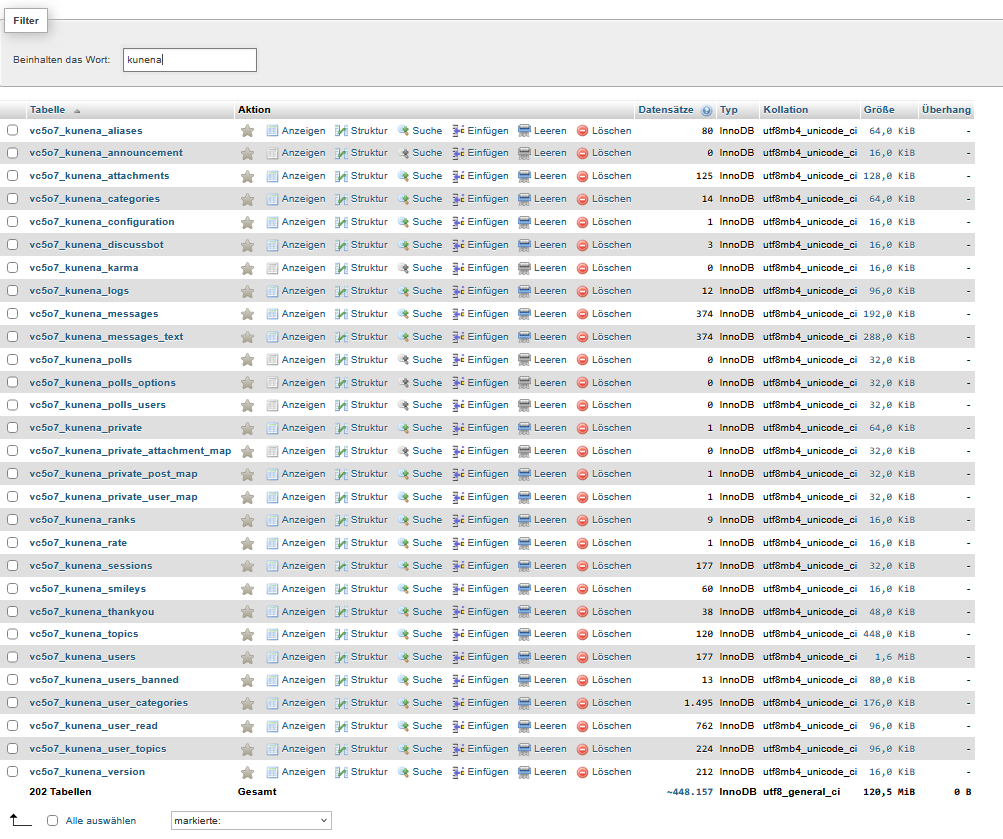
As for the actual error: There have been recurring issues where changes—or even new posts—failed to save entirely. In these instances, an error message appeared stating that the user lacked the necessary permissions.
For example, if I enter some simple text and save it, there is (usually) no problem.
This is the source code that causes an error when saving:
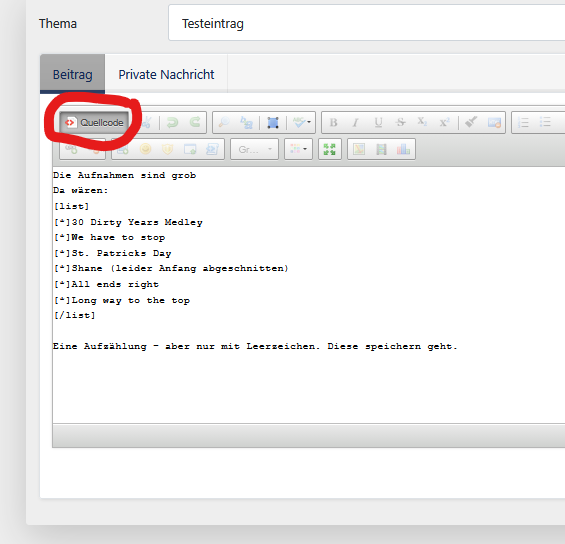
Also if I then modify the text—for instance, to create a simple list—an error message appears when I try to save: "Forbidden!"
The post also fails to save when a list is added subsequently.
This saving issue occurs with other actions as well, but so far, creating a list is the only instance I have found to be reproducible.
Unfortunately, I’ve run out of ideas on where else to look for the error.
Thanks for your help!
the same error appears on three websites with kunena. It was likely present in previous versions of Kunena as well. I have now finally discovered how to reproduce the error.
First of all: It is strange that the collation is flagged as incorrect (showing `utf8_general_ci`), yet when I access the database via phpMyAdmin, it displays the correct collation.
I don’t understand this difference.
Warning: Spoiler!
This message contains confidential information
Database collation check: vc5o7_kunena_aliases have wrong collation of type utf8_general_ci on field alias vc5o7_kunena_aliases have wrong collation of type utf8_general_ci on field type vc5o7_kunena_aliases have wrong collation of type utf8_general_ci on field item vc5o7_kunena_announcement have wrong collation of type utf8_general_ci on field title vc5o7_kunena_announcement have wrong collation of type utf8_general_ci on field sdescription vc5o7_kunena_announcement have wrong collation of type utf8_general_ci on field description vc5o7_kunena_attachments have wrong collation of type utf8_general_ci on field hash vc5o7_kunena_attachments have wrong collation of type utf8_general_ci on field folder vc5o7_kunena_attachments have wrong collation of type utf8_general_ci on field filename vc5o7_kunena_attachments have wrong collation of type utf8_general_ci on field filename_real vc5o7_kunena_attachments have wrong collation of type utf8_general_ci on field caption vc5o7_kunena_categories have wrong collation of type utf8_general_ci on field name vc5o7_kunena_categories have wrong collation of type utf8_general_ci on field alias vc5o7_kunena_categories have wrong collation of type utf8_general_ci on field accesstype vc5o7_kunena_categories have wrong collation of type utf8_general_ci on field channels vc5o7_kunena_categories have wrong collation of type utf8_general_ci on field description vc5o7_kunena_categories have wrong collation of type utf8_general_ci on field headerdesc vc5o7_kunena_categories have wrong collation of type utf8_general_ci on field class_sfx vc5o7_kunena_categories have wrong collation of type utf8_general_ci on field iconset vc5o7_kunena_categories have wrong collation of type utf8_general_ci on field params vc5o7_kunena_configuration have wrong collation of type utf8_general_ci on field params vc5o7_kunena_logs have wrong collation of type utf8_general_ci on field ip vc5o7_kunena_logs have wrong collation of type utf8_general_ci on field operation vc5o7_kunena_messages have wrong collation of type utf8_general_ci on field name vc5o7_kunena_messages have wrong collation of type utf8_general_ci on field email vc5o7_kunena_messages have wrong collation of type utf8_general_ci on field subject vc5o7_kunena_messages have wrong collation of type utf8_general_ci on field ip vc5o7_kunena_messages have wrong collation of type utf8_general_ci on field modified_reason vc5o7_kunena_polls have wrong collation of type utf8_general_ci on field title vc5o7_kunena_polls_options have wrong collation of type utf8_general_ci on field text vc5o7_kunena_sessions have wrong collation of type utf8_general_ci on field allowed vc5o7_kunena_sessions have wrong collation of type utf8_general_ci on field readtopics vc5o7_kunena_smileys have wrong collation of type utf8_general_ci on field code vc5o7_kunena_smileys have wrong collation of type utf8_general_ci on field location vc5o7_kunena_topics have wrong collation of type utf8_general_ci on field subject vc5o7_kunena_topics have wrong collation of type utf8_general_ci on field first_post_message vc5o7_kunena_topics have wrong collation of type utf8_general_ci on field first_post_guest_name vc5o7_kunena_topics have wrong collation of type utf8_general_ci on field last_post_message vc5o7_kunena_topics have wrong collation of type utf8_general_ci on field last_post_guest_name vc5o7_kunena_topics have wrong collation of type utf8_general_ci on field params vc5o7_kunena_users have wrong collation of type utf8_general_ci on field status_text vc5o7_kunena_users have wrong collation of type utf8_general_ci on field view vc5o7_kunena_users have wrong collation of type utf8_general_ci on field signature vc5o7_kunena_users have wrong collation of type utf8_general_ci on field avatar vc5o7_kunena_users have wrong collation of type utf8_general_ci on field personalText vc5o7_kunena_users have wrong collation of type utf8_general_ci on field location vc5o7_kunena_users have wrong collation of type utf8_general_ci on field websitename vc5o7_kunena_users have wrong collation of type utf8_general_ci on field websiteurl vc5o7_kunena_users_banned have wrong collation of type utf8_general_ci on field ip vc5o7_kunena_users_banned have wrong collation of type utf8_general_ci on field reason_private vc5o7_kunena_users_banned have wrong collation of type utf8_general_ci on field reason_public vc5o7_kunena_users_banned have wrong collation of type utf8_general_ci on field comments vc5o7_kunena_users_banned have wrong collation of type utf8_general_ci on field params vc5o7_kunena_version have wrong collation of type utf8_general_ci on field version vc5o7_kunena_version have wrong collation of type utf8_general_ci on field versionname vc5o7_kunena_version have wrong collation of type utf8_general_ci on field state
Joomla! SEF: Enabled | Joomla! SEF rewrite: Enabled | FTP layer: Disabled |
This message contains confidential informationhtaccess: Exists | PHP environment: Max execution time: 120 seconds | Max execution memory: 512M | Max file upload:
Kunena menu details:
Warning: Spoiler!
ID Name Menutype Link Path In trash 482 Forum mainmenu view=home&defaultmenu=2574 kunena No 483 Index mainmenu view=category&layout=list&catid=0 kunena/index No 484 Aktuell mainmenu view=topics&mode=replies kunena/aktuell No 485 Neues Thema mainmenu view=topic&layout=create kunena/neuesthema No 486 Ohne Antwort mainmenu view=topics&mode=noreplies kunena/ohneantwort No 487 Meine Themen mainmenu view=topics&layout=user&mode=default kunena/meinethemen No 488 Profil mainmenu view=user kunena/profil No 489 Hilfe mainmenu view=misc kunena/hilfe No 490 Suche mainmenu view=search kunena/suche No 2910 Mitglieder mainmenu view=user&layout=list kunena/mitglieder No 2909 Statistik mainmenu view=statistics kunena/statistik No 2574 Forum kunenamenu view=home&defaultmenu=2576 forum No 2575 Index kunenamenu view=category&layout=list forum/index No 2576 Aktuell kunenamenu view=topics&mode=replies forum/aktuell No 2577 Ungelesen kunenamenu view=topics&layout=unread forum/ungelesen No 2578 Neues Thema kunenamenu view=topic&layout=create forum/neuesthema No 2579 Ohne Antwort kunenamenu view=topics&mode=noreplies forum/ohneantwort No 2580 Meine Themen kunenamenu view=topics&layout=user&mode=default forum/meinethemen No 2581 Profil kunenamenu view=user forum/profil No 2582 Hilfe kunenamenu view=misc forum/hilfe No 2583 Suche kunenamenu view=search forum/suche No
Joomla default template details : cassiopeia | author: Joomla! Project | version: 1.0 | creationdate: 2017-02
Kunena default template details : Aurelia | author: Kunena Team | version: 7.0.11 | creationdate: 2026-10-23
Kunena template params:
Warning: Spoiler!
DefaultCategoryicon profileIconset default DefaultIconset default editorIconset default bootstrap 1 borderless 1 tooltips 1 SubjectLengthMessage 80 fullactions 1 quick 0 displayMenu 1 displayDropdownMenu 1 displayDropdownContent 1 displayModule 1 displayBreadcrumb 1 displayAnnouncement 1 displayFooter 1 avatarPosition left formRecover 0 labels 0 whoisonlineName default avatarType rounded topicicontype svg fontawesome 0 socialshare 0 socialsharetag socialtheme classic optional_username 0 writeaccess 0 localstorage 0 moduleIdWebauthn 0 IconColor inherit IconColorNew #48a348 editorType ckeditor Bold 1 Italic 1 Underline 1 Strike 1 Subscript 1 Smiley 1 Superscript 1 RemoveFormat 1 BulletedList 1 NumberedList 1 Blockquote 1 JustifyLeft 1 JustifyCenter 1 JustifyRight 1 JustifyBlock 1 Link_Unlink 1 Image 1 Confidential 0 Hidetext 1 Spoiler 1 Code 1 Ebay 0 X_Social 0 0 Soundcloud 0 FontSize 1 TextColor 1 Maximize 1 Map 1 Video 1 editorButtons Confidential,Ebay,X_Social,Instagram,Soundcloud nameskinckeditor ckeditorcustomprefixconfigfile avatarSizeX 40 avatarSizeY 90 avatarSizeXThumb 36 avatarSizeYThumb 36 avatarSizeXWelcome 72 avatarSizeYWelcome 72 avatarSizeXList 36 avatarSizeYList 36 avatarSizeXPost 144 avatarSizeYPost 144 avatarSizeXProfile 200 avatarSizeYProfile 200 templatebyText templatebyName templatebyLink
Kunena version detailed: Kunena 7.0.11 | 2026-10-23 [ Mezzomerico ]
| Kunena detailed configuration:| Kunena integration settings:Warning: Spoiler!
Kunena config settings: template aurelia emailSenderName Forum ♦ Steterburg.de sendEmails 1 boardOffline 0 readOnly 0 sessionTimeOut 1800 enableRss 0 debug 0 profiler 0 fallbackEnglish 1 timeToCreatePage 1 sef 1 accessComponent 0 sefRedirect 1 cache 1 cacheTime 60 threadsPerPage 10 messagesPerPage 10 messagesPerPageSearch 15 showHistory 1 historyLimit 6 postDateFormat datetime postDateFormatHover datetime showNew 1 showAnnouncement 1 avatarOnCategory 0 listCatShowModerators 0 showChildCatIcon 1 enableForumJump 1 reportMsg 1 orderingSystem mesid hideIp 1 latestCategoryIn 1 topicIcons 0 lightbox 1 showListTime -1 topicLayout indented pickupCategory 1 articleDisplay intro defaultSort asc searchTime all allowChangeSubject 0 ratingEnabled 1 attachStart 0 attachEnd 14 quickReply 0 disableRe 1 displayFilenameAttachment 1 datePickerFormat dd.mm.yyyy username 1 askEmail 0 showEmail 0 showUserStats 1 showKarma 1 showThankYou 1 thankYouMax 10 userEdit 0 userEditTime 86400 userEditTimeGrace 600 editMarkup 0 allowFavorites 1 boxGhostMessage 0 showBannedReason 0 showImgFilesManageProfile 1 userReport 0 logModeration 0 userStatus 1 signature 1 maxSig 300 personal 1 privateMessage 1 emailHeader /media/kunena/email/hero-wide.png emailHeaderSizeY 560 emailHeaderSizeX 560 allowSubscriptions 1 mailFull 0 plainEmail 1 categorySubscriptions post topicSubscriptions first subscriptionsChecked 1 emailRecipientCount 50 emailRecipientPrivacy bcc useSystemEmails 0 utmSource 0 sendMailUserBanned 0 mailBodyUserBanned mailBodyUserUnBanned pubWrite 0 holdGuestPosts 0 userlistAllowed 0 pubProfile 0 regOnly 0 holdNewUsersPosts 0 userDeleteMessage 1 modSeeDeleted 1 floodProtection 0 mailModerators 1 mailAdministrators -1 ipTracking 0 statsLinkAllowed 0 maxLinks 3 teaser 0 urlSubjectTopic 1 moderatorPermDelete 1 newUsersPreventPostUrlImages 0 minimalUserPostsAddUrlImage 10 captcha 1 captchaPostLimit 0 stopForumSpamNewUserCheck 0 avatarType 0 defaultAvatar nophoto.png defaultAvatarSmall s_nophoto.png avatarTypes gif,jpeg,jpg,png,webp allowAvatarUpload 1 allowAvatarGallery 1 avatarSize 4096 avatarQuality 50 avatarCrop 1 avatarEdit 0 attachmentLimit 10 attachmentProtection 0 attachmentUtf8 1 imageUpload registered showImgForGuest 1 imageTypes jpeg,jpg,gif,png,webp,avif checkMimeTypes 1 imageMimeTypes image/jpeg,image/jpg,image/gif,image/png imageSize 4000 imageWidth 1400 imageHeight 1400 thumbWidth 32 thumbHeight 32 imageQuality 50 fileUpload registered showFileForGuest 1 fileTypes txt,rtf,doc,docx,xls,xlsx,pdf,zip,tar.gz,tgz,tar.bz2,mp3,mp4 fileSize 20000 showRanking 1 rankImages 1 trimLongUrls 1 trimLongUrlsFront 40 trimLongUrlsBack 20 autoLink 1 smartLinking 0 autoEmbedYoutube 1 autoEmbedEbay 1 autoEmbedInstagram 1 autoEmbedSoundcloud 1 highlightCode 0 bbcodeImgSecure text ebayLanguage 77 ebayCertId rssType recent rssSpecification rss2.0 rssTimeLimit 1 month rssLimit 100 rssAllowHtml 1 rssAuthorFormat name rssAuthorInTitle 1 rssWordCount 0 rssOldTitles 1 rssCache 900 rssFeedBurnerUrl userlistRows 30 userlistOnline 1 userlistAvatar 1 userlistPosts 1 userlistKarma 1 userlistEmail 0 userlistJoinDate 1 userlistLastVisitDate 0 userlistUserHits 1 superAdminUserlist 1 userListUserType 0 showSessionType 0 showSessionStartTime 0 showWhoIsOnline 1 showStats 1 showGenStats 1 showPopUserStats 1 popUserCount 5 showPopSubjectStats 1 popSubjectCount 5 showPopPollStats 1 popPollsCount 5 showPopThankYouStats 1 popThanksCount 5 userlistCountUsers 0 pollEnabled 1 pollNbOptions 4 pollTimeBtVotes 00:15:00 pollNbVotesByUser 100 pollAllowVoteOne 1 pollResultsUserslist 1 allowUserEditPoll 0 defaultPage recent activeMenuItem mainMenuId homeId indexId moderatorsId topicListId miscId profileId searchId rules | Joomla! detailed language files installed:Warning: Spoiler!Kunena - Finder Enabled
Kunena - Community Builder Enabled: access=1 login=1 activity=0 avatar=1 profile=0 private=0
Kunena - Easyblog Disabled
Kunena - Easysocial Disabled
Kunena - Gravatar Disabled
Kunena - JomSocial Disabled
Kunena - Joomla Enabled: access=1 login=1
Kunena - Kunena Enabled: avatar=1 profile=1
Kunena - UddeIm Disabled
Warning: Spoiler!
Joomla! languages installed: de-DE German (Germany) en-GB English (United Kingdom)
Third-party components: CommunityBuilder 2.12.0 | UddeIm 5.6.3
Third-party SEF components: None
Plugins: Content - Kunena Discuss 6.2.2
Modules: Kunena Latest 6.2.2 | Kunena Stats 6.2.2 | Kunena Search 6.2.2
As for the actual error: There have been recurring issues where changes—or even new posts—failed to save entirely. In these instances, an error message appeared stating that the user lacked the necessary permissions.
For example, if I enter some simple text and save it, there is (usually) no problem.
This is the source code that causes an error when saving:
Source - Save - Forbidden!Songs:
This ends in: Forbidden
- 30 Dirty Years Medley
- We have to stop
- St. Patricks Day
- Shane (leider Anfang abgeschnitten)
- All ends right
- Long way to the top
Also if I then modify the text—for instance, to create a simple list—an error message appears when I try to save: "Forbidden!"
The post also fails to save when a list is added subsequently.
This saving issue occurs with other actions as well, but so far, creating a list is the only instance I have found to be reproducible.
Unfortunately, I’ve run out of ideas on where else to look for the error.
Thanks for your help!
Last edit: 2 weeks 5 days ago by Shuffle.
Please Log in or Create an account to join the conversation.


2 weeks 5 days ago #235550
by xillibit
I don't provide support by PM, because this can be useful for someone else.
Replied by xillibit on topic 7.0.11 (and earlier versions) Error in the editor - saving: Forbidden!
Hello,
On tables collation, Kunena requires utf8mb4_unicode_ci like Joomla! 6+ have, ljust look the structure of some Kunena tables and you will see the collation isn't the same
On tables collation, Kunena requires utf8mb4_unicode_ci like Joomla! 6+ have, ljust look the structure of some Kunena tables and you will see the collation isn't the same
I don't provide support by PM, because this can be useful for someone else.
Please Log in or Create an account to join the conversation.
2 weeks 5 days ago #235551
by Shuffle
Replied by Shuffle on topic 7.0.11 (and earlier versions) Error in the editor - saving: Forbidden!
Hello,
I am no expert, but if I look at the 'aliases', for example, the correct collation is actually listed there—yet the Kunena report shows it as incorrect (see images).
The report is showing

phpMyadmin told
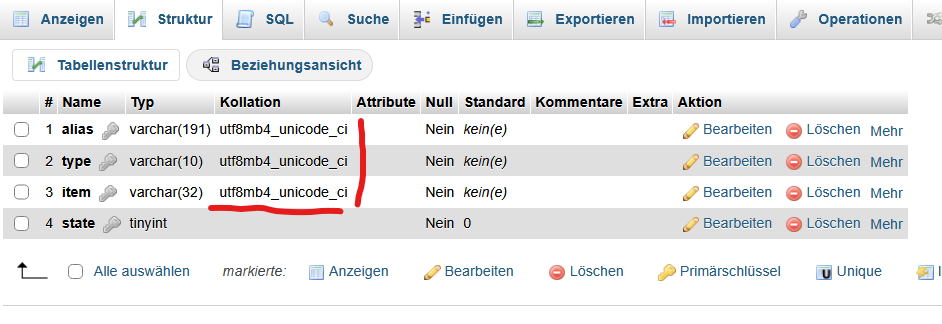
How is this possible? Where is the bug?
Thanks for your help.
I am no expert, but if I look at the 'aliases', for example, the correct collation is actually listed there—yet the Kunena report shows it as incorrect (see images).
The report is showing
phpMyadmin told
How is this possible? Where is the bug?
Thanks for your help.
Please Log in or Create an account to join the conversation.


Less
More
- Posts: 1083
- Thank you received: 188
2 weeks 5 days ago - 2 weeks 5 days ago #235552
by Pinkeltje
Replied by Pinkeltje on topic 7.0.11 (and earlier versions) Error in the editor - saving: Forbidden!
The collation check in the configuration report reads the column collations directly through Joomla’s own database connection. If phpMyAdmin shows utf8mb4_unicode_ci for the same columns, you’re most likely looking at a different database than the one Joomla uses. Could you check the following?
1. Collation / database
1. Collation / database
- In Joomla, go to System → Global Configuration → Server tab → Database section. Note the Host, Database Name and Database Tables Prefix.
- In phpMyAdmin, check the breadcrumb at the top (Server » Database). Is it exactly the same database name?
- If you have more than one database with the same prefix (vc5o7_), for example an old copy or a test site, make sure you’re checking the right one.
- To be sure, post a test message in the forum and check whether it appears in vc5o7_kunena_messages in the database you have open in phpMyAdmin.
- Open your browser’s developer tools (F12) → Network tab, and then try to save the message that fails.
- Click the failing request (status 403) and check:
- the request URL (which task?)
- the response: is it a Joomla/Kunena error page, or a plain server page like “Forbidden – You don’t have permission to access this resource”?
- the Server response header (Apache, LiteSpeed, nginx, Cloudflare, …)
- If it’s a plain server page, it’s most likely a web application firewall (mod_security) at your host blocking the content. Remove parts of the text until the error disappears, so you know which line triggers it. Then ask your host which mod_security rule ID was triggered at that time, and whether they can whitelist it for your site.
Last edit: 2 weeks 5 days ago by Pinkeltje.
The following user(s) said Thank You: Shuffle
Please Log in or Create an account to join the conversation.
2 weeks 3 days ago - 2 weeks 3 days ago #235557
by Shuffle
Replied by Shuffle on topic 7.0.11 (and earlier versions) Error in the editor - saving: Forbidden!
Great!
I have now examined one of the websites in more detail (all the problematic sites are with the same host).
To begin with, I found no issues with the collation in the Kunena tables within the database. That’s a relief!
I will look into the other websites later. As I turned off the host's firewall actually allowed data to be saved without any errors!
I have asked the host to add an exception to the firewall, which will then need to be applied to all the websites with kunena.
Thank you very much for your detailed help!
I have now examined one of the websites in more detail (all the problematic sites are with the same host).
To begin with, I found no issues with the collation in the Kunena tables within the database. That’s a relief!
Warning: Spoiler!
This message contains confidential information
Database collation check: The collation of your table fields are correct
Joomla! SEF: Enabled | Joomla! SEF rewrite: Enabled | FTP layer: Disabled |
This message contains confidential informationhtaccess: Exists | PHP environment: Max execution time: 900 seconds | Max execution memory: 768M | Max file upload:
Kunena menu details:
Warning: Spoiler!
ID Name Menutype Link Path In trash 263 Forum kunenamenu view=home&defaultmenu=263 forum No 264 Index kunenamenu view=category&layout=list forum/index No 265 Aktuell kunenamenu view=topics&mode=replies forum/aktuell No 266 Ungelesen kunenamenu view=topics&layout=unread forum/ungelesen No 267 Neues Thema kunenamenu view=topic&layout=create forum/neuesthema No 268 Ohne Antwort kunenamenu view=topics&mode=noreplies forum/ohneantwort No 269 Meine Themen kunenamenu view=topics&layout=user&mode=default forum/meinethemen No 284 Suche kunenamenu view=search forum/suche No
Joomla default template details : cassiopeia | author: Joomla! Project | version: 1.0 | creationdate: 2017-02
Kunena default template details : Aurelia | author: Kunena Team | version: 7.0.11 | creationdate: 2026-10-23
Kunena template params:
Warning: Spoiler!
DefaultCategoryicon profileIconset default DefaultIconset default editorIconset default bootstrap 1 borderless 1 tooltips 1 SubjectLengthMessage 80 fullactions 1 quick 0 displayMenu 1 displayDropdownMenu 1 displayDropdownContent 1 displayModule 1 displayBreadcrumb 1 displayAnnouncement 1 displayFooter 1 avatarPosition left formRecover 0 labels 0 whoisonlineName default avatarType rounded topicicontype svg fontawesome 0 optional_username 0 writeaccess 0 localstorage 0 moduleIdWebauthn 0 IconColor inherit IconColorNew #48a348 editorType ckeditor Bold 1 Italic 1 Underline 1 Strike 1 Subscript 1 Smiley 1 Superscript 1 RemoveFormat 1 BulletedList 1 NumberedList 1 Blockquote 1 JustifyLeft 1 JustifyCenter 1 JustifyRight 1 JustifyBlock 1 Link_Unlink 1 Image 1 Confidential 1 Hidetext 1 Spoiler 1 Code 1 Ebay 1 X_Social 1 1 Soundcloud 1 FontSize 1 TextColor 1 Maximize 1 Map 1 Video 1 editorButtons nameskinckeditor ckeditorcustomprefixconfigfile avatarSizeX 40 avatarSizeY 90 avatarSizeXThumb 36 avatarSizeYThumb 36 avatarSizeXWelcome 72 avatarSizeYWelcome 72 avatarSizeXList 36 avatarSizeYList 36 avatarSizeXPost 144 avatarSizeYPost 144 avatarSizeXProfile 200 avatarSizeYProfile 200 templatebyText templatebyName templatebyLink
Kunena version detailed: Kunena 7.0.11 | 2026-10-23 [ Mezzomerico ]
| Kunena detailed configuration:| Kunena integration settings:Warning: Spoiler!
Kunena config settings: template aurelia emailSenderName Forum ♦ The Keltics sendEmails 1 boardOffline 0 readOnly 0 sessionTimeOut 1800 enableRss 0 debug 0 profiler 0 fallbackEnglish 1 timeToCreatePage 1 sef 1 accessComponent 0 sefRedirect 1 cache 1 cacheTime 60 threadsPerPage 20 messagesPerPage 10 messagesPerPageSearch 15 showHistory 1 historyLimit 6 postDateFormat datetime postDateFormatHover datetime showNew 1 showAnnouncement 1 avatarOnCategory 0 listCatShowModerators 0 showChildCatIcon 1 enableForumJump 1 reportMsg 0 orderingSystem mesid hideIp 1 latestCategoryIn 1 topicIcons 0 lightbox 1 showListTime -1 topicLayout indented pickupCategory 1 articleDisplay intro defaultSort asc searchTime all allowChangeSubject 0 ratingEnabled 1 attachStart 0 attachEnd 14 quickReply 0 disableRe 1 displayFilenameAttachment 1 datePickerFormat dd.mm.yyyy username 1 askEmail 0 showEmail 0 showUserStats 1 showKarma 1 showThankYou 1 thankYouMax 10 userEdit 1 userEditTime 0 userEditTimeGrace 600 editMarkup 0 allowFavorites 1 boxGhostMessage 0 showBannedReason 0 showImgFilesManageProfile 1 userReport 0 logModeration 0 userStatus 1 signature 1 maxSig 300 personal 1 privateMessage 0 emailHeader media/kunena/email/hero-wide.png emailHeaderSizeY 560 emailHeaderSizeX 560 allowSubscriptions 1 mailFull 1 plainEmail 1 categorySubscriptions post topicSubscriptions every subscriptionsChecked 1 emailRecipientCount 15 emailRecipientPrivacy bcc useSystemEmails 0 utmSource 0 sendMailUserBanned 0 mailBodyUserBanned mailBodyUserUnBanned pubWrite 0 holdGuestPosts 0 userlistAllowed 0 pubProfile 0 regOnly 0 holdNewUsersPosts 0 userDeleteMessage 0 modSeeDeleted 1 floodProtection 0 mailModerators 1 mailAdministrators -1 ipTracking 0 statsLinkAllowed 0 maxLinks 6 teaser 0 urlSubjectTopic 1 moderatorPermDelete 1 newUsersPreventPostUrlImages 0 minimalUserPostsAddUrlImage 10 captcha 1 captchaPostLimit 0 stopForumSpamNewUserCheck 0 avatarType 0 defaultAvatar nophoto.png defaultAvatarSmall s_nophoto.png avatarTypes gif,jpeg,jpg,png,webp,avif allowAvatarUpload 1 allowAvatarGallery 1 avatarSize 4096 avatarQuality 75 avatarCrop 1 avatarEdit 0 attachmentLimit 10 attachmentProtection 0 attachmentUtf8 1 imageUpload registered showImgForGuest 1 imageTypes jpg,jpeg,gif,png,webp,avif checkMimeTypes 1 imageMimeTypes image/jpeg,image/jpg,image/gif,image/png,image/webp,image/avif imageSize 8000 imageWidth 1600 imageHeight 1400 thumbWidth 32 thumbHeight 32 imageQuality 50 fileUpload registered showFileForGuest 0 fileTypes aac,txt,rtf,doc,docx,xls,xlsx,pdf,zip,tar.gz,tgz,tar.bz2,mp3,mp4 fileSize 64000 showRanking 1 rankImages 1 trimLongUrls 1 trimLongUrlsFront 40 trimLongUrlsBack 20 autoLink 1 smartLinking 0 autoEmbedYoutube 1 autoEmbedEbay 1 autoEmbedInstagram 1 autoEmbedSoundcloud 1 highlightCode 0 bbcodeImgSecure text ebayLanguage 77 ebayCertId rssType topic rssSpecification rss2.0 rssTimeLimit 1 month rssLimit 100 rssAllowHtml 1 rssAuthorFormat name rssAuthorInTitle 1 rssWordCount 0 rssOldTitles 1 rssCache 900 rssFeedBurnerUrl userlistRows 30 userlistOnline 1 userlistAvatar 1 userlistPosts 1 userlistKarma 1 userlistEmail 0 userlistJoinDate 1 userlistLastVisitDate 1 userlistUserHits 1 superAdminUserlist 1 userListUserType 0 showSessionType 2 showSessionStartTime 1800 showWhoIsOnline 1 showStats 1 showGenStats 1 showPopUserStats 1 popUserCount 5 showPopSubjectStats 1 popSubjectCount 5 showPopPollStats 1 popPollsCount 5 showPopThankYouStats 1 popThanksCount 5 userlistCountUsers 1 pollEnabled 1 pollNbOptions 4 pollTimeBtVotes 00:15:00 pollNbVotesByUser 100 pollAllowVoteOne 1 pollResultsUserslist 1 allowUserEditPoll 0 defaultPage recent activeMenuItem mainMenuId homeId indexId moderatorsId topicListId miscId profileId searchId rules | Joomla! detailed language files installed:Warning: Spoiler!Kunena - Finder Enabled
Kunena - Community Builder Disabled
Kunena - Easyblog Disabled
Kunena - Easysocial Disabled
Kunena - Gravatar Disabled
Kunena - JomSocial Disabled
Kunena - Joomla Enabled: access=1 login=1
Kunena - Kunena Enabled: avatar=1 profile=1
Kunena - UddeIm Disabled
Warning: Spoiler!
Joomla! languages installed: de-DE German (Germany) en-GB English (United Kingdom)
Third-party components: None
Third-party SEF components: None
Plugins: None
Modules: Kunena Latest 6.2.2 | Kunena Stats 6.2.2 | Kunena Login 6.2.2 | Kunena Search 6.2.2
I will look into the other websites later. As I turned off the host's firewall actually allowed data to be saved without any errors!
I have asked the host to add an exception to the firewall, which will then need to be applied to all the websites with kunena.
Thank you very much for your detailed help!
Last edit: 2 weeks 3 days ago by Shuffle. Reason: Fehlende Foren-Bilddateien
Please Log in or Create an account to join the conversation.
2 weeks 3 days ago #235560
by Shuffle
Replied by Shuffle on topic 7.0.11 (and earlier versions) Error in the editor - saving: Forbidden!
In a second installation, the collation is definitely incorrect.
Unfortunately, a problem arises with the `kunena_aliases` table as soon as I attempt to change the collation.
Where can I find guidance on how to proceed?
What I tried:
MySQL meldet:
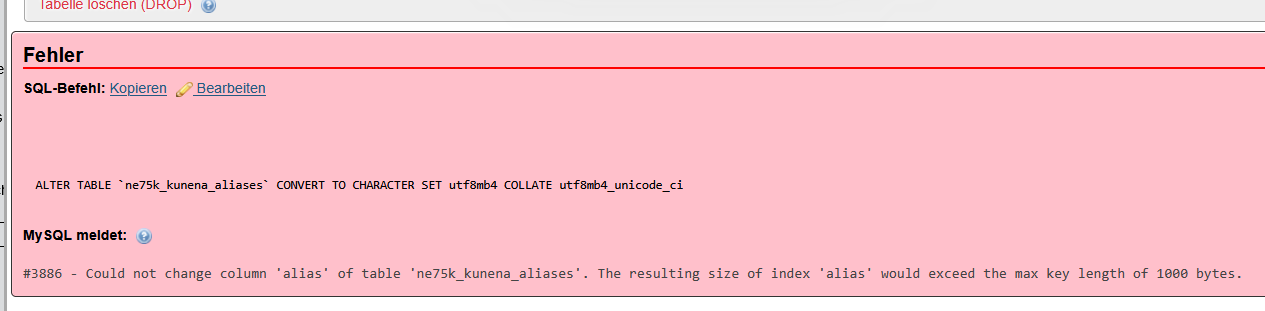
Unfortunately, a problem arises with the `kunena_aliases` table as soon as I attempt to change the collation.
Where can I find guidance on how to proceed?
What I tried:
Code:
ALTER TABLE `ne75k_kunena_aliases` CONVERT TO CHARACTER SET utf8mb4 COLLATE utf8mb4_unicode_ci
Code:
#3886 - Could not change column 'alias' of table 'ne75k_kunena_aliases'. The resulting size of index 'alias' would exceed the max key length of 1000 bytes.
Please Log in or Create an account to join the conversation.
Time to create page: 0.214 seconds