


- Posts: 3
- Thank you received: 0
Kunena 7.0.11 & Kunena 6.4.16 – Security Updates Released and K7.1 in RC1 2
The Kunena team has announce the arrival of three simultaneous security release : K6.4.16, K7.0.11 and K7.1 RC2. Just a reminder K6.4.16 receives only securities fixes untill end of 2026, so it's advised for users to upgrade to K7.0.11. K7.0.11 is the last release of the K7.0 because it's replaced by K7.1 branch with the stable release in the corner. The translations for K7.1 on crowdin.com/project/kunena-forum-7-1 needs to be checked or improved becasue it has been generated by TM (Translation Machine).
Topics that are moved into this category are generally considered to be closed. Users may want to add additional information but these topics should not be resurrected in order to discuss new problems or unrelated matters.
Question Remove some bbcodes from editor
14 years 1 month ago #133299
by DDN
Remove some bbcodes from editor was created by DDN
I searched around internet but found only solution for older version. So ... which file i should parse for remove this bbcodes in 2.0.2 version of Kunena:
image missing http://img13.imageshost.ru/img/2012/09/17/image_50563ccf26c69.png
image missing http://img13.imageshost.ru/img/2012/09/17/image_50563ccf26c69.png
Please Log in or Create an account to join the conversation.

14 years 1 month ago - 14 years 1 month ago #133348
by TKtemp
Replied by TKtemp on topic Remove some bbcodes from editor
How about to add this css rules to your JOOMLA default template css file:
Code:
#Kunena ul#kbbcode-toolbar li a#kbbcode-help-button,
#Kunena ul#kbbcode-toolbar li a#kbbcode-map-button,
#Kunena ul#kbbcode-toolbar li a#kbbcode-list-button,
#Kunena ul#kbbcode-toolbar li a#kbbcode-olist-button,
#Kunena ul#kbbcode-toolbar li a#kbbcode-ulist-button,
#Kunena ul#kbbcode-toolbar li a#kbbcode-sup-button,
#Kunena ul#kbbcode-toolbar li a#kbbcode-sub-button,
#Kunena ul#kbbcode-toolbar li a#kbbcode-strike-button {
display: none;
}
Last edit: 14 years 1 month ago by TKtemp.
Please Log in or Create an account to join the conversation.
14 years 1 month ago #133364
by DDN
Replied by DDN on topic Remove some bbcodes from editor
Eh, elegant solution. Put this code in Kunena default css template, it's work. But why don't work this method for removal separators?
Code:
#Kunena ul#kbbcode-toolbar li a#kbbcode-separator1,
#Kunena ul#kbbcode-toolbar li a#kbbcode-separator2,
#Kunena ul#kbbcode-toolbar li a#kbbcode-separator3 {
display: none;
}
Please Log in or Create an account to join the conversation.
14 years 1 month ago - 14 years 1 month ago #133385
by TKtemp
Replied by TKtemp on topic Remove some bbcodes from editor
Well, looks like that numbering of separators is removed and have not id, so you can show all or hide all
P.S. It is better to insert this code in JOOMLA template css file, you'll not lose your changes when upgrade kunena.
Code:
#Kunena ul#kbbcode-toolbar li a.kbbcode-separator {
display: none;
}
P.S. It is better to insert this code in JOOMLA template css file, you'll not lose your changes when upgrade kunena.
Last edit: 14 years 1 month ago by TKtemp.
Please Log in or Create an account to join the conversation.
14 years 1 month ago #133422
by DDN
Replied by DDN on topic Remove some bbcodes from editor
Nope, separators are not removed. Anyway thanks, main is bbcodes.
Please Log in or Create an account to join the conversation.

14 years 3 weeks ago #134182
by san65
Replied by san65 on topic Remove some bbcodes from editor
Hi,
Following the advice given in this thread, I made the following addition to the css/personal.css file in the beez20 template:
/* code to suppress kunena bb codes ... */
#Kunena ul#kbbcode-toolbar li a#kbbcode-help-button,
#Kunena ul#kbbcode-toolbar li a#kbbcode-map-button,
#Kunena ul#kbbcode-toolbar li a#kbbcode-list-button,
#Kunena ul#kbbcode-toolbar li a#kbbcode-olist-button,
#Kunena ul#kbbcode-toolbar li a#kbbcode-ulist-button,
#Kunena ul#kbbcode-toolbar li a#kbbcode-sup-button,
#Kunena ul#kbbcode-toolbar li a#kbbcode-sub-button,
#Kunena ul#kbbcode-toolbar li a#kbbcode-strike-button
#Kunena ul#kbbcode-toolbar li a#kbbcode-image-button,
#Kunena ul#kbbcode-toolbar li a#kbbcode-link-button {
display: none;
}
The outcome of the addition is visible in the attached image.
I would like to suppress the BB code and image corresponding to "image links". Request Kunena experts for guidance on this.
TIA.
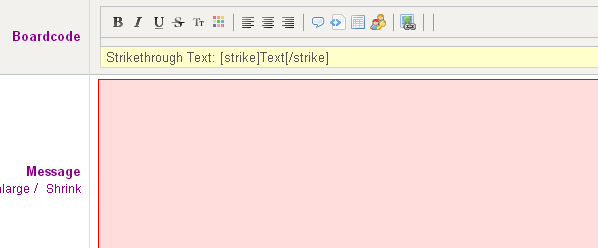
Some BB code image icons continue to be visible. More important for me, the image link needs
Following the advice given in this thread, I made the following addition to the css/personal.css file in the beez20 template:
/* code to suppress kunena bb codes ... */
#Kunena ul#kbbcode-toolbar li a#kbbcode-help-button,
#Kunena ul#kbbcode-toolbar li a#kbbcode-map-button,
#Kunena ul#kbbcode-toolbar li a#kbbcode-list-button,
#Kunena ul#kbbcode-toolbar li a#kbbcode-olist-button,
#Kunena ul#kbbcode-toolbar li a#kbbcode-ulist-button,
#Kunena ul#kbbcode-toolbar li a#kbbcode-sup-button,
#Kunena ul#kbbcode-toolbar li a#kbbcode-sub-button,
#Kunena ul#kbbcode-toolbar li a#kbbcode-strike-button
#Kunena ul#kbbcode-toolbar li a#kbbcode-image-button,
#Kunena ul#kbbcode-toolbar li a#kbbcode-link-button {
display: none;
}
The outcome of the addition is visible in the attached image.
I would like to suppress the BB code and image corresponding to "image links". Request Kunena experts for guidance on this.
TIA.
Some BB code image icons continue to be visible. More important for me, the image link needs
Please Log in or Create an account to join the conversation.
Time to create page: 0.196 seconds