

- Posts: 75
- Thank you received: 1
Kunena 6.3.0 released
The Kunena team has announce the arrival of Kunena 6.3.0 [K 6.3.0] in stable which is now available for download as a native Joomla extension for J! 4.4.x/5.0.x/5.1.x. This version addresses most of the issues that were discovered in K 6.2 and issues discovered during the last development stages of K 6.3
Topics that are moved into this category are generally considered to be closed. Users may want to add additional information but these topics should not be resurrected in order to discuss new problems or unrelated matters.
Question KD 2.0.3 plugin does not work
11 years 5 months ago #1
by jpc0480
Kunena 3.0.4
CB 1.9.1
Joomla 2.5.18
KD 2.0.3 plugin does not work was created by jpc0480
I have just upgraded to Kunena 2.0.3 and just tried to integrate the discuss plugin. The plugin does not show a discuss area in the article. Instead when you click the article link you are directly taken to the forum where the new topic has been created. It completely bypasses the article entirely.
I have set the "Default Forum Category" to the corresponding Kunena category ID and I set the "Allowed Content Categories" to the corresponding Joomla Content Category. See screenshot.
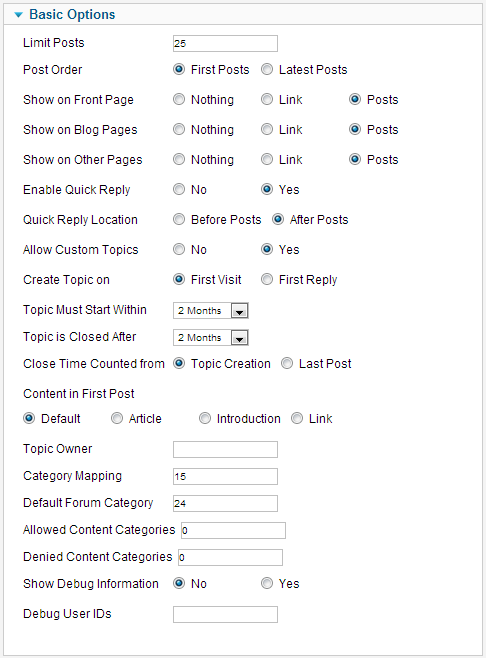
I can't figure out how to show the article with the discussion following, with a link to the actual forum post.
I have set the "Default Forum Category" to the corresponding Kunena category ID and I set the "Allowed Content Categories" to the corresponding Joomla Content Category. See screenshot.
I can't figure out how to show the article with the discussion following, with a link to the actual forum post.
Kunena 3.0.4
CB 1.9.1
Joomla 2.5.18
Please Log in or Create an account to join the conversation.

11 years 5 months ago #2
by 810
Replied by 810 on topic KD 2.0.3 plugin does not work
try the follow settings:
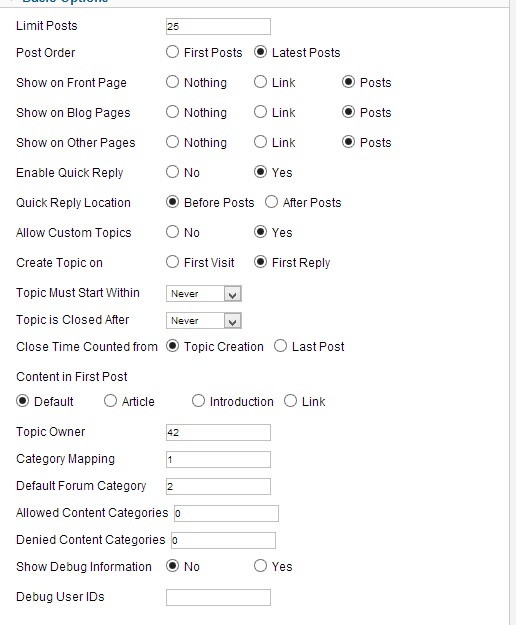
The following user(s) said Thank You: Shynx
Please Log in or Create an account to join the conversation.
11 years 5 months ago - 11 years 5 months ago #3
by jpc0480
Kunena 3.0.4
CB 1.9.1
Joomla 2.5.18
Replied by jpc0480 on topic KD 2.0.3 plugin does not work
I still couldn't get this to work?
I have set the ID for "Category Mapping" to the Joomla category ID and "Default Forum Category" to the Kunena forum category ID. I am smh here trying to figure this out...? I received the following when I activated debugging:
[KunenaDiscuss debug: Constructor called in com_content ]
[KunenaDiscuss debug: onPrepareContent.Deny: Category 15 was disabled in the category map. ]
[KunenaDiscuss debug: onPrepareContent: we are in article/ page. ]
[KunenaDiscuss debug: onPrepareContent: Article 19 ]
[KunenaDiscuss debug: onPrepareContent: Searched for {kunena_discuss:#}: Custom Topic not found. ]
****EDIT****
I added the content ID to "Allowed" and everything works.
Thanks!
I have set the ID for "Category Mapping" to the Joomla category ID and "Default Forum Category" to the Kunena forum category ID. I am smh here trying to figure this out...? I received the following when I activated debugging:
[KunenaDiscuss debug: Constructor called in com_content ]
[KunenaDiscuss debug: onPrepareContent.Deny: Category 15 was disabled in the category map. ]
[KunenaDiscuss debug: onPrepareContent: we are in article/ page. ]
[KunenaDiscuss debug: onPrepareContent: Article 19 ]
[KunenaDiscuss debug: onPrepareContent: Searched for {kunena_discuss:#}: Custom Topic not found. ]
****EDIT****
I added the content ID to "Allowed" and everything works.
Thanks!
Kunena 3.0.4
CB 1.9.1
Joomla 2.5.18
Last edit: 11 years 5 months ago by jpc0480.
Please Log in or Create an account to join the conversation.

11 years 5 months ago - 11 years 5 months ago #4
by nemmar
Hi,
I installed the new K2.0.3 updates, including the new Discuss Plugin, and the Discuss plugin is still not working for me.
There is a long post of this issue in the forum but that thread was closed since it was reported that the K2.0.3 Discuss Plugin was fixed:
www.kunena.org/forum/K-2-0-Kunena-Discus...icle?start=10#135567
Can you tell me what you did for the workaround? I'm not clear on what you mean by setting the content ID to "Allowed" and everything then worked with the plugin.
Note to forum moderator: If I posted in the wrong section/thread then let me know and I will move my post to the section of the forum you recommend.
Thanks for any advice!
Replied by nemmar on topic KD 2.0.3 plugin does not work
jpc0480 wrote: I still couldn't get this to work?
****EDIT****
I added the content ID to "Allowed" and everything works.Thanks!
Hi,
I installed the new K2.0.3 updates, including the new Discuss Plugin, and the Discuss plugin is still not working for me.
There is a long post of this issue in the forum but that thread was closed since it was reported that the K2.0.3 Discuss Plugin was fixed:
www.kunena.org/forum/K-2-0-Kunena-Discus...icle?start=10#135567
Can you tell me what you did for the workaround? I'm not clear on what you mean by setting the content ID to "Allowed" and everything then worked with the plugin.
Note to forum moderator: If I posted in the wrong section/thread then let me know and I will move my post to the section of the forum you recommend.
Thanks for any advice!
Last edit: 11 years 5 months ago by nemmar.
Please Log in or Create an account to join the conversation.
11 years 5 months ago #5
by 810
Replied by 810 on topic KD 2.0.3 plugin does not work
hi, you must enter a number on "Allowed content id" 0 = every content
Please Log in or Create an account to join the conversation.
11 years 5 months ago #6
by nemmar
Hi 810,
I checked my K Discuss plugin settings and I do have the Allowed Content ID at 0.
So should I post the bug/problem with K Discuss 2.0.3 not being fixed yet? The other forum thread was closed since the forum mod wrote the bug was fixed for 2.0.3 before the release of the update.
www.kunena.org/forum/K-2-0-Kunena-Discus...icle?start=10#135567
I'm not sure where to post so the Discuss plugin devs are aware of the issue.
Replied by nemmar on topic KD 2.0.3 plugin does not work
810 wrote: hi, you must enter a number on "Allowed content id" 0 = every content
Hi 810,
I checked my K Discuss plugin settings and I do have the Allowed Content ID at 0.
So should I post the bug/problem with K Discuss 2.0.3 not being fixed yet? The other forum thread was closed since the forum mod wrote the bug was fixed for 2.0.3 before the release of the update.
www.kunena.org/forum/K-2-0-Kunena-Discus...icle?start=10#135567
I'm not sure where to post so the Discuss plugin devs are aware of the issue.
Please Log in or Create an account to join the conversation.

11 years 5 months ago #7
by sozzled
Blue Eagle vs. Crypsis reference guide
Read my blog and

Replied by sozzled on topic KD 2.0.3 plugin does not work
I have moved this topic to the
K 2.0 + Kunena Discuss (P)
category. I hope that answers your question about where we should discuss issues relating to why Kunena Discuss 2.0.3 may not be working on your site. As far as I can tell, we do not have a problem with the settings used (see the sticky topic in this category) at K.org.
I hope this helps.
I hope this helps.
Blue Eagle vs. Crypsis reference guide
Read my blog and
Please Log in or Create an account to join the conversation.
11 years 5 months ago #8
by 810
Please make a screenshot from your settings and post it here.
Replied by 810 on topic KD 2.0.3 plugin does not work
nemmar wrote:
810 wrote: hi, you must enter a number on "Allowed content id" 0 = every content
Hi 810,
I checked my K Discuss plugin settings and I do have the Allowed Content ID at 0.
So should I post the bug/problem with K Discuss 2.0.3 not being fixed yet? The other forum thread was closed since the forum mod wrote the bug was fixed for 2.0.3 before the release of the update.
www.kunena.org/forum/K-2-0-Kunena-Discus...icle?start=10#135567
I'm not sure where to post so the Discuss plugin devs are aware of the issue.
Please make a screenshot from your settings and post it here.
Please Log in or Create an account to join the conversation.
11 years 5 months ago - 11 years 5 months ago #9
by jpc0480
Kunena 3.0.4
CB 1.9.1
Joomla 2.5.18
Replied by jpc0480 on topic KD 2.0.3 plugin does not work
Here is my screenshot. The changes I made were:
I added the values to Category Mapping. The 15 is my Joomla Category ID and the 24 is my Kunena Forum Category. I then added the Kunena values to the Default Forum Category and the my Joomla values for the Allowed Content Categories.
Hope this helps.
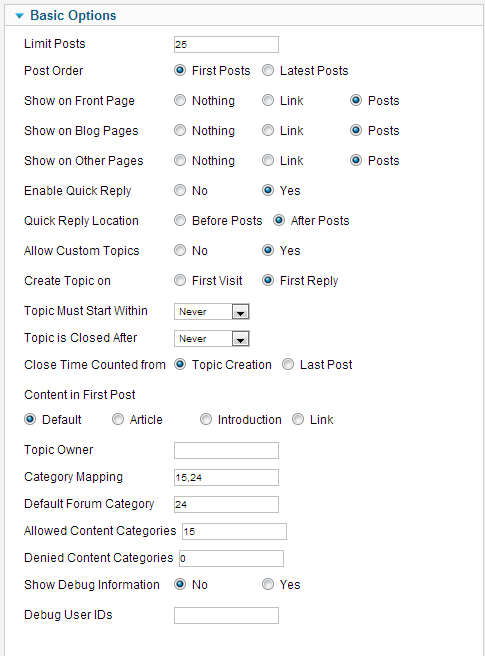
I added the values to Category Mapping. The 15 is my Joomla Category ID and the 24 is my Kunena Forum Category. I then added the Kunena values to the Default Forum Category and the my Joomla values for the Allowed Content Categories.
Hope this helps.
Kunena 3.0.4
CB 1.9.1
Joomla 2.5.18
Last edit: 11 years 5 months ago by jpc0480.
Please Log in or Create an account to join the conversation.
11 years 5 months ago #10
by sozzled
Blue Eagle vs. Crypsis reference guide
Read my blog and
Replied by sozzled on topic KD 2.0.3 plugin does not work
Here is an example of settings that work - this example is taken from this website.
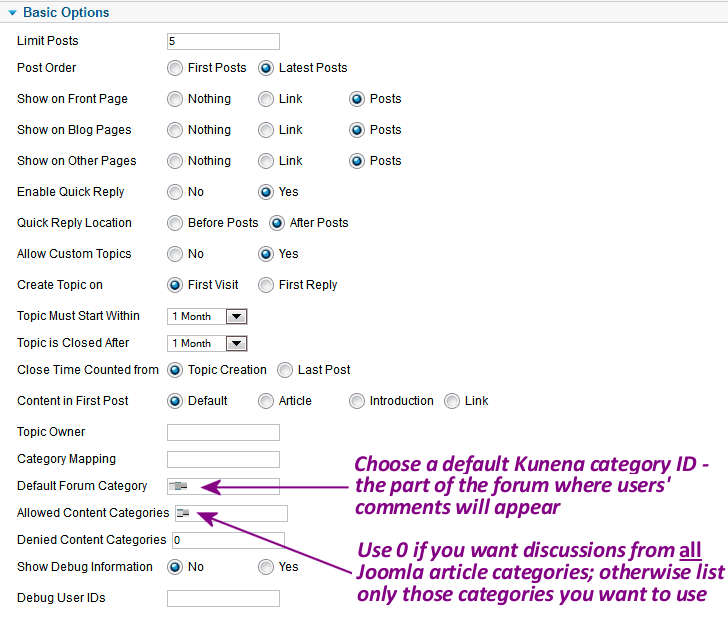
If your settings are not working, set Show Debug Information = Yes and let us know what messages appear on your article(s).
See Kunena Discuss "quick and dirty" instructions for use for more information.
If your settings are not working, set Show Debug Information = Yes and let us know what messages appear on your article(s).
See Kunena Discuss "quick and dirty" instructions for use for more information.
Blue Eagle vs. Crypsis reference guide
Read my blog and
The following user(s) said Thank You: Katannah
Please Log in or Create an account to join the conversation.
Time to create page: 2.807 seconds