


- Posts: 12
- Thank you received: 0
Kunena 7.0.9 & Kunena 6.4.14 – Security Updates Released
The Kunena team has announce the arrival of Kunena 7.0.9 [K 7.0.9] in stable which is now available for download as a native Joomla extension for J! 5.4.x/6.0.x./6.1.x. This version addresses most of the issues that were discovered in K 6.2 / K 6.3 / K 6.4 and issues discovered during the last development stages of K 7.0
Topics that are moved into this category are generally considered to be closed. Users may want to add additional information but these topics should not be resurrected in order to discuss new problems or unrelated matters.
Solved {mos_fb_discuss:15} is quoted, no link shown
14 years 3 months ago #127733
by plunk
Replied by plunk on topic {mos_fb_discuss:15} is quoted, no link shown
Same discusiion is going on here:
www.kunena.org/forum/178-Kunena-Discuss-...-article-and-Discuss
Struggling myself I found out:
When i go frontend to the forum, to the specific topic, the url looks like this:
/index.php?option=com_kunena&view=topic&catid=15&id=155&Itemid=25
id=155
{kunena_discuss:155} is the right syntax
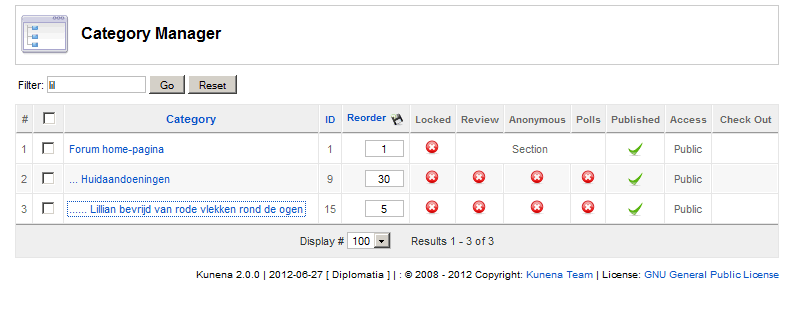
My surprise was: 155, from Kunena category manager I would have expected 15 (see attachment 1).
I still don't understand! Why 155, where can I find that ID backend???
Struggling myself I found out:
When i go frontend to the forum, to the specific topic, the url looks like this:
/index.php?option=com_kunena&view=topic&catid=15&id=155&Itemid=25
id=155
{kunena_discuss:155} is the right syntax
My surprise was: 155, from Kunena category manager I would have expected 15 (see attachment 1).
I still don't understand! Why 155, where can I find that ID backend???
Please Log in or Create an account to join the conversation.


14 years 3 months ago #127736
by sozzled
Blue Eagle vs. Crypsis reference guide
Read my blog and

Replied by sozzled on topic {mos_fb_discuss:15} is quoted, no link shown
I do not intend to reply to both this topic and in another topic where you have asked the same question. I will leave it to you to decide what you want to do about the other topic.
To find the topic id is simple: look at the URL of the page where it is displayed on on your site's frontend; the topic id is in the URL. In your case the topic-id is 155 (the category-id is 15 but this is irrelevant). There is no way to look in the backend at the [possibly many thousands] of topics that have been created on your forum. The image you show in your last message is from the category manager. The category manager does not come into play in the discussion we are now having.
As Matias wrote, the syntax of the Kunena tag is this:
{kunena_discuss:<topic-id>}
There is also a special case, if <topic-id> is "0" then the article will not feed into any topic on your site. In other words, to prevent articles generating discussions on your forum, you would use
{kunena_discuss:0}
This matter is resolved.
To find the topic id is simple: look at the URL of the page where it is displayed on on your site's frontend; the topic id is in the URL. In your case the topic-id is 155 (the category-id is 15 but this is irrelevant). There is no way to look in the backend at the [possibly many thousands] of topics that have been created on your forum. The image you show in your last message is from the category manager. The category manager does not come into play in the discussion we are now having.
As Matias wrote, the syntax of the Kunena tag is this:
{kunena_discuss:<topic-id>}
There is also a special case, if <topic-id> is "0" then the article will not feed into any topic on your site. In other words, to prevent articles generating discussions on your forum, you would use
{kunena_discuss:0}
This matter is resolved.
Blue Eagle vs. Crypsis reference guide
Read my blog and
Please Log in or Create an account to join the conversation.
14 years 3 months ago #127748
by plunk
Replied by plunk on topic {mos_fb_discuss:15} is quoted, no link shown
Thanks Sozzled for replying . For me this matter is also solved. But i would like fture visitors to read this outcome too:
In fact, (in my opinion) topic-id's do not exist. Or maybe the word topic is explained different by me and Sozzled (Kunena). Every single message has an ID. And the message-ID of the first message of a thread (or should I say category???), is what Kunena regards as topic-id.
Read here:
www.kunena.org/forum/178-Kunena-Discuss-...e-and-Discuss#127746
In fact, (in my opinion) topic-id's do not exist. Or maybe the word topic is explained different by me and Sozzled (Kunena). Every single message has an ID. And the message-ID of the first message of a thread (or should I say category???), is what Kunena regards as topic-id.
Read here:
www.kunena.org/forum/178-Kunena-Discuss-...e-and-Discuss#127746
Please Log in or Create an account to join the conversation.
14 years 3 months ago #127750
by sozzled
Blue Eagle vs. Crypsis reference guide
Read my blog and
Replied by sozzled on topic {mos_fb_discuss:15} is quoted, no link shown
The first message of a message "thread" (which is a very confusing and old-fashioned word) defines the topic id, yes. Categories are different. Please read Standard (consistent) Terminology?!plunk wrote: And the message-ID of the first message of a thread (or should I say category???), is what Kunena regards as topic-id.
Blue Eagle vs. Crypsis reference guide
Read my blog and
Please Log in or Create an account to join the conversation.


14 years 3 months ago #127774
by Matias
Replied by Matias on topic {mos_fb_discuss:15} is quoted, no link shown
In Kunena 1.7 topic id = first message id, but that's not true in Kunena 2.0 anymore.
But it doesn't matter, in both versions you find topic id from the URL just before topic title.
But it doesn't matter, in both versions you find topic id from the URL just before topic title.
Please Log in or Create an account to join the conversation.
14 years 2 months ago - 14 years 2 months ago #128001
by plunk
Replied by plunk on topic {mos_fb_discuss:15} is quoted, no link shown: my salvation
Okay, problem clear, but how can you solve it?
I did not find an easy way. If your forum is big, this will provide you a lot of work.
This is what I did:
Good luck!
I did not find an easy way. If your forum is big, this will provide you a lot of work.
This is what I did:
- I opened my database
- search: {mos_fb
- you get a list of all articles containing {mos_fb
- sort by Id (makes work easier)
- Open another window
- Open article manager
- sort by ID
- open each article that contains {mos_fb on by one
- alter {mos_fb_ into {kunena_
- don't close this article yet! The right number xx has yet to be found and inserted {kunena_discuss:xx}
- Open another window
- Open kunena on your website
- search for the right topic and open it
- get the right id from your url: index.php?option=com_kunena&view=topic&catid=40&id=212&Itemid=247
- insert this id in your article: {kunena_discuss:xx}
- hit save or apply
- you are ready, but I would recommend you to check your article by clicking preview (not joomla core preview but by " better preview ")
Good luck!
Last edit: 14 years 2 months ago by plunk.
Please Log in or Create an account to join the conversation.
Time to create page: 0.248 seconds