


- Posts: 16
- Thank you received: 1
Kunena 7.0.9 & Kunena 6.4.14 – Security Updates Released
The Kunena team has announce the arrival of Kunena 7.0.9 [K 7.0.9] in stable which is now available for download as a native Joomla extension for J! 5.4.x/6.0.x./6.1.x. This version addresses most of the issues that were discovered in K 6.2 / K 6.3 / K 6.4 and issues discovered during the last development stages of K 7.0
If you are having problems then, for your own benefit, it would save us all a lot of time if you would kindly post your
configuration report
when you ask for help from this forum. If you do not post your configuration report we will not ask you for it but you will probably not get your problem solved, either.
K 2.0 support will cease on 31 August 2013 and this section of the forum will be closed and archived after that time and no further questions will be answered about this version.
K 2.0 support will cease on 31 August 2013 and this section of the forum will be closed and archived after that time and no further questions will be answered about this version.
Question How to stop shortening of attachment-filenames
13 years 4 months ago - 13 years 4 months ago #143789
by kallle
??? Isn't it possible to upload attachments here? I tried it with a txt- and with a pdf-file. In preview the name attached file is to see. But in the posting I miss it... ??? So I can't show an example :S
How to stop shortening of attachment-filenames was created by kallle
- I'd like to see the whole filename of attachments - instead of the shortened.
Where to set this? - And where can I set the width of the "kfile-input-textbox"
??? Isn't it possible to upload attachments here? I tried it with a txt- and with a pdf-file. In preview the name attached file is to see. But in the posting I miss it... ??? So I can't show an example :S
Last edit: 13 years 4 months ago by kallle.
Please Log in or Create an account to join the conversation.


13 years 4 months ago #143944
by Matias
Replied by Matias on topic How to stop shortening of attachment-filenames
There is a configuration option for shortening urls. I think that attachments use the same option.
We accept some types, but not all. Jpegs and png files are supported and zip & tar.gz.
We accept some types, but not all. Jpegs and png files are supported and zip & tar.gz.
Please Log in or Create an account to join the conversation.
13 years 4 months ago #143962
by kallle
Replied by kallle on topic How to stop shortening of attachment-filenames
Thank you, Matias!
Yes in the "BBCode-tab" of configuration there is this option. But I'm not sure, if it has influence, because there is another strange effect:
If I load up an attachment, the result is not the same than by uploading from another Admin. (Please see the png-attachment: The other Admin gets two (!) symbols in front of his shortened URL, while I get no symbol and unshortened URL.)
The configuration in BBCode is: 100 signs in front part and 50 signs in back part of the URL.
I'm wondering why...
Regards kallle
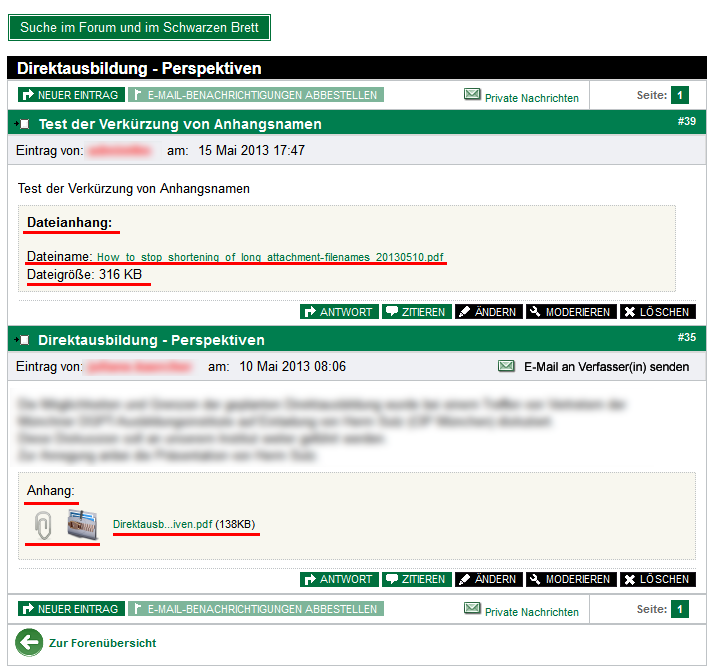
Yes in the "BBCode-tab" of configuration there is this option. But I'm not sure, if it has influence, because there is another strange effect:
If I load up an attachment, the result is not the same than by uploading from another Admin. (Please see the png-attachment: The other Admin gets two (!) symbols in front of his shortened URL, while I get no symbol and unshortened URL.)
The configuration in BBCode is: 100 signs in front part and 50 signs in back part of the URL.
I'm wondering why...
Regards kallle
Please Log in or Create an account to join the conversation.
13 years 4 months ago #143964
by Matias
Replied by Matias on topic How to stop shortening of attachment-filenames
Not sure. I see that you're using custom template. Maybe the issue is in there?
Can you test if the issue exists with our default one (Blue Eagle)?
Can you test if the issue exists with our default one (Blue Eagle)?
Please Log in or Create an account to join the conversation.
13 years 4 months ago - 13 years 4 months ago #143978
by kallle
Replied by kallle on topic How to stop shortening of attachment-filenames
No, it IS Blue Eagle! But with a lot of changes in php- and css-files to make the layout identical with all other sites.
All changes are made very carefully: The/a code for URL-shortening I had not touched.
Regards, kallle
All changes are made very carefully: The/a code for URL-shortening I had not touched.
Regards, kallle
Last edit: 13 years 4 months ago by kallle.
Please Log in or Create an account to join the conversation.
13 years 4 months ago #143994
by Matias
Replied by Matias on topic How to stop shortening of attachment-filenames
BTW, if you change the files, I advice you to create a new template with only changed files in it (+ template.php and xml file in it). In that way your changes won't get overridden on upgrade and it will be easier to keep your template up to date (or just ignore all upstream fixes).
Please Log in or Create an account to join the conversation.
Time to create page: 0.240 seconds