


- Posts: 15
- Thank you received: 0
Kunena 7.0.8 Released
The Kunena team has announce the arrival of Kunena 7.0.8 [K 7.0.8] in stable which is now available for download as a native Joomla extension for J! 5.4.x/6.0.x./6.1.x. This version addresses most of the issues that were discovered in K 6.2 / K 6.3 / K 6.4 and issues discovered during the last development stages of K 7.0
Solved Template Darstellung anpassen
9 years 8 months ago #182309
by tobasium
Template Darstellung anpassen was created by tobasium
Hallo zusammen,
Ich verzweifel aktuell ein wenig am crypsis Template.
Das Forum findet Ihr hier: lif-koenigsthal.de/index.php/forumindex
Würde gerne einige Farben anpassen: (Bootstrap laden ist aktiviert da sonst das Template komplett verschoben ist.)
Unter anderem soll das Menü nicht weiß sein.
Ebenso die Alert Meldung im Willkommens Thread würde ich gerne anpassen. Ohne mein joomla Template zu editieren.
Auch die class broadcumb hat 2 verschiedene Hintergründe die ein lesen nicht gerade einfach machen.
Evtl reicht mir schon ein Tip welche less und css ich anpassen muss. Mit custom css oder less bin ich aktuell ein bissle überfragt.
Vielen Dank vorab.
Gruß Tobi
Ich verzweifel aktuell ein wenig am crypsis Template.
Das Forum findet Ihr hier: lif-koenigsthal.de/index.php/forumindex
Würde gerne einige Farben anpassen: (Bootstrap laden ist aktiviert da sonst das Template komplett verschoben ist.)
Unter anderem soll das Menü nicht weiß sein.
Ebenso die Alert Meldung im Willkommens Thread würde ich gerne anpassen. Ohne mein joomla Template zu editieren.
Auch die class broadcumb hat 2 verschiedene Hintergründe die ein lesen nicht gerade einfach machen.
Evtl reicht mir schon ein Tip welche less und css ich anpassen muss. Mit custom css oder less bin ich aktuell ein bissle überfragt.
Vielen Dank vorab.
Gruß Tobi
Please Log in or Create an account to join the conversation.


Less
More
- Posts: 12288
- Thank you received: 2537
9 years 7 months ago #182315
by rich
Important! Always create a backup before you make any changes to your website!
Replied by rich on topic Template Darstellung anpassen
Normalerweise würde ich dir empfehlen, die Änderungen in die custom.less einzutragen (
wie du diese anlegst, kannst du hier sehen
) aber diese wird anscheinend nicht richtig geladen, so dass du für die meisten Codes ein !important benötigst. Du kannst es aber trotzdem damit probieren. Ansonsten verwende deine custom.css. Bei den Breadcrumbs ist es nicht der Hintergrund welcher stört, sondern die Textschatten.
Versuche es mal mit diesen Codes:
Versuche es mal mit diesen Codes:
Code:
.layout#kunena .navbar-inner {
border-color: #000;
background: #474747;
background: -moz-linear-gradient(top, #474747 0%, #000000 100%);
background: -webkit-linear-gradient(top, #474747 0%,#000000 100%);
background: linear-gradient(to bottom, #474747 0%,#000000 100%);
filter: progid:DXImageTransform.Microsoft.gradient( startColorstr='#474747', endColorstr='#000000',GradientType=0 );
}
span.login-text {
text-shadow: none;
}
#kunena .breadcrumb>li {
text-shadow: none;
}
#kunena .alert-info {
color: #fff;
text-shadow: none;
}
Important! Always create a backup before you make any changes to your website!
The following user(s) said Thank You: tobasium
Please Log in or Create an account to join the conversation.
9 years 7 months ago #182319
by tobasium
Replied by tobasium on topic Template Darstellung anpassen
Also ich hab das mal in die css reingenommen. Vielen Dank.
Super das sieht doch schon mal ganz gut aus. Das Dropdownmenü habe ich auch halbwegs hinbekommen.
Nur sind in der Menüleiste und im Dropdown die Schatten noch drin.
text-shadow: none; bringt mir hier auch keine Änderung.
Ebenfalls unter Profil Bearbeiten stört dieses weiß. Siehe Anhang. Wie kann ich diese bereiche anpassen.
hatte es mit .table-striped versucht aber das war wohl falsch.
Vielen Dank vorab.
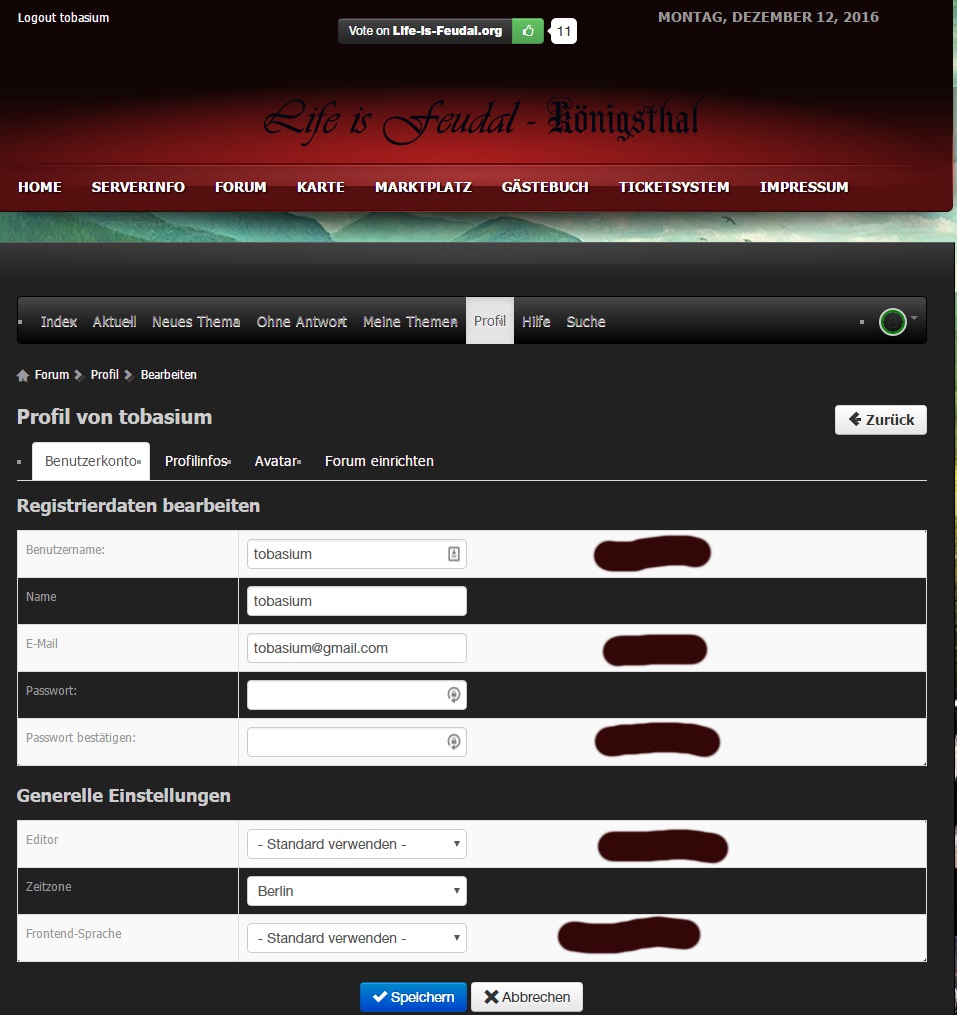
Super das sieht doch schon mal ganz gut aus. Das Dropdownmenü habe ich auch halbwegs hinbekommen.
Nur sind in der Menüleiste und im Dropdown die Schatten noch drin.
text-shadow: none; bringt mir hier auch keine Änderung.
Ebenfalls unter Profil Bearbeiten stört dieses weiß. Siehe Anhang. Wie kann ich diese bereiche anpassen.
hatte es mit .table-striped versucht aber das war wohl falsch.
Vielen Dank vorab.
Please Log in or Create an account to join the conversation.
Less
More
- Posts: 12288
- Thank you received: 2537
9 years 7 months ago #182320
by rich
Important! Always create a backup before you make any changes to your website!
Replied by rich on topic Template Darstellung anpassen
Jetzt wird es schon schwieriger für mich, da ich diese Optionen nicht sehen kann. Auch die Navigation scheint nur für registrierte Benutzer erlaubt.
>> und im Dropdown die Schatten noch drin. <<
Hier sehe ich ebenfalls nur die Optionen für die Anmeldung, aber da ist kein Textschatten. Nur das reine #fff ist etwas agressiv. Ich würde hier #ccc wählen.
Für die anderen Dinge versuche:
>> und im Dropdown die Schatten noch drin. <<
Hier sehe ich ebenfalls nur die Optionen für die Anmeldung, aber da ist kein Textschatten. Nur das reine #fff ist etwas agressiv. Ich würde hier #ccc wählen.
Code:
#kunena.layout .nav .dropdown-menu a {
color: #ccc;
}
Für die anderen Dinge versuche:
Code:
#kunena.layout .navbar .nav > li > a {
text-shadow: none;
}
.table-striped tbody > tr:nth-child(2n+1) > td, .table-striped tbody > tr:nth-child(2n+1) > th {
background-color: #555 !important;
}
Important! Always create a backup before you make any changes to your website!
The following user(s) said Thank You: tobasium
Please Log in or Create an account to join the conversation.
9 years 7 months ago #182346
by tobasium
Replied by tobasium on topic Template Darstellung anpassen
Danke das hat soweit Funktioniert. Gefühlt war das früher mal alles einfacher. Mal sehen ob ich den Rest hin bekomme.
Please Log in or Create an account to join the conversation.
9 years 7 months ago #182389
by tobasium
Replied by tobasium on topic Template Darstellung anpassen
Hi,
Ein kleines Problem ist mir noch aufgefallen. Die Schriftfarbe in den Untermenüs sollte weiß werden.
Folgendes Hatte ich probiert:
.layout#kunena .dropdown-menu>li>a {
color: #fff;
}
Leider zieht es immer die Farbe aus dem bootstrip:
lif-koenigsthal.de/media/jui/css/bootstrap.min.css
Wie binde ich dies den in die css richtig ein?
Danke schonmal.
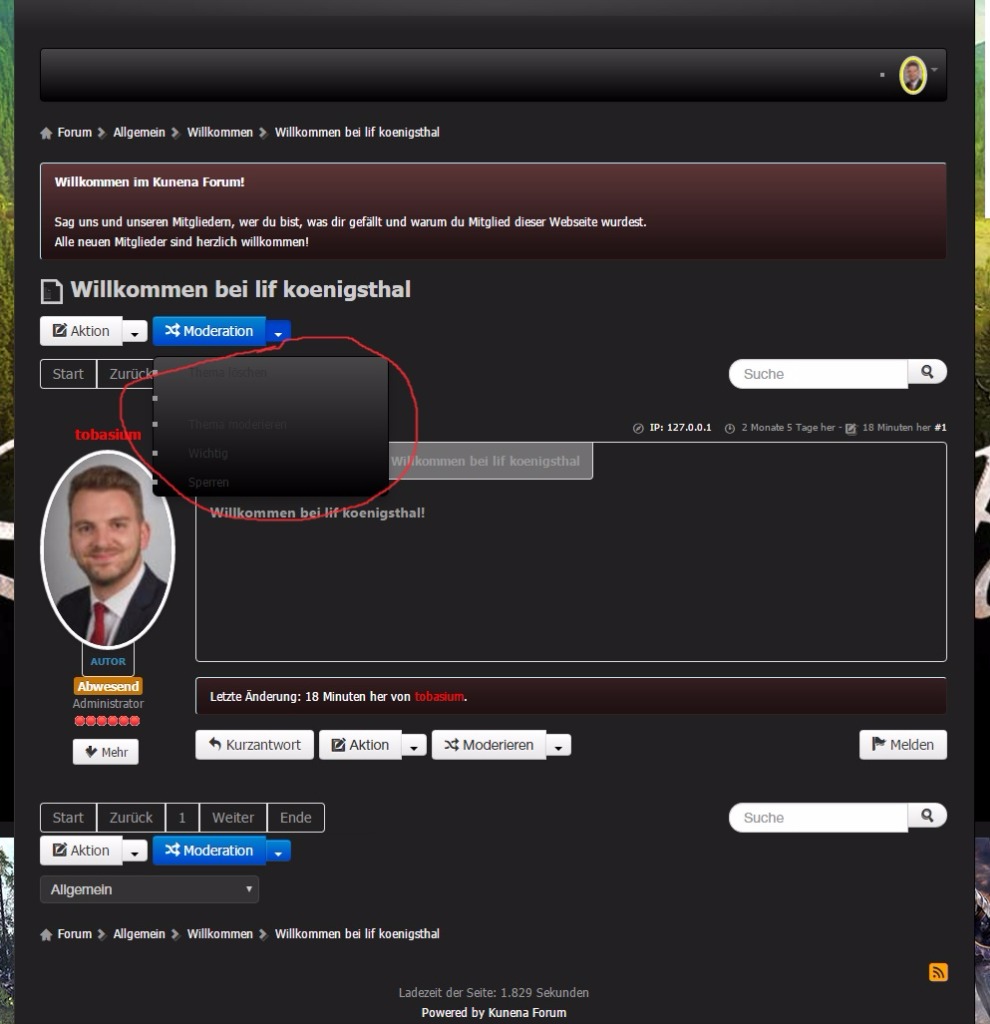
Ein kleines Problem ist mir noch aufgefallen. Die Schriftfarbe in den Untermenüs sollte weiß werden.
Folgendes Hatte ich probiert:
.layout#kunena .dropdown-menu>li>a {
color: #fff;
}
Leider zieht es immer die Farbe aus dem bootstrip:
lif-koenigsthal.de/media/jui/css/bootstrap.min.css
Wie binde ich dies den in die css richtig ein?
Danke schonmal.
Please Log in or Create an account to join the conversation.
Time to create page: 0.264 seconds