
- Posts: 16
- Thank you received: 1
Kunena 7.0.9 & Kunena 6.4.14 – Security Updates Released
The Kunena team has announce the arrival of Kunena 7.0.9 [K 7.0.9] in stable which is now available for download as a native Joomla extension for J! 5.4.x/6.0.x./6.1.x. This version addresses most of the issues that were discovered in K 6.2 / K 6.3 / K 6.4 and issues discovered during the last development stages of K 7.0
Topics that are moved into this category are generally considered to be closed. Users may want to add additional information but these topics should not be resurrected in order to discuss new problems or unrelated matters.
Question Read more on post translation
- Tanrısever
-
 Topic Author
- Offline
- Junior Member
-

Less
More
15 years 2 months ago #102580
by Tanrısever
Read more on post translation was created by Tanrısever
Hello,
I'm using J1.6 with Kunena 1.6 with a custom theme.
Kunena Discuss is not coming with my language, so i translated the English language file.
And the first weird thing is here,i put the language file in joomla/languages folder but didn't worked. So i tried uploading it to joomla/administrator/languages and language file worked. This is really interesting.
My discuss plugin is creating posts at forum when first viewed as default(intro text+read more link),which i prefer.
The problem is no matter what i tried i couldn't change the "Read more.." text displayed on link to the main article.
I wonder where this plugin calls it. In blog view my joomla shows the read more text as Turkish.
I checked the files that might be overriding it,like Yootheme Warp framework language files.
But i couldn't find a way to translate it.
I found the below code in joomla/plugins/content/kunenadiscuss/kunenadiscuss/view.php
<div class="kdiscuss-more"><?php echo CKunenaLink::GetThreadLink ( 'view', $this->catid, $this->thread, JText::_('COM_KUNENA_ANN_READMORE'), 'follow') ?></div>
is it calling the COM_KUNENA_ANN_READMORE from somewhere to show the text? I've added this to kunena discuss language file and defined the translation.Well not worked..
Language files are called by kunenadiscuss.php
$this->loadLanguage ( 'plg_content_kunenadiscuss', JPATH_ADMINISTRATOR );
so what i understand is even the translation is called from above path, readmore translation is called from component path.
This is not about the kunena theme,i've tried with other themes.Problem persists..
So i just want to translate that simple text but already overwhelmed about finding the correct file to modify
Any help is appreciated..
I'm using J1.6 with Kunena 1.6 with a custom theme.
Kunena Discuss is not coming with my language, so i translated the English language file.
And the first weird thing is here,i put the language file in joomla/languages folder but didn't worked. So i tried uploading it to joomla/administrator/languages and language file worked. This is really interesting.
My discuss plugin is creating posts at forum when first viewed as default(intro text+read more link),which i prefer.
The problem is no matter what i tried i couldn't change the "Read more.." text displayed on link to the main article.
I wonder where this plugin calls it. In blog view my joomla shows the read more text as Turkish.
I checked the files that might be overriding it,like Yootheme Warp framework language files.
But i couldn't find a way to translate it.
I found the below code in joomla/plugins/content/kunenadiscuss/kunenadiscuss/view.php
<div class="kdiscuss-more"><?php echo CKunenaLink::GetThreadLink ( 'view', $this->catid, $this->thread, JText::_('COM_KUNENA_ANN_READMORE'), 'follow') ?></div>
is it calling the COM_KUNENA_ANN_READMORE from somewhere to show the text? I've added this to kunena discuss language file and defined the translation.Well not worked..
Language files are called by kunenadiscuss.php
$this->loadLanguage ( 'plg_content_kunenadiscuss', JPATH_ADMINISTRATOR );
so what i understand is even the translation is called from above path, readmore translation is called from component path.
This is not about the kunena theme,i've tried with other themes.Problem persists..
So i just want to translate that simple text
but already overwhelmed about finding the correct file to modify Any help is appreciated..
Please Log in or Create an account to join the conversation.


15 years 2 months ago #102590
by xillibit
I don't provide support by PM, because this can be useful for someone else.
Replied by xillibit on topic Re: Read more on post translation
Hello,
The string COM_KUNENA_ANN_READMORE is in the frontend kunena language file, or if it's not here just add it.
The string COM_KUNENA_ANN_READMORE is in the frontend kunena language file, or if it's not here just add it.
I don't provide support by PM, because this can be useful for someone else.
Please Log in or Create an account to join the conversation.


15 years 2 months ago #102611
by sozzled
Blue Eagle vs. Crypsis reference guide
Read my blog and

Replied by sozzled on topic Re: Read more on post translation
G'day, Tanrısever, and welcome to Kunena.
See Where is the language file?Tanrısever wrote: So i just want to translate that simple text but already overwhelmed about finding the correct file to modify
Blue Eagle vs. Crypsis reference guide
Read my blog and
Please Log in or Create an account to join the conversation.
- Tanrısever
-
Topic Author
- Offline
- Junior Member
-
Less
More
- Posts: 16
- Thank you received: 1
15 years 2 months ago - 15 years 2 months ago #102650
by Tanrısever
Replied by Tanrısever on topic Re: Read more on post translation
hello there again,
thanks for replies..
xillibit i've already checked the frontend language file and i have the entry for COM_KUNENA_ANN_READMORE and the translation for it.Even i tried changing the translation in English file to see if its called from that one. Well not working.
i already know the language file locations as i made some custom translations for both kunena and discuss plugin.
The problem is when the first post is created by kunena discuss it puts a read more link below article as default. And it is not called from the default language of kunena,kunena discuss or joomla installation.
Once again all readmore texts in my joomla installation is in my language,except the ones created by kunena discuss.
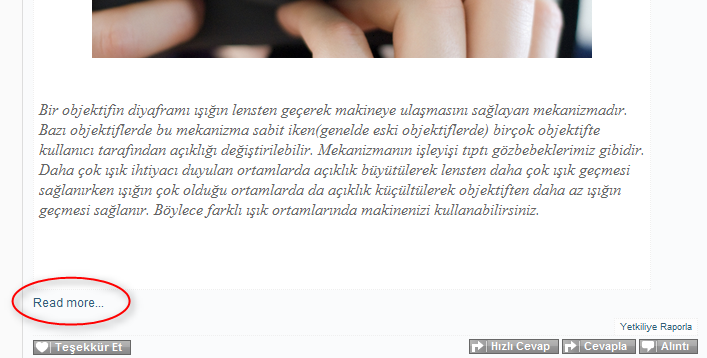
thanks for replies..
xillibit i've already checked the frontend language file and i have the entry for COM_KUNENA_ANN_READMORE and the translation for it.Even i tried changing the translation in English file to see if its called from that one. Well not working.
i already know the language file locations as i made some custom translations for both kunena and discuss plugin.
The problem is when the first post is created by kunena discuss it puts a read more link below article as default. And it is not called from the default language of kunena,kunena discuss or joomla installation.
Once again all readmore texts in my joomla installation is in my language,except the ones created by kunena discuss.
Last edit: 15 years 2 months ago by Tanrısever. Reason: screenshot added
Please Log in or Create an account to join the conversation.


15 years 2 months ago - 15 years 2 months ago #102810
by Mortti
Replied by Mortti on topic Re: Read more on post translation
In Kunena 1.6.5 is also added
string and that text come from it.
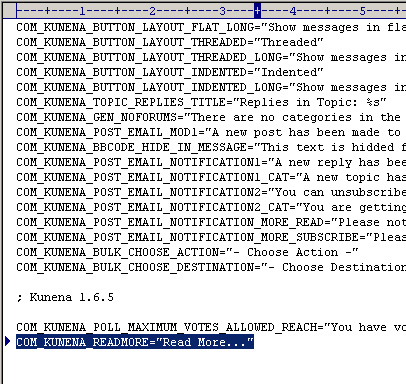
And if you check Turkish language file(site), that string is not translated --> www.transifex.net/projects/p/Kunena/reso...kunena/l/tr_TR/view/
Code:
COM_KUNENA_READMORE="Read More..."
And if you check Turkish language file(site), that string is not translated --> www.transifex.net/projects/p/Kunena/reso...kunena/l/tr_TR/view/
Last edit: 15 years 2 months ago by Mortti.
Please Log in or Create an account to join the conversation.
- Tanrısever
-
Topic Author
- Offline
- Junior Member
-
Less
More
- Posts: 16
- Thank you received: 1
15 years 2 months ago #102932
by Tanrısever
Replied by Tanrısever on topic Re: Read more on post translation
Thank you Mortti .. i have that string in my languaage file but the problem is something is overriding it and still shows English. I don't know but i cant understand why this is so complicated to change just a string.
Ok lets see as it is calling the string from COM_KUNENA_READMORE it is just related with Kunena language files. I mean there is no chance that any other language file can override it as that string is uniique for Kunena.
What i have done so far? I've checked and replaced every language file related with Kunena, including the main frontend,backend,template,plugin language files. Even i replaced the string value in English files with Turkish translation...
and it is still English....
This is not a cache issue as i keep cleaning my browser and joomla cache with every try..
So this is still not solved Dont know what i'm missing...
Ok lets see as it is calling the string from COM_KUNENA_READMORE it is just related with Kunena language files. I mean there is no chance that any other language file can override it as that string is uniique for Kunena.
What i have done so far? I've checked and replaced every language file related with Kunena, including the main frontend,backend,template,plugin language files. Even i replaced the string value in English files with Turkish translation...
and it is still English....
This is not a cache issue as i keep cleaning my browser and joomla cache with every try..
So this is still not solved
Dont know what i'm missing... Please Log in or Create an account to join the conversation.
Time to create page: 0.243 seconds