


- Posts: 6
- Thank you received: 0
Kunena 7.0.9 & Kunena 6.4.14 – Security Updates Released
The Kunena team has announce the arrival of Kunena 7.0.9 [K 7.0.9] in stable which is now available for download as a native Joomla extension for J! 5.4.x/6.0.x./6.1.x. This version addresses most of the issues that were discovered in K 6.2 / K 6.3 / K 6.4 and issues discovered during the last development stages of K 7.0
Topics that are moved into this category are generally considered to be closed. Users may want to add additional information but these topics should not be resurrected in order to discuss new problems or unrelated matters.
Question I can't work discuss
15 years 2 months ago - 15 years 2 months ago #102128
by vinicius
I can't work discuss was created by vinicius
I can not do work properly. Does not appear in my articles to link to the comment. I did the following:
Kunena installed. I installed the plugin discussion. I want to be commented joomla categories 17 and 18. The categories of Kunena are 4 and 5. In the plugin, marked as follows: 17.5, 18.4, (no spaces). It does not work.
When I put in an article that is in the category 17 joomla
{kunena_discuss: 17}
appears in the article on my site:
Discuss this article
You are not allowed to participate in this discussion
An invalid post id was requested
Follow the instructions and the support of all the articles I saw in this forum.
Also follow the instructions in this site: www.video-tutorial-joomla.com/plugins-jo...cuss-bot-plugin.html
He says that somewhere there is the following: Kunena -> Configuración -> Discussbot. I did not think this way
I love using Kunena, but I can not: (
I used Google translate to compose this text. sorry
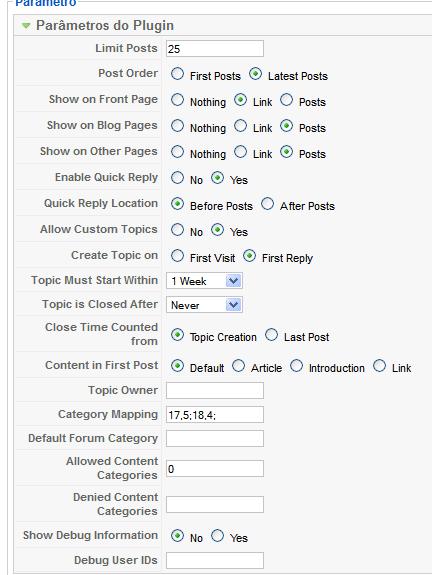
Kunena installed. I installed the plugin discussion. I want to be commented joomla categories 17 and 18. The categories of Kunena are 4 and 5. In the plugin, marked as follows: 17.5, 18.4, (no spaces). It does not work.
When I put in an article that is in the category 17 joomla
{kunena_discuss: 17}
appears in the article on my site:
Discuss this article
You are not allowed to participate in this discussion
An invalid post id was requested
Follow the instructions and the support of all the articles I saw in this forum.
Also follow the instructions in this site: www.video-tutorial-joomla.com/plugins-jo...cuss-bot-plugin.html
He says that somewhere there is the following: Kunena -> Configuración -> Discussbot. I did not think this way
I love using Kunena, but I can not: (
I used Google translate to compose this text. sorry
Last edit: 15 years 2 months ago by vinicius. Reason: Text Revision
Please Log in or Create an account to join the conversation.


15 years 2 months ago #102135
by xillibit
I don't provide support by PM, because this can be useful for someone else.
Replied by xillibit on topic Re: I can't work discuss
Hello,
Set debug mode to see what's happen, set too a default forum category. Maybe try others settings for "show on front page", "show on blog pages", "show on others pages"
Set debug mode to see what's happen, set too a default forum category. Maybe try others settings for "show on front page", "show on blog pages", "show on others pages"
I don't provide support by PM, because this can be useful for someone else.
Please Log in or Create an account to join the conversation.
15 years 2 months ago #102138
by vinicius
Replied by vinicius on topic Re: I can't work discuss
Thks for quickly answer.
Look
[KunenaDiscuss debug: Created #__kunenadiscuss cross reference table. ]
[KunenaDiscuss debug: Constructor called in com_content ]
[KunenaDiscuss debug: onPrepareContent.Allow: Category 17 is in the category map using Kunena category 5 ]
[KunenaDiscuss debug: onPrepareContent: Article 87 ]
[KunenaDiscuss debug: onPrepareContent: Searched for {kunena_discuss:#}: Custom Topic 5 found. ]
[KunenaDiscuss debug: showPlugin: First hit to Custom Topic, created cross reference to topic 5 ]
[KunenaDiscuss debug: showForm: Public posting is not permitted, show login instead ]
[KunenaDiscuss debug: showPlugin: Rendering discussion ]
[KunenaDiscuss debug: onAfterDisplayContent: Returning content for article 87 ]
What this means?
Look
[KunenaDiscuss debug: Created #__kunenadiscuss cross reference table. ]
[KunenaDiscuss debug: Constructor called in com_content ]
[KunenaDiscuss debug: onPrepareContent.Allow: Category 17 is in the category map using Kunena category 5 ]
[KunenaDiscuss debug: onPrepareContent: Article 87 ]
[KunenaDiscuss debug: onPrepareContent: Searched for {kunena_discuss:#}: Custom Topic 5 found. ]
[KunenaDiscuss debug: showPlugin: First hit to Custom Topic, created cross reference to topic 5 ]
[KunenaDiscuss debug: showForm: Public posting is not permitted, show login instead ]
[KunenaDiscuss debug: showPlugin: Rendering discussion ]
[KunenaDiscuss debug: onAfterDisplayContent: Returning content for article 87 ]
What this means?
Please Log in or Create an account to join the conversation.
15 years 2 months ago #102139
by xillibit
I don't provide support by PM, because this can be useful for someone else.
Replied by xillibit on topic Re: I can't work discuss
This means that the joomla category with id 17 is mapped with kunena category with id 5.
In your article you have setted {kunena_discuss: 5}
But try without using : {kunena_discuss: 5}
The instructions are here : www.kunena.org/forum/178-kunena-discuss-...cussbot-instructions
In your article you have setted {kunena_discuss: 5}
But try without using : {kunena_discuss: 5}
The instructions are here : www.kunena.org/forum/178-kunena-discuss-...cussbot-instructions
I don't provide support by PM, because this can be useful for someone else.
Please Log in or Create an account to join the conversation.
15 years 2 months ago #102155
by vinicius
Replied by vinicius on topic Re: I can't work discuss
Negative! thanks for the help. I had already tested the solution of the thread tells me. I give up. I do not have sufficient knowledge of PHP to search for the error, I have to find another solution. Sorry. 
Please Log in or Create an account to join the conversation.
15 years 2 months ago #102232
by vinicius
Replied by vinicius on topic Re: I can't work discuss
:laugh:
It worked! At least in part. I found that it only starts after Funcines new items. With those that existed prior to the installation of Kunene and what does not. Does anyone have an answer for this?
It worked! At least in part. I found that it only starts after Funcines new items. With those that existed prior to the installation of Kunene and what does not. Does anyone have an answer for this?
Please Log in or Create an account to join the conversation.
Time to create page: 0.296 seconds