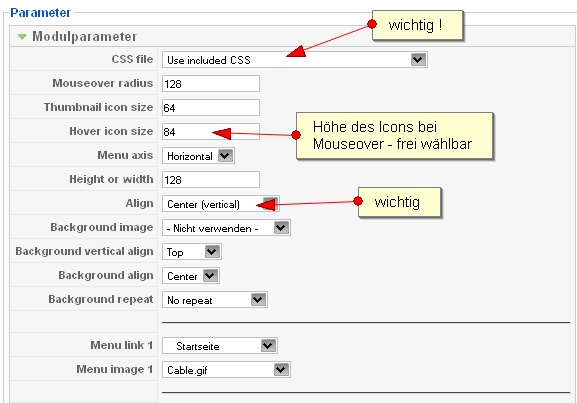
Ein anderes funktionierendes Fish-Eye-Menü ist das
aracnet_fisheye
. Du musst vor der Installation den Ordner aracnet_fisheye im images ordner erstellen und dorthin deine Grafiken, die du für das Menü verwenden willst, hinein packen. Wenn du die roten Kreuze (vom obigen Sreenshot) im Internet Explorer unterbinden willst, musst du transparente Gifs verwenden, IE hat immer noch ein png-Problem.
Im Ja-Purity müsstest du in der ja-sosdmenu.css (/templates/ja_purity/css) eine feste Höhe eintragen:
#ja-mainnavwrap {
background:#444444 none repeat scroll 0 0;
border-top:1px solid #666666;
height:70px;
}
und in der iFishEye.css (modules/mod_aracnet_fisheye/assets) dieselbe Höhe für table und div
#iFishEye > table {
margin: auto;
height: 70px;
}
#iFishEye > div {
margin: auto;
height: 70px;
}
Und die Farbe unterhalb der buttons (gifs) änderst du, in dem du noch eine color-definition einfügst:
.iFishEyeCaption {
font-variant:small-caps;
font-weight:bold;
color:#ffffff;
}
Die Höhe kannst du natürlich einstellen, wie du willst, wichtig ist, dieselbe Größe dreimal gleich zu vergeben.
Die Einstellungen für das Modul selbst, siehe Screenshot: