


- Posts: 5
- Thank you received: 0
Kunena 7.0.9 & Kunena 6.4.14 – Security Updates Released
The Kunena team has announce the arrival of Kunena 7.0.9 [K 7.0.9] in stable which is now available for download as a native Joomla extension for J! 5.4.x/6.0.x./6.1.x. This version addresses most of the issues that were discovered in K 6.2 / K 6.3 / K 6.4 and issues discovered during the last development stages of K 7.0
Topics that are moved into this category are generally considered to be closed. Users may want to add additional information but these topics should not be resurrected in order to discuss new problems or unrelated matters.
Question Unreadable text tabs (same color as background)
15 years 5 months ago - 15 years 5 months ago #92164
by dmccubbi
Unreadable text tabs (same color as background) was created by dmccubbi
Hi,
The text in the tabs is very hard to read. I was able to use Firebug to change the text color from #5388B4 to #FFFFFF. Please see attached for a screenshot of my site with Firebug turned on. Looks a little ugly, as I need now to change the font and/or font size, but it works in Firebug.
In the Kunena configuration panel, I set the debug mode to yes, so that Kunena uses the "clear" human readable file "kunena.default.css". I think I found the line of code that I edited in Firebug and made the change to #FFFFFF.
#Kunena a:link,
#Kunena a:visited,
#Kunena a:active {color: #FFFFFF;}
After uploading the file and refreshing, nothing happened. Did I make the wrong change? Or maybe the template I am using (Inspirion by JoomlaShack) is overriding this? I am guessing the latter. As I have seen discussed elsewhere in this forum , it may be a better idea to adjust the CSS file of the template.
I have tried looking around the template CSS files, but am not sure what to adjust. Is there a line of code that I could add to the template that would take care of this? Any suggestions would be much appreciated.
Best regards,
Don
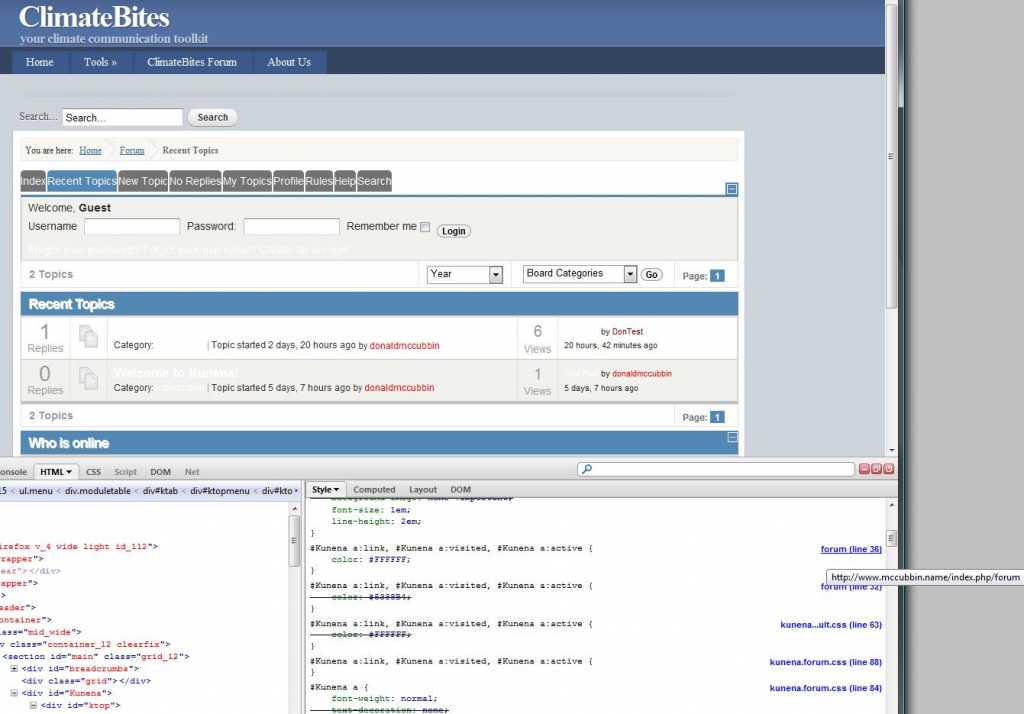
The text in the tabs is very hard to read. I was able to use Firebug to change the text color from #5388B4 to #FFFFFF. Please see attached for a screenshot of my site with Firebug turned on. Looks a little ugly, as I need now to change the font and/or font size, but it works in Firebug.
In the Kunena configuration panel, I set the debug mode to yes, so that Kunena uses the "clear" human readable file "kunena.default.css". I think I found the line of code that I edited in Firebug and made the change to #FFFFFF.
#Kunena a:link,
#Kunena a:visited,
#Kunena a:active {color: #FFFFFF;}
After uploading the file and refreshing, nothing happened. Did I make the wrong change? Or maybe the template I am using (Inspirion by JoomlaShack) is overriding this? I am guessing the latter. As I have seen discussed elsewhere in this forum , it may be a better idea to adjust the CSS file of the template.
I have tried looking around the template CSS files, but am not sure what to adjust. Is there a line of code that I could add to the template that would take care of this? Any suggestions would be much appreciated.
Best regards,
Don
Last edit: 15 years 5 months ago by dmccubbi.
Please Log in or Create an account to join the conversation.


15 years 5 months ago - 15 years 5 months ago #92210
by sozzled
Blue Eagle vs. Crypsis reference guide
Read my blog and

Replied by sozzled on topic Re: Unreadable text tabs (same color as background)
Part of the problem is J! 1.6 and the K 1.6.3 Blue Eagle template is not optimised for J! 1.6. So there are issues there to begin with (your Kunena menu is one, for example). The solution is to apply whatever CSS adjustments necessary to your J! 1.6 site template.
I looked at your site (took me a short while to discover its location - and you would have received a reply sooner if you had volunteered the information at the beginning) and it looks like you've fixed the problem yourself.
I looked at your site (took me a short while to discover its location - and you would have received a reply sooner if you had volunteered the information at the beginning) and it looks like you've fixed the problem yourself.
Blue Eagle vs. Crypsis reference guide
Read my blog and
Last edit: 15 years 5 months ago by sozzled.
Please Log in or Create an account to join the conversation.
15 years 5 months ago #92219
by dmccubbi
Replied by dmccubbi on topic Re: Unreadable text tabs (same color as background)
Hi Sozzled,
Thanks so much for replying!! I very much appreciate it. Sorry about not giving my site url -- I meant to.
As I noted at the beginning of this thread, I think I identified the issue with the unreadable tabs and can fix it with Firebug, but I do not have a permanent fix. The attached is what I see with Mozilla (and IE8). (I -do- have a fix on the blurry white headers that I was seeing before.)
I am enough of a newbie that I don't know the fix on my Joomla template (or the K template) for the tabs. Any suggestion you might would be much appreciated.
Best regards,
Don
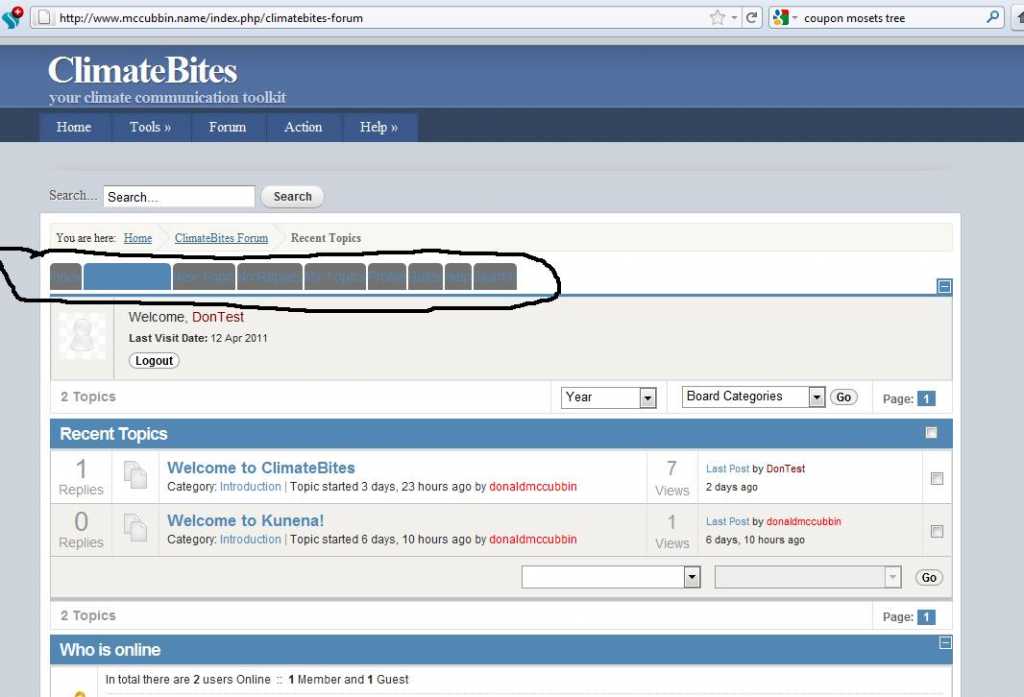
Thanks so much for replying!! I very much appreciate it. Sorry about not giving my site url -- I meant to.
As I noted at the beginning of this thread, I think I identified the issue with the unreadable tabs and can fix it with Firebug, but I do not have a permanent fix. The attached is what I see with Mozilla (and IE8). (I -do- have a fix on the blurry white headers that I was seeing before.)
I am enough of a newbie that I don't know the fix on my Joomla template (or the K template) for the tabs. Any suggestion you might would be much appreciated.
Best regards,
Don
Please Log in or Create an account to join the conversation.
15 years 5 months ago - 15 years 5 months ago #92221
by sozzled
Blue Eagle vs. Crypsis reference guide
Read my blog and
Replied by sozzled on topic Re: Unreadable text tabs (same color as background)
Thank you for your reply. As I mentioned in my earlier message, the K 1.6.3 Blue Eagle template is not optimised for J! 1.6. If you like, you can interpret that to mean we are aware of these problems. These issues have been rectified in K 1.6.4 but that version is not yet available to the public. This leaves you with three possible choices:
(1) Wait until K 1.6.4 has been made available as a public release.
(2) Start again, build your website using J! 1.5.23 and K! 1.6.3 and you will not have those problems.
(3) Make some changes to your Joomla site template and hope that other issues involving the use of J! 1.6 do not impact your ability to use K 1.6.3.
There is a workaround to assist you (and others) who are in this situation - those who are waiting for K 1.6.4 and who are also waiting for J! 1.6 to stabilise to the extent that K 1.6 will nicely co-operate with it. See J! 1.6 + K 1.6.2 - How do I restore my Kunena menu? I hope this information helps.
(1) Wait until K 1.6.4 has been made available as a public release.
(2) Start again, build your website using J! 1.5.23 and K! 1.6.3 and you will not have those problems.
(3) Make some changes to your Joomla site template and hope that other issues involving the use of J! 1.6 do not impact your ability to use K 1.6.3.
There is a workaround to assist you (and others) who are in this situation - those who are waiting for K 1.6.4 and who are also waiting for J! 1.6 to stabilise to the extent that K 1.6 will nicely co-operate with it. See J! 1.6 + K 1.6.2 - How do I restore my Kunena menu? I hope this information helps.
Blue Eagle vs. Crypsis reference guide
Read my blog and
Last edit: 15 years 5 months ago by sozzled.
Please Log in or Create an account to join the conversation.
15 years 5 months ago - 15 years 5 months ago #92270
by dmccubbi
Replied by dmccubbi on topic Re: Unreadable text tabs (same color as background)
Hi Sozzled,
Thanks again. You are awesome for addressing so many questions (mine and everyone else)!
As a workaround, I tried to change the background color for the tabs in the kunena.default.css file. This worked for the non-active tabs, but not the active and hover tabs.
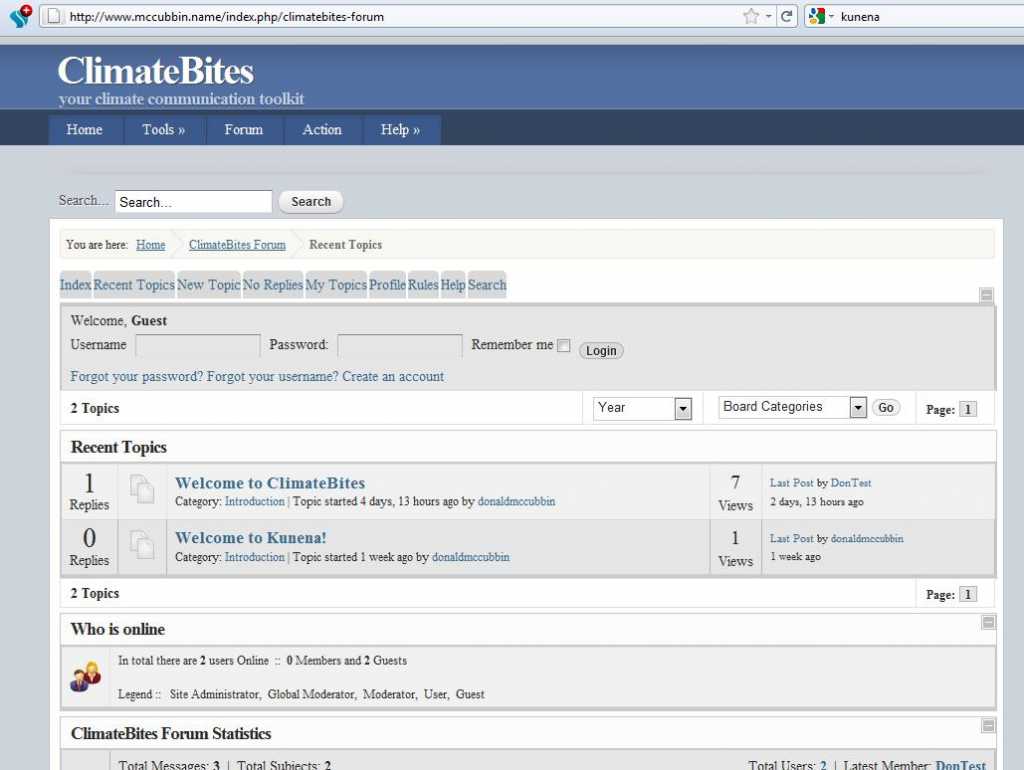
A better workaround for me is to go to the Blue Eagle template and set to "No" the radio button for "Blend with Joomla Template." This seems to work fine (see below), and I'll install 1.6.4 when it comes out.
Thanks again,
Don
Thanks again. You are awesome for addressing so many questions (mine and everyone else)!
As a workaround, I tried to change the background color for the tabs in the kunena.default.css file. This worked for the non-active tabs, but not the active and hover tabs.
A better workaround for me is to go to the Blue Eagle template and set to "No" the radio button for "Blend with Joomla Template." This seems to work fine (see below), and I'll install 1.6.4 when it comes out.
Thanks again,
Don
Last edit: 15 years 5 months ago by dmccubbi.
Please Log in or Create an account to join the conversation.
15 years 5 months ago #92300
by sozzled
Blue Eagle vs. Crypsis reference guide
Read my blog and
Replied by sozzled on topic Re: Unreadable text tabs (same color as background)
When you install K 1.6.4 make sure that you remove the customised CSS changes that you've made to your site template. OK? 
Blue Eagle vs. Crypsis reference guide
Read my blog and
The following user(s) said Thank You: dmccubbi
Please Log in or Create an account to join the conversation.
Time to create page: 0.230 seconds