


- Posts: 7
- Thank you received: 0
Kunena 7.0.9 & Kunena 6.4.14 – Security Updates Released
The Kunena team has announce the arrival of Kunena 7.0.9 [K 7.0.9] in stable which is now available for download as a native Joomla extension for J! 5.4.x/6.0.x./6.1.x. This version addresses most of the issues that were discovered in K 6.2 / K 6.3 / K 6.4 and issues discovered during the last development stages of K 7.0
Topics that are moved into this category are generally considered to be closed. Users may want to add additional information but these topics should not be resurrected in order to discuss new problems or unrelated matters.
Question [Resolved] template color overrides - some questions
14 years 6 months ago #120307
by rob2701
[Resolved] template color overrides - some questions was created by rob2701
I managed (with the help of Firebug) to adapt most colors for Kunena with CSS overrrides in my main site template,
but there are still a few things which I cannot seem to figure out.
No biggies, just annoying. Hope someone can help me to locate the rules for these or tell me if they are possible at all:
- hover color on the collapse above the Welcome box
- hover color on the checkboxes (remember me)
- dropdown boxes: selection color bar (sky blue #4CA4F7 in default Blue Eagle)
- dropdown boxes: down arrow on hover (very light sky blue)
Thanks in advance for your help!
but there are still a few things which I cannot seem to figure out.
No biggies, just annoying. Hope someone can help me to locate the rules for these or tell me if they are possible at all:
- hover color on the collapse above the Welcome box
- hover color on the checkboxes (remember me)
- dropdown boxes: selection color bar (sky blue #4CA4F7 in default Blue Eagle)
- dropdown boxes: down arrow on hover (very light sky blue)
Thanks in advance for your help!
Please Log in or Create an account to join the conversation.


14 years 6 months ago #120331
by sozzled
Blue Eagle vs. Crypsis reference guide
Read my blog and

Replied by sozzled on topic Re: template color overrides - some questions
The general answer to these kinds of questions is given in the article
My Joomla site template makes a mess of Kunena
. It should be possible to change the things you mention in your question with a judicious use of CSS but, without seeing your website, it's more difficult to give you more specific information at this time.
If you would like to share details about your site (the URL of your forum, for example) someone may be able to suggest something. It would also help if you posted your configuration report, too, so that we might know what Joomla template you are using as well as the Kunena template you are trying to modify.
If you would like to share details about your site (the URL of your forum, for example) someone may be able to suggest something. It would also help if you posted your configuration report, too, so that we might know what Joomla template you are using as well as the Kunena template you are trying to modify.
Blue Eagle vs. Crypsis reference guide
Read my blog and
Please Log in or Create an account to join the conversation.
14 years 6 months ago - 14 years 6 months ago #120352
by rob2701
Replied by rob2701 on topic Re: template color overrides - some questions
Of course I read that article. I stated above that I am using style overrides in my main template 
The site is (for now) on a non-connected development server.
The site template is one I am custom building from scratch for Joomla 2.5.
The Kunena template I use is the default Blue Eagle.
I am not modifying the Kunena template, I am using CSS rules in my main template to override it.
Figured out the collapse hover in the meantime:
#Kunena span.ktoggler a:hover {}
So now I'm just stuck with these two:
- dropdown boxes: the selection color bar (sky blue #4CA4F7 in default Blue Eagle)
- dropdown boxes: the down arrow on hover (very light sky blue)
The site is (for now) on a non-connected development server.
The site template is one I am custom building from scratch for Joomla 2.5.
The Kunena template I use is the default Blue Eagle.
I am not modifying the Kunena template, I am using CSS rules in my main template to override it.
Figured out the collapse hover in the meantime:
#Kunena span.ktoggler a:hover {}
So now I'm just stuck with these two:
- dropdown boxes: the selection color bar (sky blue #4CA4F7 in default Blue Eagle)
- dropdown boxes: the down arrow on hover (very light sky blue)
Last edit: 14 years 6 months ago by rob2701.
Please Log in or Create an account to join the conversation.
14 years 6 months ago #120356
by sozzled
Blue Eagle vs. Crypsis reference guide
Read my blog and
Replied by sozzled on topic Re: template color overrides - some questions
Can you post a picture that illustrates the web elements that you want to change and maybe someone will be able to recommend the CSS changes you need to make to your Joomls site template CSS file.
Blue Eagle vs. Crypsis reference guide
Read my blog and
Please Log in or Create an account to join the conversation.
14 years 6 months ago - 14 years 6 months ago #120385
by rob2701
Replied by rob2701 on topic Re: template color overrides - some questions
Thanks, excellent suggestion!
Partial screenprint is attached.
The bits in blue are what I cannot seem to find (down arrow and selection bar). Don't know if it is possible to style the option hover, at least I couldn't find it.
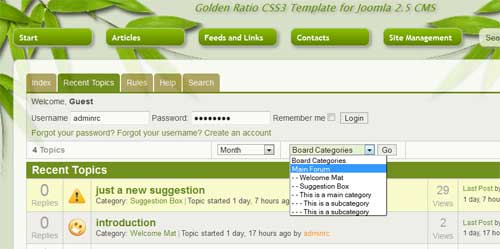
Partial screenprint is attached.
The bits in blue are what I cannot seem to find (down arrow and selection bar). Don't know if it is possible to style the option hover, at least I couldn't find it.
Last edit: 14 years 6 months ago by sozzled. Reason: Insert image inline with text
Please Log in or Create an account to join the conversation.
14 years 6 months ago #120396
by sozzled
Blue Eagle vs. Crypsis reference guide
Read my blog and
Replied by sozzled on topic Re: template color overrides - some questions
The short answer is no, you cannot do this with CSS. (See definitive answer at
forums.digitalpoint.com/showthread.php?t=235040
)
Blue Eagle vs. Crypsis reference guide
Read my blog and
The following user(s) said Thank You: rob2701
Please Log in or Create an account to join the conversation.
Time to create page: 0.208 seconds