
- Posts: 3
- Thank you received: 0
Kunena 7.0.9 & Kunena 6.4.14 – Security Updates Released
The Kunena team has announce the arrival of Kunena 7.0.9 [K 7.0.9] in stable which is now available for download as a native Joomla extension for J! 5.4.x/6.0.x./6.1.x. This version addresses most of the issues that were discovered in K 6.2 / K 6.3 / K 6.4 and issues discovered during the last development stages of K 7.0
Topics that are moved into this category are generally considered to be closed. Users may want to add additional information but these topics should not be resurrected in order to discuss new problems or unrelated matters.
Question Remove the forum breadcrumbs and top forum controls
14 years 10 months ago #111748
by Chrisx909
Remove the forum breadcrumbs and top forum controls was created by Chrisx909
Hello,
I'm using Kunena 1.7.1 on Joomla 1.7.3. Currently I'm using as template B and B (v1.7.x). I asked this already the developer, but he point me to this forum.
Is it possible to remove the red marked area?
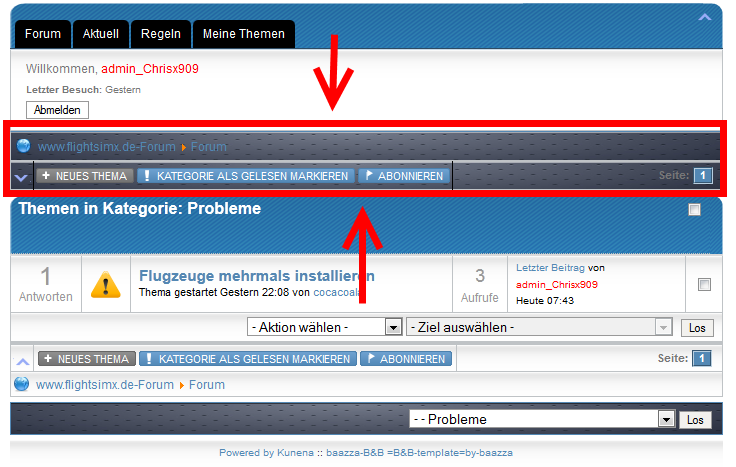
Greetings from Germany,
Chris
I'm using Kunena 1.7.1 on Joomla 1.7.3. Currently I'm using as template B and B (v1.7.x). I asked this already the developer, but he point me to this forum.
Is it possible to remove the red marked area?
Greetings from Germany,
Chris
Please Log in or Create an account to join the conversation.


14 years 10 months ago #111755
by sozzled
Blue Eagle vs. Crypsis reference guide
Read my blog and

Replied by sozzled on topic Re: Remove the forum breadcrumbs and top forum controls
The first part, removing the breadcrumbs, is easy. You only to add these lines of CSS to your Joomla site template:
The second part, is much harder. You have to modify the Kunena PHP source code and remove the part that displays the first occurrence of <table class="klist-actions"> ... and then you have to maintain that code from one release of Kunena to the next. Give me a little while and I'll try to find where we've answered this question before. If it was my website, I just wouldn't do it. 
Code:
#Kunena .kforum-pathway {
display: none;
Blue Eagle vs. Crypsis reference guide
Read my blog and
The following user(s) said Thank You: Chrisx909
Please Log in or Create an account to join the conversation.
14 years 10 months ago - 14 years 10 months ago #111792
by Chrisx909
Replied by Chrisx909 on topic Re: Remove the forum breadcrumbs and top forum controls
Thank you, your hack worked fine for me.
I tried also this command, but it blow of the bottem and upper part . I'm going to spend more time in this problem - but patience will also get disbursed
I tried also this command, but it blow of the bottem and upper part
. I'm going to spend more time in this problem - but patience will also get disbursed Code:
#Kunena .klist-actions {
display: none;
}
Last edit: 14 years 10 months ago by Chrisx909.
Please Log in or Create an account to join the conversation.
14 years 10 months ago #111801
by sozzled
Blue Eagle vs. Crypsis reference guide
Read my blog and
Replied by sozzled on topic Re: Remove the forum breadcrumbs and top forum controls
Yes, I know. If you use CSS to hide the class .klist-actions then you hide both the top and the bottom row of forum controls. As I wrote, you can modify the source code but then it's your problem to maintain those changes from one release of Kunena to the next. In other words, you have to create your own Kunena template so that the changes won't be lost. In my personal opinion, the need doesn't justify the amount of effort involved.
However, if you are really set on making these changes and you accept the risks in doing so you can fiddle about with the file ../components/com_kunena/template/default/threads/latestx.php.
However, if you are really set on making these changes and you accept the risks in doing so you can fiddle about with the file ../components/com_kunena/template/default/threads/latestx.php.
Blue Eagle vs. Crypsis reference guide
Read my blog and
The following user(s) said Thank You: Chrisx909
Please Log in or Create an account to join the conversation.
14 years 10 months ago #111823
by Chrisx909
Replied by Chrisx909 on topic Re: Remove the forum breadcrumbs and top forum controls
I had a look into the latestx.php, but no idea, where to modify - so I will leave this point.
Great thank you for this incredible support/effort
Great thank you for this incredible support/effort
Please Log in or Create an account to join the conversation.
- colinwill78
-

- Offline
- New Member
-

Less
More
- Posts: 1
- Thank you received: 0
14 years 8 months ago - 14 years 8 months ago #115750
by colinwill78
Replied by colinwill78 on topic Re: Remove the forum breadcrumbs and top forum controls
I'm a complete noob but i finally worked this out.
(what i wanted, but i'm not sure it's what you wanted)
i used the following code at the bottom of my joomla template.
worked for me. easy and no need to update it (unless i change my template)
the first code did the welcome box and the second one did the klist-actions.
Try it out and let me know.
#Kunena table.kprofilebox {
display:none;
}
#Kunena table.klist-actions {
display:none;
}
I signed up here just to tell you.
my forum is at www.paddocktalk.com.au/forum if you want to see it, but it still looks sh!t at the moment. still working at the basics.
(what i wanted, but i'm not sure it's what you wanted)
i used the following code at the bottom of my joomla template.
worked for me. easy and no need to update it (unless i change my template)
the first code did the welcome box and the second one did the klist-actions.
Try it out and let me know.
#Kunena table.kprofilebox {
display:none;
}
#Kunena table.klist-actions {
display:none;
}
I signed up here just to tell you.
my forum is at www.paddocktalk.com.au/forum if you want to see it, but it still looks sh!t at the moment. still working at the basics.
Last edit: 14 years 8 months ago by colinwill78.
Please Log in or Create an account to join the conversation.
Time to create page: 0.260 seconds