


- Posts: 15
- Thank you received: 1
Kunena 7.0.4 Released
The Kunena team has announce the arrival of Kunena 7.0.4 [K 7.0.4] in stable which is now available for download as a native Joomla extension for J! 5.4.x/6.0.x. This version addresses most of the issues that were discovered in K 6.2 / K 6.3 / K 6.4 and issues discovered during the last development stages of K 7.0
Before posting in this category, please read sticky topics and, as general background,
My Joomla site template makes a mess of Kunena
.
If you have questions about third-party templates, please use the User-written Templates category or contact the author directly. This category should only be used for questions about templates developed and supported by the Kunena project.
If you have questions about third-party templates, please use the User-written Templates category or contact the author directly. This category should only be used for questions about templates developed and supported by the Kunena project.
Question Category Font
15 years 3 weeks ago #92750
by pickykim
Where to change main category headers (HI?) font style was created by pickykim
I would think it is in kunena.default-min.css - however, I cannot find it and much to my surprise, I had to change the link color of those same category headers in initialize.php.
Does anyone know where I can change the font to Segoe Print?
Thanks, Kim
Does anyone know where I can change the font to Segoe Print?
Thanks, Kim
Please Log in or Create an account to join the conversation.


15 years 3 weeks ago - 15 years 3 weeks ago #92758
by sozzled
Blue Eagle vs. Crypsis reference guide
Read my blog and

Replied by sozzled on topic Re: Where to change main category headers (HI?) font style
Please read
Minified CSS
in the Wiki. We do not recommend directly editing any "-min" CSS file.
The font family used by Kunena is normally taken from your site template CSS file. If you want to change any specific Kunena attributes, we recommend that you add your own CSS declaratives to the end of your site template CSS. site template CSS declaratives always override component (i.e. Kunena) CSS declaratives (unless you have a !important qualifier used somewhere in which case it's the last-loaded !important rule that overrides any previously referenced !important rule).
The font family used by Kunena is normally taken from your site template CSS file. If you want to change any specific Kunena attributes, we recommend that you add your own CSS declaratives to the end of your site template CSS. site template CSS declaratives always override component (i.e. Kunena) CSS declaratives (unless you have a !important qualifier used somewhere in which case it's the last-loaded !important rule that overrides any previously referenced !important rule).
Blue Eagle vs. Crypsis reference guide
Read my blog and
Last edit: 15 years 3 weeks ago by sozzled.
Please Log in or Create an account to join the conversation.
15 years 3 weeks ago #92765
by pickykim
Replied by pickykim on topic Re: Where to change main category headers (HI?) font style
OK, even though I use firebug, I still have a hard time figuring out which element to change. All I want to change is the main category font. Can you off-hand tell me what the name of that element is or do you have some sort of documentation as to what each element refers to?
Thanks, Kim
Thanks, Kim
Please Log in or Create an account to join the conversation.
15 years 3 weeks ago #92768
by sozzled
Blue Eagle vs. Crypsis reference guide
Read my blog and
Replied by sozzled on topic Re: Where to change main category headers (HI?) font style
I don't do things "off-hand"; if I don't know the specific answer I will say so. I do not know the specific answer unless I can see the situation at first-hand for myself. If I give a general solution it may not work because your site template may do something else to invalidate that solution. Show me what it is, specifically, that you want to change (a picture is best) and the URL of the page where this issue occurs and we might be able to help you better. Does that seem like a reasonable plan of action to you?
Blue Eagle vs. Crypsis reference guide
Read my blog and
Please Log in or Create an account to join the conversation.
15 years 3 weeks ago #92769
by pickykim
Replied by pickykim on topic Category Font
How do I simply change the font of the Category Header items? I'm getting a little frustrated because to change the link colors on the SAME category items I'm asking about, you have to go to initialize.php NOT kunena.default.css

So please don't tell me to learn css or get firebug. I have firebug, Snap{css}, stylizer, top style and a bunch of other crap, but I cannot find how to change the stinkin' font on the category header. If there was ONE template file, I could deal with it, but now stuff is spread out over several css files.
Please.
So please don't tell me to learn css or get firebug. I have firebug, Snap{css}, stylizer, top style and a bunch of other crap, but I cannot find how to change the stinkin' font on the category header. If there was ONE template file, I could deal with it, but now stuff is spread out over several css files.
Please.
Please Log in or Create an account to join the conversation.
15 years 3 weeks ago #92770
by pickykim
Replied by pickykim on topic Re: Where to change main category headers (HI?) font style
theperkypickle.com/forum/index
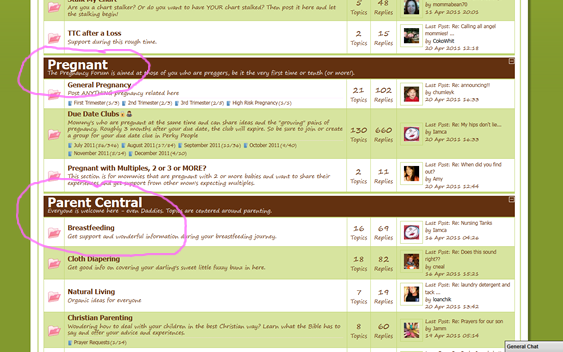
Thank you.
PS I'm using the default kunena template, just modified colors.
Thank you.
PS I'm using the default kunena template, just modified colors.
Please Log in or Create an account to join the conversation.
Time to create page: 0.254 seconds