
- Posts: 4
- Thank you received: 0
Kunena 7.0.5 & Kunena 6.4.11 – Security Updates Released
The Kunena team has announce the arrival of Kunena 7.0.5 [K 7.0.5] in stable which is now available for download as a native Joomla extension for J! 5.4.x/6.0.x. This version addresses most of the issues that were discovered in K 6.2 / K 6.3 / K 6.4 and issues discovered during the last development stages of K 7.0.
The Kunena team is also pleased to announce the eleventh version of Kunena 6.4, a native Joomla extension for Joomla! 5.0, 5.1, 5.2, 5.3, 5.4 and 6.0.
Before posting in this category, please read sticky topics and, as general background,
My Joomla site template makes a mess of Kunena
.
If you have questions about third-party templates, please use the User-written Templates category or contact the author directly. This category should only be used for questions about templates developed and supported by the Kunena project.
If you have questions about third-party templates, please use the User-written Templates category or contact the author directly. This category should only be used for questions about templates developed and supported by the Kunena project.
Question Remain left modules
- mikael_engan
-
 Topic Author
- Offline
- New Member
-

Less
More
15 years 2 months ago - 15 years 2 months ago #88383
by mikael_engan
Remain left modules was created by mikael_engan
Hi,
I´m using Kuena forum component for Joomla and on my site I have a left submenu. In this submenu I have created menu items that links to Kuena categories. When navigate via the submenu everything works fine, but when trying to read a post or creat a new post the forum gets full with and the submenu does not show? Also the pathway says where at the homepage eaven if I have navigated via the submenu,,,?
How can I change so that the submenu always shows, eavenb when navigating via the forum? The submenu is set to publish on all menus..?
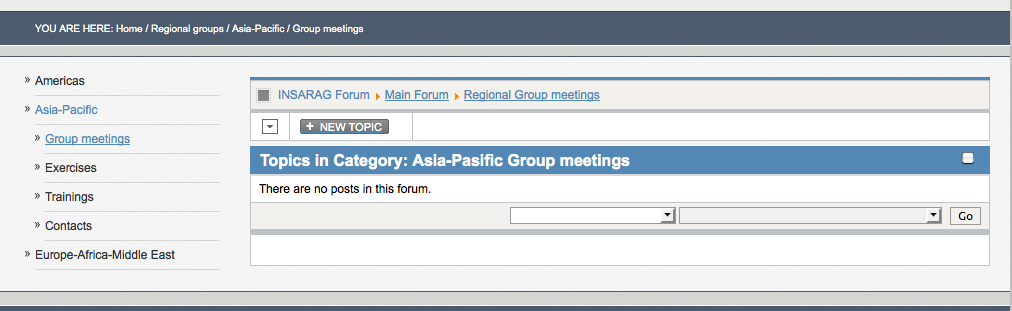
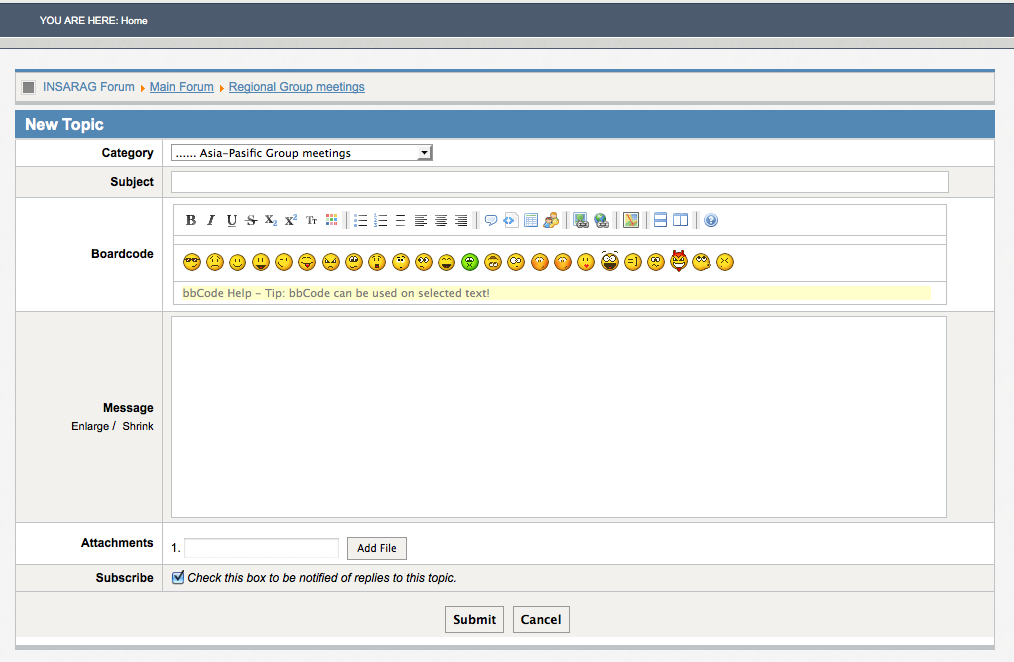
Pls see attached print screens, 1.png shows when the left submenu is showing and 2.png shows what happens when clicking on a forum post or at Create new post button...
Also I´ve niticed when publishing the automatic created Kuena menu the left menu shows? But then the links in pathway does not work? When I click on a menu item the pathway and active links actually points to another menu thats connected to Kuena?
Kind regards Mikael
I´m using Kuena forum component for Joomla and on my site I have a left submenu. In this submenu I have created menu items that links to Kuena categories. When navigate via the submenu everything works fine, but when trying to read a post or creat a new post the forum gets full with and the submenu does not show? Also the pathway says where at the homepage eaven if I have navigated via the submenu,,,?
How can I change so that the submenu always shows, eavenb when navigating via the forum? The submenu is set to publish on all menus..?
Pls see attached print screens, 1.png shows when the left submenu is showing and 2.png shows what happens when clicking on a forum post or at Create new post button...
Also I´ve niticed when publishing the automatic created Kuena menu the left menu shows? But then the links in pathway does not work? When I click on a menu item the pathway and active links actually points to another menu thats connected to Kuena?
Kind regards Mikael
Last edit: 15 years 2 months ago by mikael_engan.
Please Log in or Create an account to join the conversation.


15 years 2 months ago #88386
by GoremanX
THE place to discuss photography!
www.friendlyphotozone.com
Replied by GoremanX on topic Re: Remain left modules
Kunena is very picky about where menu items are and how they're organized. Just adding direct links to stuff doesn't always work.
Do you still have the Kunena menu (titled kunenamenu) that Kunena creates when you install it?
Can you post your entire menu structure? I might be able to help you, but I need more information.
Do you still have the Kunena menu (titled kunenamenu) that Kunena creates when you install it?
Can you post your entire menu structure? I might be able to help you, but I need more information.
THE place to discuss photography!
www.friendlyphotozone.com
Please Log in or Create an account to join the conversation.
- mikael_engan
-
Topic Author
- Offline
- New Member
-
Less
More
- Posts: 4
- Thank you received: 0
15 years 2 months ago #88598
by mikael_engan
Replied by mikael_engan on topic Re: Remain left modules
Hi and thanks for your reply!
The kuena menu is there but two main things happens:
1. When I publish a link to the Kuena Entrypage the left menu remains BUT then I always gets one of the options in the left menu active, eaven if I navigate via other menu options? The menu item that are active is the one with the lowest ID of the kuena menu items.
2. If I unpublish the Kuena Entrypage menu item the active menu items are correct but as soon as I click on a category or post in the forum, my left submenu dissapears?
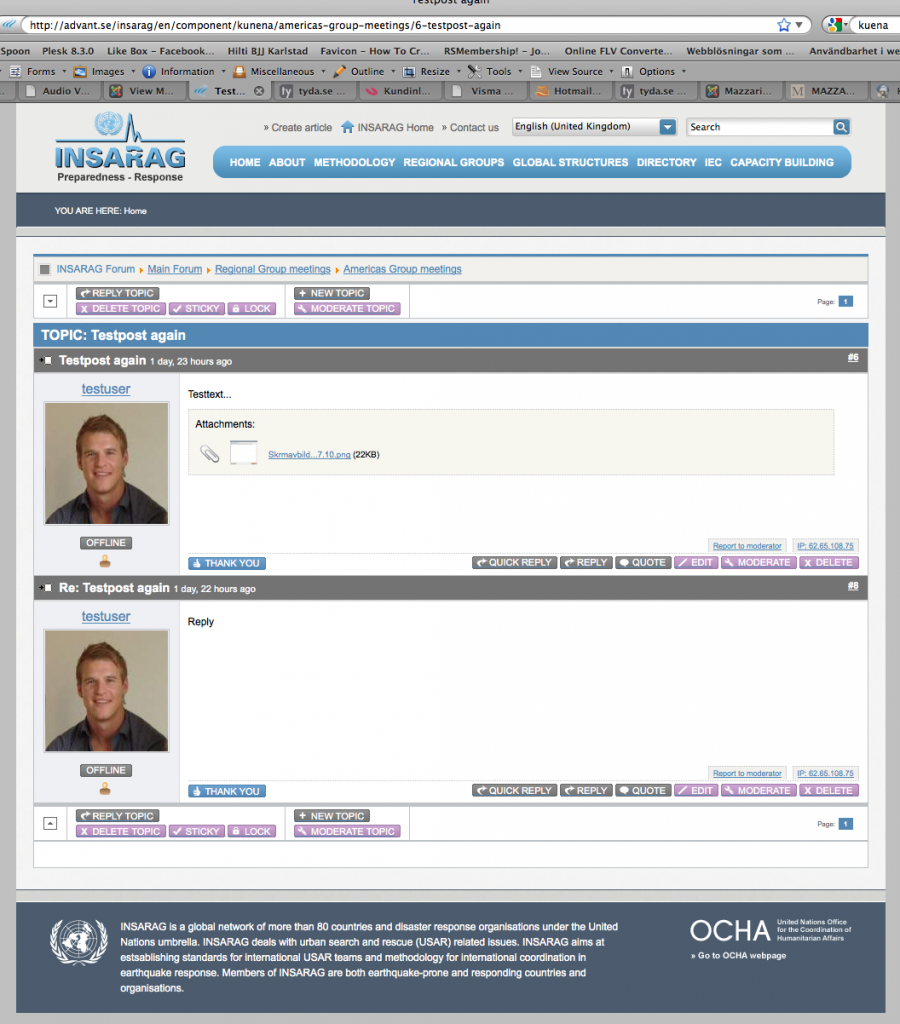
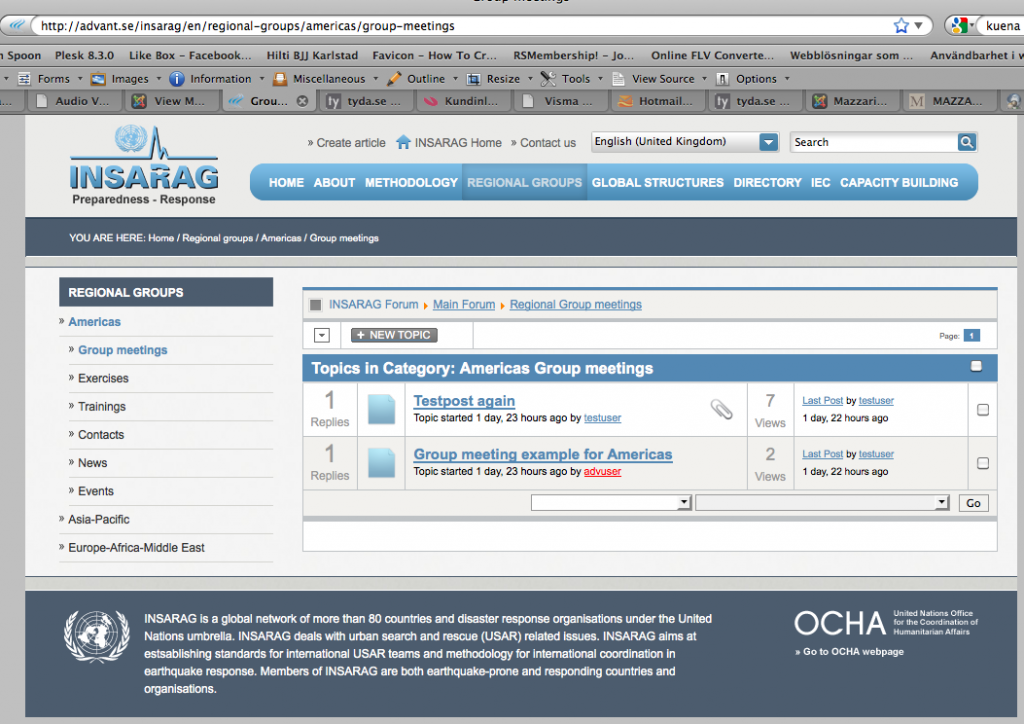
I have attached a printscreen of my menu in backend and also from the whole webpage frontend so you can see the structure of my menus. Im using a main menu with dropdown and also a complimentary left subemnu that uses the submenuitems from the main menu. In the printscreens you can also see the url:s how theese changes.
Thanks for your help!
/Mikael
The kuena menu is there but two main things happens:
1. When I publish a link to the Kuena Entrypage the left menu remains BUT then I always gets one of the options in the left menu active, eaven if I navigate via other menu options? The menu item that are active is the one with the lowest ID of the kuena menu items.
2. If I unpublish the Kuena Entrypage menu item the active menu items are correct but as soon as I click on a category or post in the forum, my left submenu dissapears?
I have attached a printscreen of my menu in backend and also from the whole webpage frontend so you can see the structure of my menus. Im using a main menu with dropdown and also a complimentary left subemnu that uses the submenuitems from the main menu. In the printscreens you can also see the url:s how theese changes.
Thanks for your help!
/Mikael
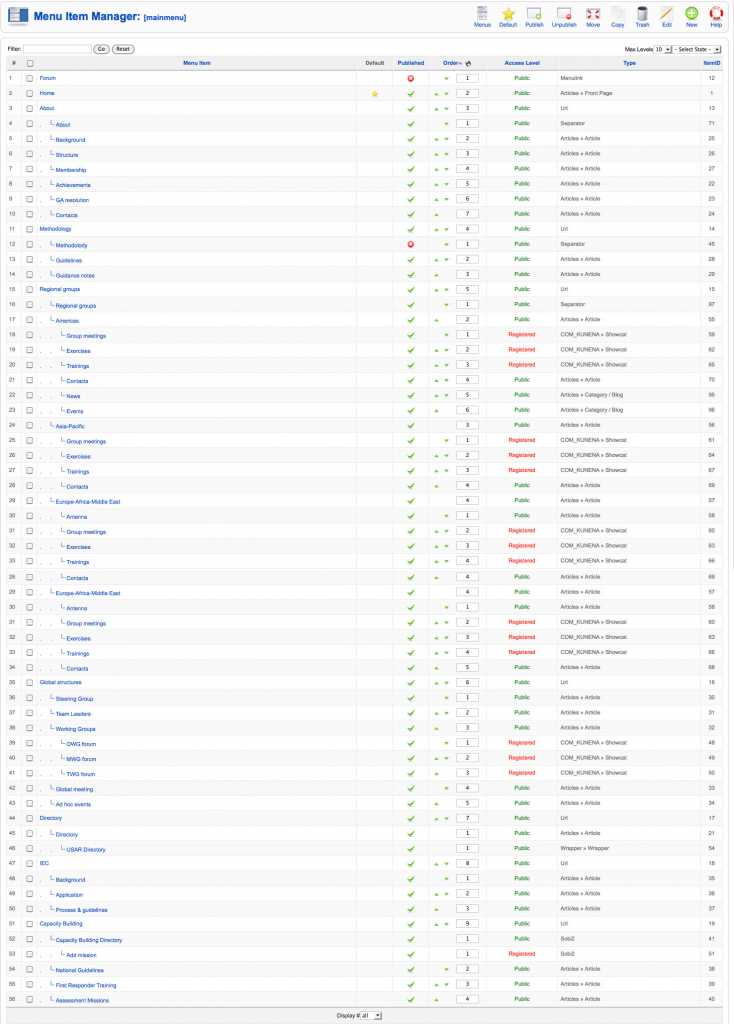
Please Log in or Create an account to join the conversation.

15 years 2 months ago #88954
by severdia
Author of Using Joomla from O'Reilly Media. | www.usingjoomlabook.com
Replied by severdia on topic Re: Remain left modules
Are you familiar with the concept of a "hidden" menu in Joomla? If not, it's another menu you create in Joomla that contains links that you want to exist and add parameters to, but don't want them visible on the frontend of your site. Try going to the Menu Manager and creating a new menu (no menu module with it) then create a menu item in that new menu that's the Kunena > New Topic view. Now go to the Module Manager to make sure your existing menu module is showing on that new menu item's page.
Author of Using Joomla from O'Reilly Media. | www.usingjoomlabook.com
Please Log in or Create an account to join the conversation.
- mikael_engan
-
Topic Author
- Offline
- New Member
-
Less
More
- Posts: 4
- Thank you received: 0
15 years 2 months ago #89018
by mikael_engan
Replied by mikael_engan on topic Re: Remain left modules
Hi,
Yes I´m familiar with hidden menu. I just made a menu item like you described and my submenu module is published on all menu items. However when going to thi new menu id the submenu don´t show here, pls look att print screen.
Thanks for your reply
/Mikael
Yes I´m familiar with hidden menu. I just made a menu item like you described and my submenu module is published on all menu items. However when going to thi new menu id the submenu don´t show here, pls look att print screen.
Thanks for your reply
/Mikael
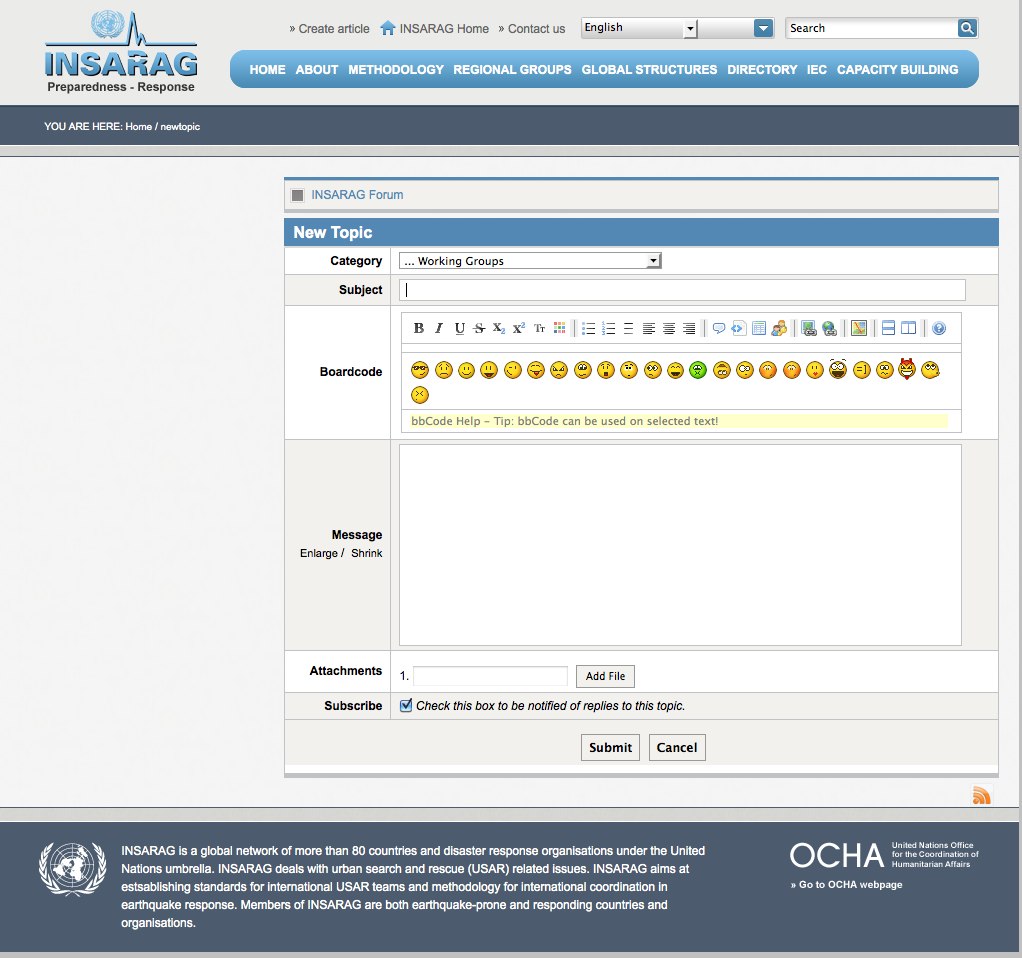
Please Log in or Create an account to join the conversation.
15 years 2 months ago #89036
by severdia
Author of Using Joomla from O'Reilly Media. | www.usingjoomlabook.com
Replied by severdia on topic Re: Remain left modules
Something is not right with your setup. Either the module position is not set up right in your template (or the conditional) or the modules/menus aren't correctly configured in Joomla. Kunena uses the built-in Joomla menu system so it works like any other menu.
One thing I noticed on your menu screenshot above is that the Type for Kunena menu items is shown as "COM_KUNENA » Post" but it should be "Kunena Forum » Post". I don't know if you need to reinstall or fix your language strings or if it's a deeper issue. Have you modified any core files?
In any case, yes, this should normally work.
One thing I noticed on your menu screenshot above is that the Type for Kunena menu items is shown as "COM_KUNENA » Post" but it should be "Kunena Forum » Post". I don't know if you need to reinstall or fix your language strings or if it's a deeper issue. Have you modified any core files?
In any case, yes, this should normally work.
Author of Using Joomla from O'Reilly Media. | www.usingjoomlabook.com
Please Log in or Create an account to join the conversation.
Time to create page: 0.982 seconds