


- Posts: 15
- Thank you received: 0
Kunena 7.0.8 Released
The Kunena team has announce the arrival of Kunena 7.0.8 [K 7.0.8] in stable which is now available for download as a native Joomla extension for J! 5.4.x/6.0.x./6.1.x. This version addresses most of the issues that were discovered in K 6.2 / K 6.3 / K 6.4 and issues discovered during the last development stages of K 7.0
Question Avatar problem persists
15 years 7 months ago - 15 years 7 months ago #83540
by brasshat
Avatar problem persists was created by brasshat
I posted a while ago of a problem
I was having with users uploading avatars which uploaded, but were not displayed. It turned out to be connected to the permissions settings for /media/kunena/ , which I had fooled around with earlier. One person in particular, Sozzled, was quite helpful pointing me toward resources I could use to solve my problem. After resetting directories to 755 and files to 644, it did indeed appear solved.
However, new avatar uploads continue to be written with the wrong permission for subsequent display. As regards file ownership, I am on a shared Apache server and Apache does indeed have ownership. If I go and manually change avatar file permissions to 644, they load just fine.
I am outfoxed here. Has anyone else experienced this issue? I have been using boardhost for a decade and intend to go to Kunena, but until I find a fix for the invisi-tars, I am two-blocked.
However, new avatar uploads continue to be written with the wrong permission for subsequent display. As regards file ownership, I am on a shared Apache server and Apache does indeed have ownership. If I go and manually change avatar file permissions to 644, they load just fine.
I am outfoxed here. Has anyone else experienced this issue? I have been using boardhost for a decade and intend to go to Kunena, but until I find a fix for the invisi-tars, I am two-blocked.
Last edit: 15 years 7 months ago by sozzled. Reason: included URL of earlier topic
Please Log in or Create an account to join the conversation.


15 years 7 months ago #83614
by sozzled
Blue Eagle vs. Crypsis reference guide
Read my blog and

Replied by sozzled on topic Re: Avatar problem persists
I can't remember what version of Kunena we are discussing. Have you tried to see if upgrading to K 1.6.3 addresses any of these issues?
Blue Eagle vs. Crypsis reference guide
Read my blog and
Please Log in or Create an account to join the conversation.
15 years 7 months ago #83655
by brasshat
Replied by brasshat on topic Re: Avatar problem persists
It's 1.6.2
I'm gonna give 1.6.3 a whirl...
I'm gonna give 1.6.3 a whirl...
Please Log in or Create an account to join the conversation.


15 years 7 months ago #83656
by fxstein
We love stars on the Joomla Extension Directory .
Replied by fxstein on topic Re: Avatar problem persists
Since this is a permissions issue, I do not expect that any Kunena version will fix this.
It sounds like your issue is based on incorrect folder permissions. even if you correct all the files inside a folder, if the folder has the permissions set to a different level, all new file will default to the folder settings.
You will need to have somebody with proper OS level expertise look at your permissions setup and correct the problem at hand.
Are you using the ftp feature of Joomla? While ncie to have, it can create many side effects - like this one - if not setup correctly.
It sounds like your issue is based on incorrect folder permissions. even if you correct all the files inside a folder, if the folder has the permissions set to a different level, all new file will default to the folder settings.
You will need to have somebody with proper OS level expertise look at your permissions setup and correct the problem at hand.
Are you using the ftp feature of Joomla? While ncie to have, it can create many side effects - like this one - if not setup correctly.
We love stars on the Joomla Extension Directory .
Please Log in or Create an account to join the conversation.
15 years 7 months ago - 15 years 7 months ago #83723
by brasshat
Replied by brasshat on topic Re: Avatar problem persists
Wow. That opened a can of worms... had made changes to editprofile.php and a few others and installed a custom set of topic icons. Back to normal now.
Using FTP Layer? Nope.
Under 1.6.3, a reg user account loaded a new avatar, but it did not regen the page, thus showing the new avatar, until I forced the browser to re-read.
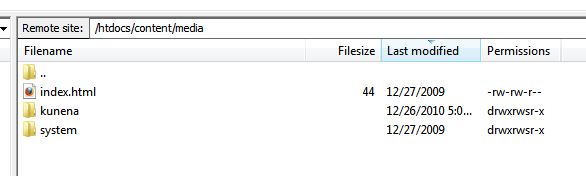
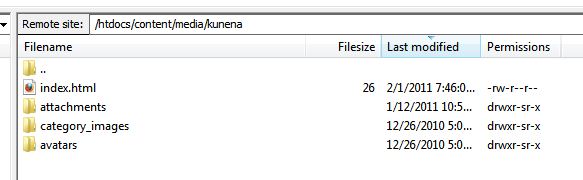
Permissions from K1.6.3 install are as follows:
dirs
/media 775
/media/kunena 775
/media/kunena/avatars 755
/media/kunena/avatars/users 755
files
all 644
This seems more or less appropriate. screen clips below:
I'm gonna have to look into those s's. Bet that's related to this.
Using FTP Layer? Nope.
Under 1.6.3, a reg user account loaded a new avatar, but it did not regen the page, thus showing the new avatar, until I forced the browser to re-read.
Permissions from K1.6.3 install are as follows:
dirs
/media 775
/media/kunena 775
/media/kunena/avatars 755
/media/kunena/avatars/users 755
files
all 644
This seems more or less appropriate. screen clips below:
I'm gonna have to look into those s's. Bet that's related to this.
Last edit: 15 years 7 months ago by brasshat.
Please Log in or Create an account to join the conversation.
15 years 7 months ago - 15 years 7 months ago #83763
by sozzled
Blue Eagle vs. Crypsis reference guide
Read my blog and
Replied by sozzled on topic Re: Avatar problem persists
I follow the recommendations of
Securing Kunena
- which are the Joomla recommendatrions - and I use same permissions on all folders (starting at the root and propagating all the way down) of 755; I use the same permissions on all files (starting at the root and propagating all the way down) of 644. If you suspect that you might have problems later, it's worth going to the trouble to make sure that the permissions are set this way on a clean installation of Joomla before installing any other software and, on a new installation of Joomla, this takes about an hour to perform. Obviously, if you have any doubts after you've installed software, it takes a lot longer when you have more files but it may be worth the peace of mind going through the process once (instead of having to tackle things in a piece-meal manner later).
Not all webbhosting services set these things for you according to the Joomla recommendations and that's why, I think, we encounter this situation every now and then.
Not all webbhosting services set these things for you according to the Joomla recommendations and that's why, I think, we encounter this situation every now and then.
Blue Eagle vs. Crypsis reference guide
Read my blog and
Last edit: 15 years 7 months ago by sozzled.
Please Log in or Create an account to join the conversation.
Time to create page: 0.230 seconds