


- Posts: 258
- Thank you received: 24
Kunena 7.0.8 Released
The Kunena team has announce the arrival of Kunena 7.0.8 [K 7.0.8] in stable which is now available for download as a native Joomla extension for J! 5.4.x/6.0.x./6.1.x. This version addresses most of the issues that were discovered in K 6.2 / K 6.3 / K 6.4 and issues discovered during the last development stages of K 7.0
Topics that are moved into this category are generally considered to be closed. Users may want to add additional information but these topics should not be resurrected in order to discuss new problems or unrelated matters.
Question K1.6b error in IE8: curvyObject warning
16 years 1 month ago #55299
by Baze
K1.6b error in IE8: curvyObject warning was created by Baze
Today suddenly i got this error in IE8:
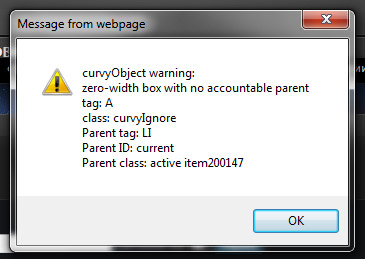
"curvyObject warning:
zero-width box with no accountable parent
tag:a
class: curvyIgnore
Parent tag: LI
Parent class: item200147"
i get this error for each button in the menu, so i'm sure the problem is with the rounded corners of the buttons. Something i've noticed is that here on Kunena, the menu in IE8 is without rounded corners, and on my site in IE i see the round corners but i alsoo see the error :S
"curvyObject warning:
zero-width box with no accountable parent
tag:a
class: curvyIgnore
Parent tag: LI
Parent class: item200147"
i get this error for each button in the menu, so i'm sure the problem is with the rounded corners of the buttons. Something i've noticed is that here on Kunena, the menu in IE8 is without rounded corners, and on my site in IE i see the round corners but i alsoo see the error :S
Please Log in or Create an account to join the conversation.


16 years 1 month ago - 16 years 1 month ago #55319
by sozzled
Blue Eagle vs. Crypsis reference guide
Read my blog and

Replied by sozzled on topic Re: K1.6b error in IE8: curvyObject warning
Thanks for the report. I think the "curvyObject warning" issue is something peculiar to your website because I could not reproduce the symptoms here at Kunena.com. Does Firefox (or another browser) report any issues?
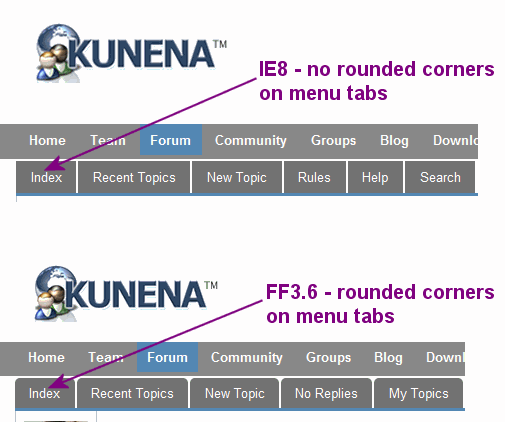
Regarding the curved corners, this seems to be an issue in how IE8 implements the CSS 3 recommendations of the W3C. If users want to see rounded corners, they might have to use a different browser. It's just "one of those things", I think. See comparison of differences in the image below:
Regarding the curved corners, this seems to be an issue in how IE8 implements the CSS 3 recommendations of the W3C. If users want to see rounded corners, they might have to use a different browser. It's just "one of those things", I think. See comparison of differences in the image below:
Blue Eagle vs. Crypsis reference guide
Read my blog and
Last edit: 16 years 1 month ago by sozzled.
Please Log in or Create an account to join the conversation.
16 years 1 month ago #55325
by Baze
Replied by Baze on topic Re: K1.6b error in IE8: curvyObject warning
I know and that's the strange thing..
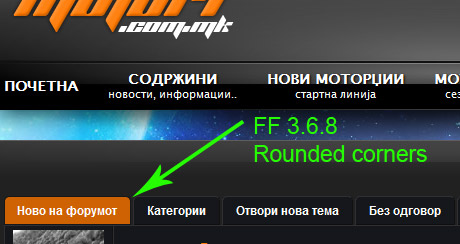
this is my site opened with ff
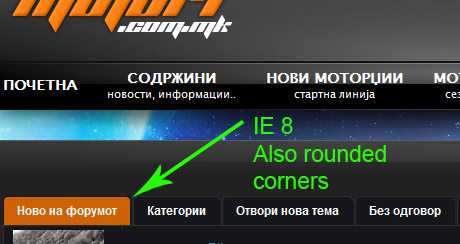
this is viewed with ie, and as you can see, the corners of the buttons ARE rounded, unlike this forum :S
but on forum loading i get this:
this is my site opened with ff
this is viewed with ie, and as you can see, the corners of the buttons ARE rounded, unlike this forum :S
but on forum loading i get this:
Please Log in or Create an account to join the conversation.
16 years 1 month ago - 16 years 1 month ago #55327
by sozzled
Blue Eagle vs. Crypsis reference guide
Read my blog and
Replied by sozzled on topic Re: K1.6b error in IE8: curvyObject warning
Thanks again for your reply. Unfortunately IE8's error message doesn't help us pin-point what it is (on your website) that's the cause. It may be that the error message comes from K 1.6 or it may be generated by something else. The only way to be sure is to try this out on a plain, simple website without any other potential "conflicting" things that you've installed on your site. :dry:
Not much help, I know, but we need to establish how this error is related to K 1.6. Has anyone else reported the same symptoms? I can only say that I haven't encountered these symptoms here at Kunena.com or on my own test sites using IE8.
Not much help, I know, but we need to establish how this error is related to K 1.6. Has anyone else reported the same symptoms? I can only say that I haven't encountered these symptoms here at Kunena.com or on my own test sites using IE8.
Blue Eagle vs. Crypsis reference guide
Read my blog and
Last edit: 16 years 1 month ago by sozzled.
Please Log in or Create an account to join the conversation.
16 years 1 month ago #55331
by Baze
Replied by Baze on topic Re: K1.6b error in IE8: curvyObject warning
Thanks for your reply sozzled, while loading the site again and again, i've noticed error on page which says:
Webpage error details
User Agent: Mozilla/4.0 (compatible; MSIE 8.0; Windows NT 6.1; WOW64; Trident/4.0; SLCC2; .NET CLR 2.0.50727; .NET CLR 3.5.30729; .NET CLR 3.0.30729; Media Center PC 6.0; HPNTDF; .NET4.0C; .NET4.0E; AskTB5.5)
Timestamp: Thu, 5 Aug 2010 23:54:40 UTC
Message: Object doesn't support this property or method
Line: 1
Char: 2440
Code: 0
URI: mysite/plugins/system/mtupgrade/mootools.js
Webpage error details
User Agent: Mozilla/4.0 (compatible; MSIE 8.0; Windows NT 6.1; WOW64; Trident/4.0; SLCC2; .NET CLR 2.0.50727; .NET CLR 3.5.30729; .NET CLR 3.0.30729; Media Center PC 6.0; HPNTDF; .NET4.0C; .NET4.0E; AskTB5.5)
Timestamp: Thu, 5 Aug 2010 23:54:40 UTC
Message: Object doesn't support this property or method
Line: 1
Char: 2440
Code: 0
URI: mysite/plugins/system/mtupgrade/mootools.js
Please Log in or Create an account to join the conversation.
16 years 1 month ago - 16 years 1 month ago #55332
by sozzled
Blue Eagle vs. Crypsis reference guide
Read my blog and
Replied by sozzled on topic Re: K1.6b error in IE8: curvyObject warning
Hmmm ... interesting! 
Off-topic: Have you still got Legacy mode enabled on your website or did you attend to that other matter?
I get the same "Object doesn't support this property or method in mootools.js" when I look at my test website in IE8, too.
Off-topic: Have you still got Legacy mode enabled on your website or did you attend to that other matter?
I get the same "Object doesn't support this property or method in mootools.js" when I look at my test website in IE8, too.
Blue Eagle vs. Crypsis reference guide
Read my blog and
Last edit: 16 years 1 month ago by sozzled.
Please Log in or Create an account to join the conversation.
Time to create page: 0.297 seconds