
Kunena 7.0.8 Released
The Kunena team has announce the arrival of Kunena 7.0.8 [K 7.0.8] in stable which is now available for download as a native Joomla extension for J! 5.4.x/6.0.x./6.1.x. This version addresses most of the issues that were discovered in K 6.2 / K 6.3 / K 6.4 and issues discovered during the last development stages of K 7.0
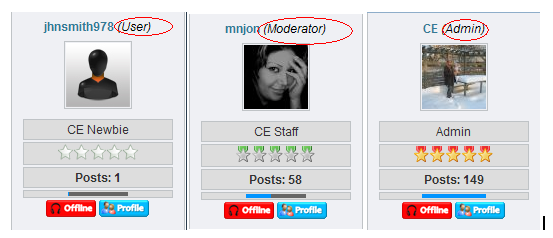
Question how can delete this text
- ghasem karimi
-
 Topic Author
- Offline
- Junior Member
-

and set multi color user for Sample :
Admin =Red color user name
Moderator = Green color user name
Normal user : black

Please Log in or Create an account to join the conversation.


Simple solution: Change Kunena Configuration » Plugins » Userlist » Show User Type = No
Blue Eagle vs. Crypsis reference guide
Read my blog and

Please Log in or Create an account to join the conversation.
- LittleJohn
-

- Offline
- Kunena Contributor
-

Please, a little more info...
Are you using a default Kunena installation?
What version?
Where do you see the texts? (url or description)
Please Log in or Create an account to join the conversation.
- ghasem karimi
-
Topic Author
- Offline
- Junior Member
-

Please Log in or Create an account to join the conversation.
- ghasem karimi
-
Topic Author
- Offline
- Junior Member
-
I havent seen the texts here on kunena.com, so I dont know how to help.
Please, a little more info...
Are you using a default Kunena installation?
What version?
Where do you see the texts? (url or description)
thx LittleJohn
my kunena : 1.5.8
How can change (User color)
Sample :
site admin user color >>red
site Moderator user color >>Green
site normal member >>> Blue or black
Please Log in or Create an account to join the conversation.
- LittleJohn
-
- Offline
- Kunena Contributor
-
You will need to edit the correct template manually to color descriptions.
I dont know which template (file) it is located in though...
Please Log in or Create an account to join the conversation.