


- Posts: 3
- Thank you received: 0
Kunena 7.0.5 & Kunena 6.4.11 – Security Updates Released
The Kunena team has announce the arrival of Kunena 7.0.5 [K 7.0.5] in stable which is now available for download as a native Joomla extension for J! 5.4.x/6.0.x. This version addresses most of the issues that were discovered in K 6.2 / K 6.3 / K 6.4 and issues discovered during the last development stages of K 7.0.
The Kunena team is also pleased to announce the eleventh version of Kunena 6.4, a native Joomla extension for Joomla! 5.0, 5.1, 5.2, 5.3, 5.4 and 6.0.
Please read
Before you ask for help with template issues ...
Question Category Header color hides text
16 years 4 weeks ago #46163
by bobk
Category Header color hides text was created by bobk
Greetings,
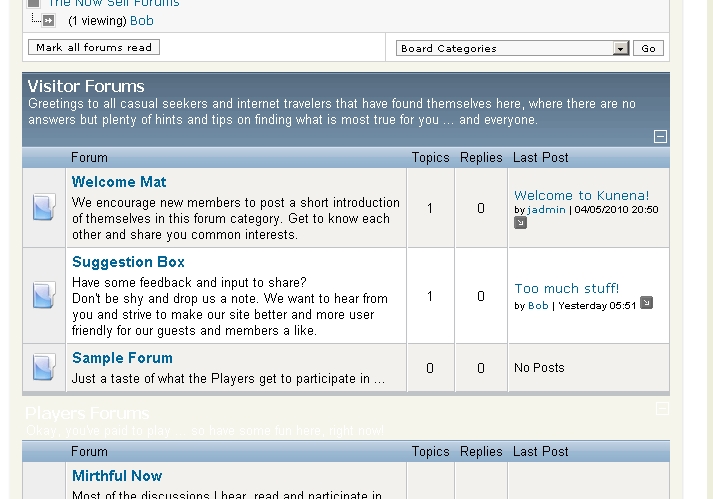
I've added several top level categories, but I can't see them all ... the (background?) color seems to be FFFFFF, and the text is also white, so the name of the category/forum is basically invisible. I've searched the forums for this, discovered Firebug and Colorzilla plugins for Firefox, but it's all beyond me ... how/where do I edit CSS (?) in order to stop this apparently default behavior (see attached screen capture)?
Thanks in advance,
Bob

I've added several top level categories, but I can't see them all ... the (background?) color seems to be FFFFFF, and the text is also white, so the name of the category/forum is basically invisible. I've searched the forums for this, discovered Firebug and Colorzilla plugins for Firefox, but it's all beyond me ... how/where do I edit CSS (?) in order to stop this apparently default behavior (see attached screen capture)?
Thanks in advance,
Bob
Please Log in or Create an account to join the conversation.


16 years 4 weeks ago #46171
by @quila
Replied by @quila on topic Re: Category Header color hides text
Hi,
have you meke some change in the kunena.forum.css?
The link to your site will be useful to track error.
have you meke some change in the kunena.forum.css?
The link to your site will be useful to track error.
Please Log in or Create an account to join the conversation.
16 years 3 weeks ago #46233
by bobk
Replied by bobk on topic Re: Category Header color hides text
Hello @quila,
Here's the site: sandbox.villageport.com/tns_j/index.php?...com_kunena&Itemid=21
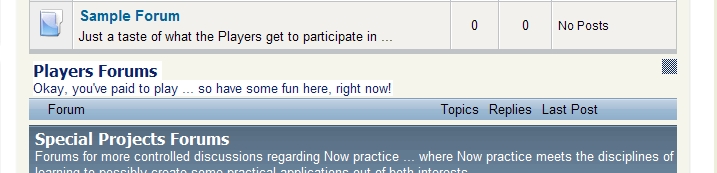
I did try changing line 31 FFFFFF to something else, but it had no effect (to show the category text) ... don't know php/css/html much, but it seems like the images/cat_title_bg.gif should be showing, just like the other categories above/below it ... basically the same screenshot again, tho with the "hidden" forum highlighted with the cursor to reveal the text:

Here's the site: sandbox.villageport.com/tns_j/index.php?...com_kunena&Itemid=21
I did try changing line 31 FFFFFF to something else, but it had no effect (to show the category text) ... don't know php/css/html much, but it seems like the images/cat_title_bg.gif should be showing, just like the other categories above/below it ... basically the same screenshot again, tho with the "hidden" forum highlighted with the cursor to reveal the text:
Please Log in or Create an account to join the conversation.
16 years 3 weeks ago - 16 years 3 weeks ago #46235
by @quila
Replied by @quila on topic Re: Category Header color hides text
Hi bobk,
Go to Kunena Configuration -> Forum Administration
Open the Category "Players Forums", then delete the "forums_players" from the field Forum CSS class suffix option, then Save.
Let me know.
Go to Kunena Configuration -> Forum Administration
Open the Category "Players Forums", then delete the "forums_players" from the field Forum CSS class suffix option, then Save.
Let me know.
Last edit: 16 years 3 weeks ago by @quila.
Please Log in or Create an account to join the conversation.


16 years 3 weeks ago - 16 years 3 weeks ago #46236
by sozzled
Blue Eagle vs. Crypsis reference guide
Read my blog and

Replied by sozzled on topic Re: Category Header color hides text
G'day, bobk, and welcome to the forum. It's always a good idea to start with the basics:
Before you ask for help with template issues ...
.
It looks like you've made some kind of customised change to Kunena. :dry: There's some reference to fb_blocktableforums_players that I can't explain. Where did that come from?
Anyway, the solution is fairly easy: you need to add a few lines to the end of your Kunena CSS file (../components/com_kunena/template/default_ex/kunena.forum.css):
table.fb_blocktableforums_players {
background:url("images/cat_title_bg.gif") repeat-x scroll left top #3B3B3B;
}
It looks like you've made some kind of customised change to Kunena. :dry: There's some reference to fb_blocktableforums_players that I can't explain. Where did that come from?
Anyway, the solution is fairly easy: you need to add a few lines to the end of your Kunena CSS file (../components/com_kunena/template/default_ex/kunena.forum.css):
table.fb_blocktableforums_players {
background:url("images/cat_title_bg.gif") repeat-x scroll left top #3B3B3B;
}
Blue Eagle vs. Crypsis reference guide
Read my blog and
Last edit: 16 years 3 weeks ago by sozzled.
Please Log in or Create an account to join the conversation.
16 years 3 weeks ago #46237
by sozzled
Blue Eagle vs. Crypsis reference guide
Read my blog and
Replied by sozzled on topic Re: Category Header color hides text
Ah, yes, @quila. Of course! That explains the unexplained! Thanks. I learnt something today! :woohoo:
Blue Eagle vs. Crypsis reference guide
Read my blog and
Please Log in or Create an account to join the conversation.
Time to create page: 0.255 seconds