


- Posts: 10
- Thank you received: 0
Kunena 7.0.4 Released
The Kunena team has announce the arrival of Kunena 7.0.4 [K 7.0.4] in stable which is now available for download as a native Joomla extension for J! 5.4.x/6.0.x. This version addresses most of the issues that were discovered in K 6.2 / K 6.3 / K 6.4 and issues discovered during the last development stages of K 7.0
Topics that are moved into this category are generally considered to be closed. Users may want to add additional information but these topics should not be resurrected in order to discuss new problems or unrelated matters.
Question Why does default_ex template look different at my website?
15 years 9 months ago - 15 years 9 months ago #54480
by ashishb01
Hi,
I have just swirched to kunena 1.5 from agora because the looks of agora were a bit too clunky for me. I needed something simple and more professional looking.
But after installing and configuring kunena, I am surprised that it looks totally different that what it looks in any other site.
For me, the top menu is coming as vertical bullets instead of a horizontal navigation bar. In my whole template, there is no border, no columns, and all information is scattered in an unorganized manner.
I am using default_exe in kunena 1.5 for Joomla 1.5. Other major components that I have are Jomsocial and jSebold 9both are working perfectly fine). I have integrated it with Jomsocial at all points in the configurations.
Alos I am using Yootheme Symphony Template, which is tested and there are no known issues of yootheme with kunena
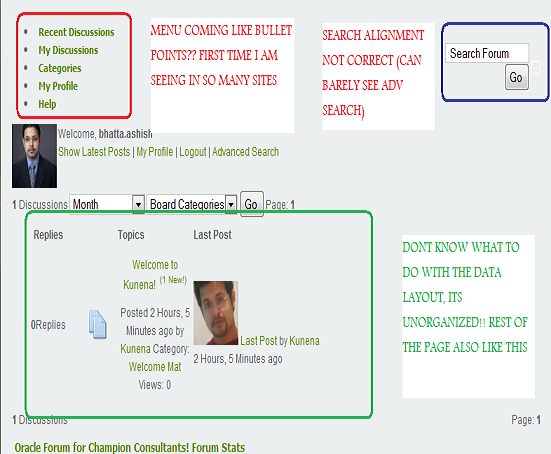
Am I missing something? Please see the screen-shot of the profile page
Your help is much awaited and truly appreciated...
I have just swirched to kunena 1.5 from agora because the looks of agora were a bit too clunky for me. I needed something simple and more professional looking.
But after installing and configuring kunena, I am surprised that it looks totally different that what it looks in any other site.
For me, the top menu is coming as vertical bullets instead of a horizontal navigation bar. In my whole template, there is no border, no columns, and all information is scattered in an unorganized manner.
I am using default_exe in kunena 1.5 for Joomla 1.5. Other major components that I have are Jomsocial and jSebold 9both are working perfectly fine). I have integrated it with Jomsocial at all points in the configurations.
Alos I am using Yootheme Symphony Template, which is tested and there are no known issues of yootheme with kunena
Am I missing something? Please see the screen-shot of the profile page
Your help is much awaited and truly appreciated...
Last edit: 15 years 9 months ago by sozzled. Reason: minor spelling edits in subject
Please Log in or Create an account to join the conversation.


15 years 9 months ago - 15 years 9 months ago #54482
by sozzled
Blue Eagle vs. Crypsis reference guide
Read my blog and

Replied by sozzled on topic Re: Why does default_ex template look different at my website?
G'day, ashishb01, and welcome to Kunena. Please look at
Configuration Tips

Blue Eagle vs. Crypsis reference guide
Read my blog and
Last edit: 15 years 9 months ago by sozzled. Reason: Forgot to include link to "Configuration Tips" in the Wiki
Please Log in or Create an account to join the conversation.


15 years 9 months ago - 15 years 9 months ago #54484
by @quila
Replied by @quila on topic Re: Why does default_ex template look different at my website?
Hi,
check in the configuration of Kunena tab frontend option "Use Joomla Style", should be set to NO.
check in the configuration of Kunena tab frontend option "Use Joomla Style", should be set to NO.
This message contains confidential information
Last edit: 15 years 9 months ago by @quila.
Please Log in or Create an account to join the conversation.
15 years 9 months ago #54486
by ashishb01
thanks guys for lightning fast response.
Use Joomla Style is set to yes. But still?
sozzle,
can u plz give the link to config tips? where can i find it?
Replied by ashishb01 on topic Re: Why does default_ex template look different at my website?
@quila wrote: Hi,
check in the configuration of Kunena tab frontend option "Use Joomla Style", should be set to NO.
thanks guys for lightning fast response.
Use Joomla Style is set to yes. But still?
sozzle,
can u plz give the link to config tips? where can i find it?
Please Log in or Create an account to join the conversation.
15 years 9 months ago #54487
by ashishb01
Replied by ashishb01 on topic Re: Why does default_ex template look different at my website?
thanks guys got it sorted!
Please Log in or Create an account to join the conversation.
15 years 9 months ago #54489
by sozzled
Blue Eagle vs. Crypsis reference guide
Read my blog and
Replied by sozzled on topic Use Joomla Style = Yes
This seems to be a very common issue. I wonder whether the setting (Use Joomla Style = Yes) should even exist? 
The main point that I was trying to make was this:
The main point that I was trying to make was this:
The best change you can make to your Kunena configuration settings is to make no change at all!
Blue Eagle vs. Crypsis reference guide
Read my blog and
The following user(s) said Thank You: ashishb01
Please Log in or Create an account to join the conversation.
Time to create page: 0.260 seconds