
- Posts: 694
- Thank you received: 22
Kunena 7.0.6 & Kunena 6.4.12 – Security Updates Released
The Kunena team has announce the arrival of Kunena 7.0.6 [K 7.0.6] in stable which is now available for download as a native Joomla extension for J! 5.4.x/6.0.x. This version addresses most of the issues that were discovered in K 6.2 / K 6.3 / K 6.4 and issues discovered during the last development stages of K 7.0.
The Kunena team is also pleased to announce the twelfth version of Kunena 6.4, a native Joomla extension for Joomla! 5.0, 5.1, 5.2, 5.3, 5.4 and 6.0.
Topics that are moved into this category are generally considered to be closed. Users may want to add additional information but these topics should not be resurrected in order to discuss new problems or unrelated matters.
Question Out of Ram on VPS
- woonydanny
-
 Topic Author
- Offline
- Elite Member
-

Less
More
16 years 8 months ago #30060
by woonydanny
still wish that i can write my forum signature through a jomsocial plugin and do it from my jomsocial profile
Out of Ram on VPS was created by woonydanny
I run my J1.5.14 and K1.5.4 forum on a VPS with 768mb of RAM. I have approx 30+ users online at a time and i have been having problems lately with running of out RAM. My site is mainly just the forum, and I assume that the majority of the queries are from kunena (not sure how to check that though - does anyone know a way to look at a query log?)
1. Now I am thinking that the upcoming kunena v1.6 will come to my rescue by its huge performance overhaul? Can the devs confirm this?
2. Is there anything i can do in the meantime to help so it doesnt crash all the time?
1. Now I am thinking that the upcoming kunena v1.6 will come to my rescue by its huge performance overhaul? Can the devs confirm this?
2. Is there anything i can do in the meantime to help so it doesnt crash all the time?
still wish that i can write my forum signature through a jomsocial plugin and do it from my jomsocial profile
Please Log in or Create an account to join the conversation.


16 years 8 months ago - 16 years 8 months ago #30079
by xillibit
I don't provide support by PM, because this can be useful for someone else.
Replied by xillibit on topic Re:Out of Ram on VPS
peetree21 wrote:
You can set debug mode you will see all the queries.
peetree21 wrote:
2.Perhaps this site will help you : www.joomlaperformance.com/ , do you have think to cache datas ?
Hello,I run my J1.5.14 and K1.5.4 forum on a VPS with 768mb of RAM. I have approx 30+ users online at a time and i have been having problems lately with running of out RAM. My site is mainly just the forum, and I assume that the majority of the queries are from kunena (not sure how to check that though - does anyone know a way to look at a query log?)
You can set debug mode you will see all the queries.
peetree21 wrote:
1. Yes, Kunena 1.6.0 is a huge rewrite to MVC and it's more fast that Kunena 1.5.x and Kunena 1.0.x.1. Now I am thinking that the upcoming kunena v1.6 will come to my rescue by its huge performance overhaul? Can the devs confirm this?
2. Is there anything i can do in the meantime to help so it doesnt crash all the time?
2.Perhaps this site will help you : www.joomlaperformance.com/ , do you have think to cache datas ?
I don't provide support by PM, because this can be useful for someone else.
Last edit: 16 years 8 months ago by xillibit.
Please Log in or Create an account to join the conversation.

16 years 8 months ago #30196
by Matias
Replied by Matias on topic Re:Out of Ram on VPS
Do you have SSH access to your site?
Log in and write:
top
It shows you CPU usage, how many running processes you have (CPU > 1%) and it will tell you how much memory all the processes are using (M orders them by memory).
There are usually 3 possibilities:
1) mysqld is on the top most of the time using all/most available CPU
2) there are huge amount of httpd processes running (CPU 1-30%)
3) both 1 and 2
Log in and write:
top
It shows you CPU usage, how many running processes you have (CPU > 1%) and it will tell you how much memory all the processes are using (M orders them by memory).
There are usually 3 possibilities:
1) mysqld is on the top most of the time using all/most available CPU
2) there are huge amount of httpd processes running (CPU 1-30%)
3) both 1 and 2
Please Log in or Create an account to join the conversation.
- woonydanny
-
Topic Author
- Offline
- Elite Member
-
Less
More
- Posts: 694
- Thank you received: 22
16 years 8 months ago - 16 years 8 months ago #30201
by woonydanny
still wish that i can write my forum signature through a jomsocial plugin and do it from my jomsocial profile
Replied by woonydanny on topic Re:Out of Ram on VPS
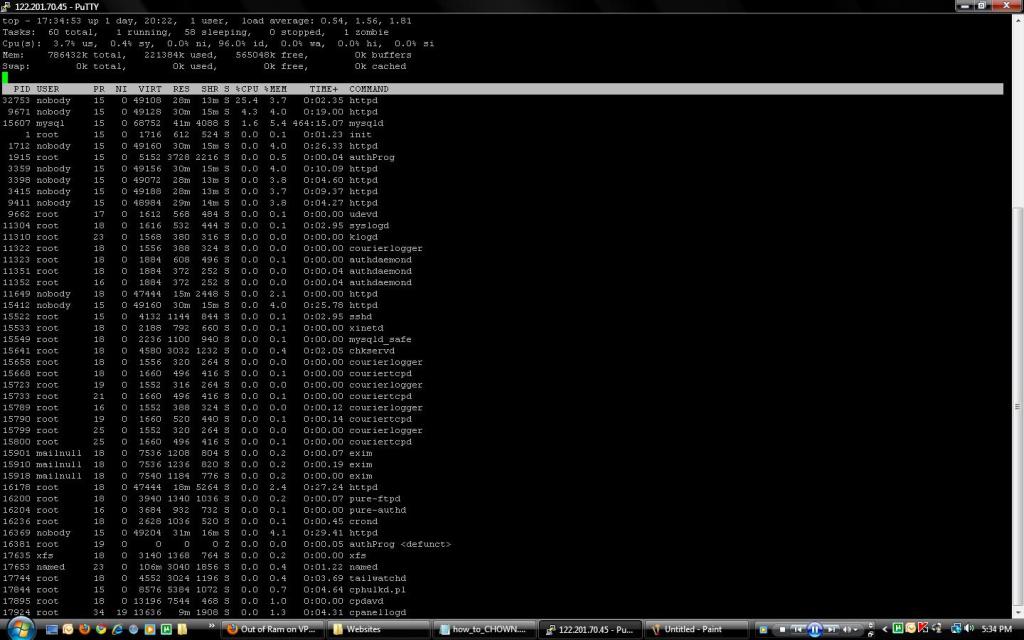
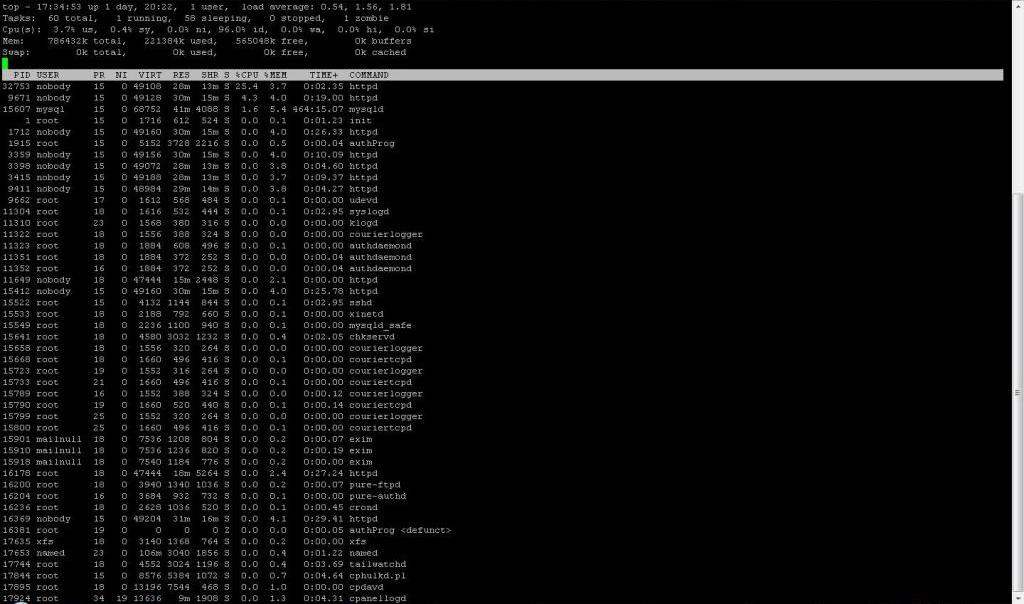
here is a screenshot of the top command. it fluctuates a fair bit but this seems to be the average sort of values.
the site at the moment is pretty quiet (this time of day isnt usually too busy - even though kunena says 28 users in the forum)
can you tell me what this means? and if there is anything i can do in the meantime? thankyou!!

the site at the moment is pretty quiet (this time of day isnt usually too busy - even though kunena says 28 users in the forum)
can you tell me what this means? and if there is anything i can do in the meantime? thankyou!!
still wish that i can write my forum signature through a jomsocial plugin and do it from my jomsocial profile
Last edit: 16 years 8 months ago by woonydanny.
Please Log in or Create an account to join the conversation.
16 years 8 months ago #30207
by Matias
Replied by Matias on topic Re:Out of Ram on VPS
Looks ok, but I suppose that you don't have enough load to saturate the server. It also shows that your server has used more resources than available for not so long time ago.
Look at the first line, there is "Load average" and three numbers: now, short history, long history. They should stay below 2 for most of the time, even on peak hours.
Cpu(s): 13.9%us, 39.8%sy, 0.0%ni, 1.0%id, 44.6%wa, 0.5%hi, 0.2%si, 0.0%st
Tells how much time is spent on:
They may reveal what is going on (if the problem is in I/O or lack of CPU time)
%CPU and %MEM for each process are also useful to look at..
Now you should wait for peak hour and look what happens. I suspect that something is taking all CPU or I/O time and causes number of Apache processes to grow so much that the server will run out of memory. But the question is what it is.
Look at the first line, there is "Load average" and three numbers: now, short history, long history. They should stay below 2 for most of the time, even on peak hours.
Cpu(s): 13.9%us, 39.8%sy, 0.0%ni, 1.0%id, 44.6%wa, 0.5%hi, 0.2%si, 0.0%st
Tells how much time is spent on:
Code:
us -- User CPU time
The time the CPU has spent running users’ processes that are not
niced.
sy -- System CPU time
The time the CPU has spent running the kernel and its processes.
ni -- Nice CPU time
The time the CPU has spent running users’ proccess that have been
niced.
wa -- iowait
Amount of time the CPU has been waiting for I/O to complete.
hi -- Hardware IRQ
The amount of time the CPU has been servicing hardware interrupts.
si -- Software Interrupts
The amount of time the CPU has been servicing software interrupts.
They may reveal what is going on (if the problem is in I/O or lack of CPU time)
%CPU and %MEM for each process are also useful to look at..
Now you should wait for peak hour and look what happens. I suspect that something is taking all CPU or I/O time and causes number of Apache processes to grow so much that the server will run out of memory. But the question is what it is.
Please Log in or Create an account to join the conversation.
- woonydanny
-
Topic Author
- Offline
- Elite Member
-
Less
More
- Posts: 694
- Thank you received: 22
16 years 8 months ago #30211
by woonydanny
still wish that i can write my forum signature through a jomsocial plugin and do it from my jomsocial profile
Replied by woonydanny on topic Re:Out of Ram on VPS
ok thanks!!! i will wait til it gets super busy and take another screenshot.
do you think K1.6 will alleviate these issues? or do i need to do something to my setup/server?
do you think K1.6 will alleviate these issues? or do i need to do something to my setup/server?
still wish that i can write my forum signature through a jomsocial plugin and do it from my jomsocial profile
Please Log in or Create an account to join the conversation.
Time to create page: 0.265 seconds