


- Posts: 24
- Thank you received: 0
Kunena 7.0.6 & Kunena 6.4.12 – Security Updates Released
The Kunena team has announce the arrival of Kunena 7.0.6 [K 7.0.6] in stable which is now available for download as a native Joomla extension for J! 5.4.x/6.0.x. This version addresses most of the issues that were discovered in K 6.2 / K 6.3 / K 6.4 and issues discovered during the last development stages of K 7.0.
The Kunena team is also pleased to announce the twelfth version of Kunena 6.4, a native Joomla extension for Joomla! 5.0, 5.1, 5.2, 5.3, 5.4 and 6.0.
Question [Gelöst] Wie entferne ich Buttons ?
17 years 2 months ago - 17 years 2 months ago #11482
by test12
[Gelöst] Wie entferne ich Buttons ? was created by test12
Hallo Community
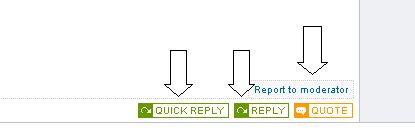
1. Wie/wo kann ich die beiden Buttons Quick Reply und Reply in der Threadansicht entfernen ?
2. Wie/wo ändere ich Report to moderator von Text in ein kleines Bild/Button um ?
Vielen Dank

1. Wie/wo kann ich die beiden Buttons Quick Reply und Reply in der Threadansicht entfernen ?
2. Wie/wo ändere ich Report to moderator von Text in ein kleines Bild/Button um ?
Vielen Dank
Last edit: 17 years 2 months ago by Lintzy.
Please Log in or Create an account to join the conversation.

17 years 2 months ago - 17 years 2 months ago #11497
by Lintzy
Replied by Lintzy on topic Re:Wie entferne ich Buttons ?
Den code für die buttons findest du in der message.php. Sowas wie
echo " " . $msg_reply;
Kommentiere sie aus (notfalls samt If Abfrage) oder lösche sie (mach vorher ein Backup der Datei und teste
Report to moderator (du nutzt demnach noch das englische Sprachfile samt englischer buttons). Such nach dem Text Report to Moderator in der kunena.english.php und lösche nur den Text "Report to Moderator" sonst nix.
Editiere deine Kunena.forum.css
und suche diesen code
span.fb_message_informMarkUp {
background:#f7f7f7;
height: 16px;
border-left:1px dotted #CCC;
border-right:1px dotted #CCC;
border-top:1px dotted #CCC;
padding:2px 5px 2px 5px;
margin-left: 3px;
font-size:xx-small;
color:#666666;
}
änder ihn in
span.fb_message_informMarkUp {
background:transparent url(images/deinegrafik.jpg) no-repeat scroll left bottom;
border-left:0;
display:inline-block;
height:16px;
width:xxpx;
padding:2px 5px 2px 5px;
margin-left:3#px;
}
in width: xx px musst du die Breite deiner Grafik angeben
in height die höhe
und deineGrafik.jpg mit dem Namen deiner Datei umbenennen.
Das müsst eigentlich klappen, aber ohne Garantie ^^
Deine Grafik musst du in den Ordner images deines Templates speichern.
Eventuell sehen padding und margin bei dir anders aus, übernimm die Werte aus deiner CSS
echo " " . $msg_reply;
Kommentiere sie aus (notfalls samt If Abfrage) oder lösche sie (mach vorher ein Backup der Datei und teste
Report to moderator (du nutzt demnach noch das englische Sprachfile samt englischer buttons). Such nach dem Text Report to Moderator in der kunena.english.php und lösche nur den Text "Report to Moderator" sonst nix.
Editiere deine Kunena.forum.css
und suche diesen code
span.fb_message_informMarkUp {
background:#f7f7f7;
height: 16px;
border-left:1px dotted #CCC;
border-right:1px dotted #CCC;
border-top:1px dotted #CCC;
padding:2px 5px 2px 5px;
margin-left: 3px;
font-size:xx-small;
color:#666666;
}
änder ihn in
span.fb_message_informMarkUp {
background:transparent url(images/deinegrafik.jpg) no-repeat scroll left bottom;
border-left:0;
display:inline-block;
height:16px;
width:xxpx;
padding:2px 5px 2px 5px;
margin-left:3#px;
}
in width: xx px musst du die Breite deiner Grafik angeben
in height die höhe
und deineGrafik.jpg mit dem Namen deiner Datei umbenennen.
Das müsst eigentlich klappen, aber ohne Garantie ^^
Deine Grafik musst du in den Ordner images deines Templates speichern.
Eventuell sehen padding und margin bei dir anders aus, übernimm die Werte aus deiner CSS
Last edit: 17 years 2 months ago by Lintzy.
Please Log in or Create an account to join the conversation.
17 years 2 months ago #11509
by test12
Replied by test12 on topic Re:Wie entferne ich Buttons ?
Hey !!!
Danke Lintzy...Buttons sind nun weg !
Nur finde ich die kunena.english.php nicht :dry:
Habe noch Kunena 1.0.8 mit default_ex Template.
Danke nochmal :knuff:
Danke Lintzy...Buttons sind nun weg !
Nur finde ich die kunena.english.php nicht :dry:
Habe noch Kunena 1.0.8 mit default_ex Template.
Danke nochmal :knuff:
Please Log in or Create an account to join the conversation.
17 years 2 months ago #11511
by Lintzy
 Gratuliere, gut gemacht
Unter administrator / components / com_kunena/ language
Replied by Lintzy on topic Re:Wie entferne ich Buttons ?
Gratuliere, gut gemacht Unter administrator / components / com_kunena/ language
Please Log in or Create an account to join the conversation.
17 years 2 months ago - 17 years 2 months ago #11513
by test12
Replied by test12 on topic Re:Wie entferne ich Buttons ?
Thx Lintzy !
Machst n super Job...weiter so !
Auf administrator wär ich nie gekommen :blush:
css bekomm ich auch noch hin...
Dankööööö
edit:

Machst n super Job...weiter so !
Auf administrator wär ich nie gekommen :blush:
css bekomm ich auch noch hin...
Dankööööö
edit:
Last edit: 17 years 2 months ago by test12.
Please Log in or Create an account to join the conversation.
17 years 2 months ago - 17 years 2 months ago #11544
by Lintzy
Replied by Lintzy on topic Re:[Gelöst] Wie entferne ich Buttons ?
Super, dass es geklappt hat und danke dafür, dass du uns Bescheid gesagt hast, dass der Löaungsweg so funktioniert. Ich war mir in dem Moment nicht ganz sicher, ob der span-tag noch angezeigt wird, wenn kein Inhalt drin ist, die Grafik wird ja nur als Hintergrund hingerlegt. Aber mit Eingabe der festen Weite und Höhe hätte es meiner Meinung nach hinhauen müssen, hat ja es auch
Hast du es mal in anderen Browsern gecheckt, ob z.B. es auch im IE und Opera angezeigt wird? Bin immer noch ein bisschen skeptisch, oder einen Link posten, ich hab ein paar unterschiedliche Browser installliert.
Hast du es mal in anderen Browsern gecheckt, ob z.B. es auch im IE und Opera angezeigt wird? Bin immer noch ein bisschen skeptisch, oder einen Link posten, ich hab ein paar unterschiedliche Browser installliert.
Last edit: 17 years 2 months ago by Lintzy.
Please Log in or Create an account to join the conversation.
Time to create page: 0.267 seconds