


- Posts: 17
- Thank you received: 0
Kunena 7.0.9 & Kunena 6.4.14 – Security Updates Released
The Kunena team has announce the arrival of Kunena 7.0.9 [K 7.0.9] in stable which is now available for download as a native Joomla extension for J! 5.4.x/6.0.x./6.1.x. This version addresses most of the issues that were discovered in K 6.2 / K 6.3 / K 6.4 and issues discovered during the last development stages of K 7.0
Topics that are moved into this category are generally considered to be closed. Users may want to add additional information but these topics should not be resurrected in order to discuss new problems or unrelated matters.
Sticky [Merged topic] Hiding the profile box at the top of the page (Blue Eagle template)
15 years 1 month ago #102758
by gamin55
Replied by gamin55 on topic HIde Welcome User Screen
Hi,
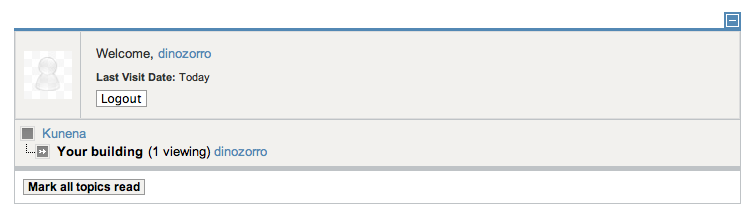
How would I hide the "Welcome User" screen (below):
Thanks!
How would I hide the "Welcome User" screen (below):
Thanks!
This message contains confidential information
Database collation check: The collation of your table fields are correct
Legacy mode: Disabled | Joomla! SEF: Enabled | Joomla! SEF rewrite: Enabled | FTP layer: Disabled |
This message contains confidential informationhtaccess: Exists | PHP environment: Max execution time: 3000 seconds | Max execution memory: 512M | Max file upload: 200M
This message contains confidential information
Joomla default template details : beez_20 | author: Angie Radtke | version: 1.7.0 | creationdate: 25 November 2009
Kunena default template details : Blue Eagle (default) | author: Kunena Team | version: 1.6.5 | creationdate: 2011-07-27
Kunena version detailled: Installed version: 1.6.5 | Build: 5005 | Version name: Babel | Kunena detailled configuration:
Warning: Spoiler![th]Kunena config settings:[/th]
board_title Kunena board_offline 0 board_ofset 0.00 offline_message <h2>The Forum is currently offline for maintenance.</h2>
<div>Check back soon!</div>enablerss 0 enablepdf 0 threads_per_page 20 messages_per_page 6 messages_per_page_search 15 showhistory 0 historylimit 6 shownew 1 jmambot 0 disemoticons 0 template default showannouncement 0 avataroncat 0 catimagepath category_images/ showchildcaticon 0 annmodid 62 rtewidth 450 rteheight 300 enableforumjump 0 reportmsg 0 username 1 askemail 0 showemail 0 showuserstats 1 showkarma 1 useredit 1 useredittime 0 useredittimegrace 600 editmarkup 1 allowsubscriptions 1 subscriptionschecked 1 allowfavorites 1 maxsubject 50 maxsig 300 regonly 0 changename 0 pubwrite 0 floodprotection 0 mailmod 0 mailadmin 0 captcha 0 mailfull 1 allowavatar 1 allowavatarupload 1 allowavatargallery 1 avatarquality 65 avatarsize 2048 allowimageupload 0 allowimageregupload 0 imageheight 800 imagewidth 800 imagesize 150 allowfileupload 0 allowfileregupload 0 filetypes txt,rtf,pdf,zip,tar.gz,tgz,tar.bz2 filesize 120 showranking 1 rankimages 1 avatar_src fb fb_profile fb pm_component no userlist_rows 0 userlist_online 1 userlist_avatar 0 userlist_name 0 userlist_username 0 userlist_posts 0 userlist_karma 0 userlist_email 0 userlist_usertype 0 userlist_joindate 0 userlist_lastvisitdate 0 userlist_userhits 0 latestcategory 6,8,9 showstats 0 showwhoisonline 0 showgenstats 0 showpopuserstats 0 popusercount 5 showpopsubjectstats 0 popsubjectcount 5 usernamechange 0 rules_infb 1 rules_cid 1 help_infb 1 help_cid 1 showspoilertag 1 showvideotag 1 showebaytag 1 trimlongurls 1 trimlongurlsfront 40 trimlongurlsback 20 autoembedyoutube 1 autoembedebay 1 ebaylanguagecode en-us fbsessiontimeout 1800 highlightcode 0 rss_type topic rss_timelimit month rss_limit 100 rss_included_categories rss_excluded_categories rss_specification rss2.0 rss_allow_html 1 rss_author_format name rss_author_in_title 1 rss_word_count 0 rss_old_titles 1 rss_cache 900 fbdefaultpage recent default_sort asc alphauserpointsnumchars 0 sef 1 sefcats 0 sefutf8 0 showimgforguest 0 showfileforguest 0 pollnboptions 4 pollallowvoteone 1 pollenabled 0 poppollscount 5 showpoppollstats 0 polltimebtvotes 00:15:00 pollnbvotesbyuser 100 pollresultsuserslist 1 maxpersotext 50 ordering_system mesid post_dateformat none post_dateformat_hover none hide_ip 1 js_actstr_integration 0 imagetypes jpg,jpeg,gif,png checkmimetypes 1 imagemimetypes image/jpeg,image/jpg,image/gif,image/png imagequality 50 thumbheight 32 thumbwidth 32 hideuserprofileinfo put_empty integration_access auto integration_login auto integration_avatar auto integration_profile auto integration_private auto integration_activity auto boxghostmessage 0 userdeletetmessage 0 latestcategory_in 1 topicicons 0 onlineusers 1 debug 0 catsautosubscribed 0 showbannedreason 0 version_check 0 showthankyou 1 showpopthankyoustats 0 popthankscount 5 mod_see_deleted 0 bbcode_img_secure text listcat_show_moderators 0 lightbox 0 activity_limit 0 show_list_time 720 show_session_type 0 show_session_starttime 0 userlist_allowed 0 userlist_count_users 1 enable_threaded_layouts 0 category_subscriptions post topic_subscriptions every pubprofile 1 thankyou_max 10
Third-party components: None
Third-party SEF components: None
Plugins: System - Mootools Upgrade: Disabled | System - Mootools12: Disabled
Modules: None
Please Log in or Create an account to join the conversation.
15 years 1 month ago - 15 years 1 month ago #102774
by gamin55
Replied by gamin55 on topic Re: Hiding the profile box at the top of the page in default template?
Hello,
I read the topic trail. I added the 3 lines at the end of my css/template "beez_20" file as below:
/**
* @version $Id: template.css 20075 2011-01-04 12:24:47Z infograf768 $
* @author Design & Accessible Team ( Angie Radtke )
* @package Joomla
* @subpackage Accessible-Template-Beez
* @copyright Copyright (C) 2005 - 2008 Open Source Matters. All rights reserved.
* @license GNU/GPL, see LICENSE.php
* Joomla! is free software. This version may have been modified pursuant to the
* GNU General Public License, and as distributed it includes or is derivative
* of works licensed under the GNU General Public License or other free or open
* source software licenses. See COPYRIGHT.php for copyright notices and
* details.
*/
body
{
background: #fff;
color: #000000;
font-size: 100.1%;
padding: 0px;
text-align: center;
}
body.contentpane {
width:auto;
margin:10px;
text-align: left;
}
img { border: 0 none; }
#Kunena table.kprofilebox {
display:none;
}
And it didn't remove the profile box from the top. Something that I am not doing right? thx.
I read the topic trail. I added the 3 lines at the end of my css/template "beez_20" file as below:
/**
* @version $Id: template.css 20075 2011-01-04 12:24:47Z infograf768 $
* @author Design & Accessible Team ( Angie Radtke )
* @package Joomla
* @subpackage Accessible-Template-Beez
* @copyright Copyright (C) 2005 - 2008 Open Source Matters. All rights reserved.
* @license GNU/GPL, see LICENSE.php
* Joomla! is free software. This version may have been modified pursuant to the
* GNU General Public License, and as distributed it includes or is derivative
* of works licensed under the GNU General Public License or other free or open
* source software licenses. See COPYRIGHT.php for copyright notices and
* details.
*/
body
{
background: #fff;
color: #000000;
font-size: 100.1%;
padding: 0px;
text-align: center;
}
body.contentpane {
width:auto;
margin:10px;
text-align: left;
}
img { border: 0 none; }
#Kunena table.kprofilebox {
display:none;
}
And it didn't remove the profile box from the top. Something that I am not doing right? thx.
Last edit: 15 years 1 month ago by gamin55.
Please Log in or Create an account to join the conversation.


15 years 1 month ago - 15 years 1 month ago #102779
by sozzled
Blue Eagle vs. Crypsis reference guide
Read my blog and

Replied by sozzled on topic Re: Hiding the profile box at the top of the page in default template?
Which file, specifically, did you change? I can't see this changes rule on your website. Use
Firebug
for Firefox to see what CSS files are being loaded.
You also have not published your Kunena menu (maybe that's the way you want it ... I don't know).
You also have not published your Kunena menu (maybe that's the way you want it ... I don't know).
Blue Eagle vs. Crypsis reference guide
Read my blog and
Last edit: 15 years 1 month ago by sozzled.
Please Log in or Create an account to join the conversation.
15 years 1 month ago #102799
by gamin55
Replied by gamin55 on topic Re: Hiding the profile box at the top of the page in default template?
Hi,
I read your article and the mention of firebug. However, I use a Mac and have Safari and prefer not to install firefox but if I must, then I must.
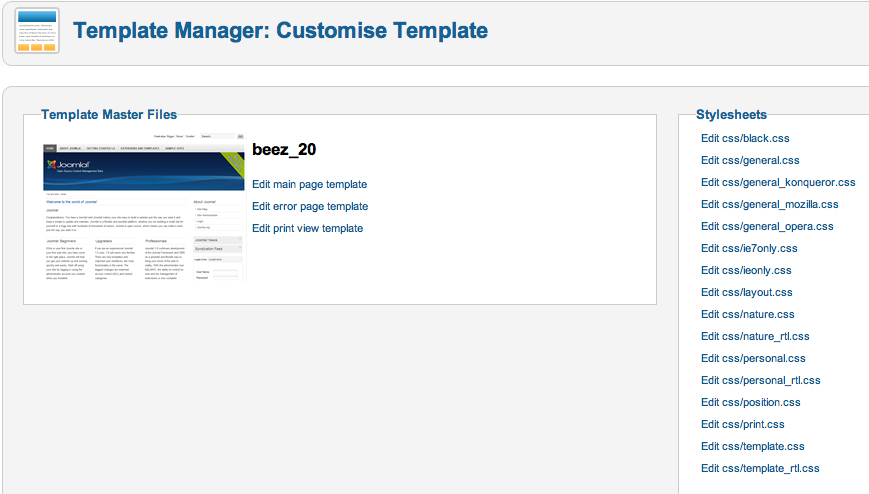
They way I update the template CSS file was: from Joomla Admistration Extensions\template manager\templates\beez_20\Edit css/template.css
See pic below.
THanks!
I read your article and the mention of firebug. However, I use a Mac and have Safari and prefer not to install firefox but if I must, then I must.
They way I update the template CSS file was: from Joomla Admistration Extensions\template manager\templates\beez_20\Edit css/template.css
See pic below.
THanks!
Please Log in or Create an account to join the conversation.
15 years 1 month ago #102801
by sozzled
Blue Eagle vs. Crypsis reference guide
Read my blog and
Replied by sozzled on topic Re: Hiding the profile box at the top of the page in default template?
I'm not familiar with Safari (I don't use a Mac) but there are probably developer tools that you can use with it (
developer.apple.com/technologies/safari/developer-tools.html
). So, if you're more comfortable using Safari with those tools, then use them. Firebug is a tool that's used with Firefox. Google Chrome has it's own tools set and so does Internet Explorer. it doesn't matter.
When I use Firebug I do not see the template that you referred to loaded by your webpage. That's what you need to address. You need to add the necessary CSS overrides to whatever CSS files are loaded. That's what we're talking about on the FAQ page (see the FAQs tab on the Kunena menu at the top of this page).
The forum here at www.kunena.org is a community-driven, self-help resource. Self-help means just that. On the other hand, we understand that some people are also not equipped with many skills associated with webcraft that many of us have taken years to acquire (and I'm not saying that I'm an expert, by any means) but if you can't help yourself there are also plenty of other ways that you can obtain that help ... although it may mean that you have to pay someone else to do it. Our main task here it to show you ways that you can make Kunena work. If you don't like the standard template, the standard features that come "out of the box", that's a different question and, ultimately, that's something you have to deal with on your own terms.
When I use Firebug I do not see the template that you referred to loaded by your webpage. That's what you need to address. You need to add the necessary CSS overrides to whatever CSS files are loaded. That's what we're talking about on the FAQ page (see the FAQs tab on the Kunena menu at the top of this page).
The forum here at www.kunena.org is a community-driven, self-help resource. Self-help means just that. On the other hand, we understand that some people are also not equipped with many skills associated with webcraft that many of us have taken years to acquire (and I'm not saying that I'm an expert, by any means) but if you can't help yourself there are also plenty of other ways that you can obtain that help ... although it may mean that you have to pay someone else to do it. Our main task here it to show you ways that you can make Kunena work. If you don't like the standard template, the standard features that come "out of the box", that's a different question and, ultimately, that's something you have to deal with on your own terms.
Blue Eagle vs. Crypsis reference guide
Read my blog and
Please Log in or Create an account to join the conversation.
15 years 1 month ago #102805
by gamin55
Replied by gamin55 on topic Re: Hiding the profile box at the top of the page in default template?
Thank you for all your help. I am going to look in the Mac tools if not, I will use firebug. Could you be so kind and point me where I can get the instructions on doing an FTP connection? I had a bit of hard time finding the instructions. Thanks again!
Please Log in or Create an account to join the conversation.
Time to create page: 0.292 seconds