


- Posts: 8
- Thank you received: 0
Kunena 7.0.6 & Kunena 6.4.12 – Security Updates Released
The Kunena team has announce the arrival of Kunena 7.0.6 [K 7.0.6] in stable which is now available for download as a native Joomla extension for J! 5.4.x/6.0.x. This version addresses most of the issues that were discovered in K 6.2 / K 6.3 / K 6.4 and issues discovered during the last development stages of K 7.0.
The Kunena team is also pleased to announce the twelfth version of Kunena 6.4, a native Joomla extension for Joomla! 5.0, 5.1, 5.2, 5.3, 5.4 and 6.0.
This is for users to help other users, to discuss topics that are related to forum administration in general or problems in running Joomla. This is not the place to ask for Joomla support. If you want assistance with Joomla please ask at
forum.joomla.org
Question Editing profile - autofiled password
15 years 7 months ago - 15 years 7 months ago #67073
by devwiz
Editing profile - autofiled password was created by devwiz
The problem appear when you have settings in your browser to remember auto fill the form fields or remember passwords automatique.
So when you EDIT your account you may be see that the first field from your passwords pre-filed (1) ********* . But if you do not fill the password confirmation field as well then ANY change (2) for ex. upload new avatar ) in the profille is not saved, and also there is no indication of error.
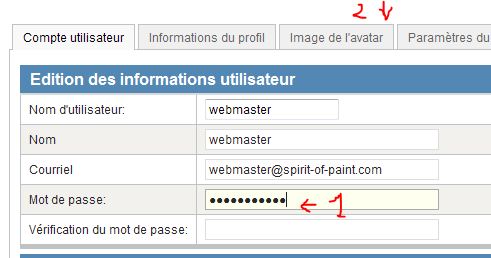
The solution could be changing the name of the form field password so it is not auto filled or at least generate error "Password doesn't match"
So when you EDIT your account you may be see that the first field from your passwords pre-filed (1) ********* . But if you do not fill the password confirmation field as well then ANY change (2) for ex. upload new avatar ) in the profille is not saved, and also there is no indication of error.
The solution could be changing the name of the form field password so it is not auto filled or at least generate error "Password doesn't match"
This message contains confidential information
Database collation check: The collation of your table fields are correct
Legacy mode: Disabled | Joomla! SEF: Enabled | Joomla! SEF rewrite: Enabled | FTP layer: Disabled |
This message contains confidential informationhtaccess: Exists | PHP environment: Max execution time: 1800 seconds | Max execution memory: 128M | Max file upload: 30M
Kunena version detailled: Installed version: 1.6.0 | Build: 3620 | Version name: Spika | Kunena detailled configuration:
Warning: Spoiler![th]Kunena config settings:[/th]
board_title SOP Forums board_offline 0 board_ofset 0 offline_message <h2>The Forum is currently offline for maintenance.</h2>
<div>Check back soon!</div>enablerss 1 enablepdf 1 threads_per_page 20 messages_per_page 20 messages_per_page_search 30 showhistory 1 historylimit 10 shownew 1 jmambot 0 disemoticons 0 template default showannouncement 1 avataroncat 1 catimagepath category_images/ showchildcaticon 1 annmodid 62,63,24233,26136,26269,27096 rtewidth 450 rteheight 300 enableforumjump 1 reportmsg 1 username 1 askemail 0 showemail 0 showuserstats 1 showkarma 1 useredit 1 useredittime 600 useredittimegrace 600 editmarkup 1 allowsubscriptions 1 subscriptionschecked 0 allowfavorites 1 maxsubject 100 maxsig 300 regonly 0 changename 1 pubwrite 0 floodprotection 0 mailmod 0 mailadmin 0 captcha 0 mailfull 1 allowavatar 1 allowavatarupload 1 allowavatargallery 1 imageprocessor gd2 avatarquality 65 avatarsize 2048 allowimageupload 0 allowimageregupload 1 imageheight 720 imagewidth 1280 imagesize 8000 allowfileupload 0 allowfileregupload 1 filetypes zip,txt,doc,gz,tgz,pdf filesize 8000 showranking 1 rankimages 1 avatar_src fb_profile pm_component userlist_rows 30 userlist_online 1 userlist_avatar 1 userlist_name 0 userlist_username 1 userlist_posts 1 userlist_karma 1 userlist_email 0 userlist_usertype 1 userlist_joindate 1 userlist_lastvisitdate 1 userlist_userhits 1 latestcategory 0 showstats 1 showwhoisonline 1 showgenstats 1 showpopuserstats 1 popusercount 100 showpopsubjectstats 1 popsubjectcount 100 usernamechange 1 rules_infb 0 rules_cid 1 rules_link www.kunena.com/ help_infb 0 help_cid 1 help_link www.kunena.com/ showspoilertag 1 showvideotag 1 showebaytag 0 trimlongurls 1 trimlongurlsfront 40 trimlongurlsback 20 autoembedyoutube 1 autoembedebay 0 ebaylanguagecode en-us fbsessiontimeout 1800 highlightcode 0 rss_type topic rss_timelimit month rss_limit 100 rss_included_categories rss_excluded_categories 210 rss_specification rss2.0 rss_allow_html 1 rss_author_format name rss_author_in_title 1 rss_word_count 50 rss_old_titles 0 rss_cache 900 fbdefaultpage categories default_sort asc alphauserpointsnumchars 30 sef 1 sefcats 0 sefutf8 1 showimgforguest 0 showfileforguest 1 pollnboptions 16 pollallowvoteone 1 pollenabled 1 poppollscount 5 showpoppollstats 1 polltimebtvotes 00:15:00 pollnbvotesbyuser 100 pollresultsuserslist 1 maxpersotext 50 ordering_system mesid post_dateformat ago post_dateformat_hover datetime hide_ip 1 js_actstr_integration 0 imagetypes jpg,jpeg,gif,png checkmimetypes 1 imagemimetypes image/jpeg,image/jpg,image/gif,image/png imagequality 50 thumbheight 32 thumbwidth 32 hideuserprofileinfo put_empty integration_access joomla integration_login auto integration_avatar kunena integration_profile kunena integration_private uddeim integration_activity none boxghostmessage 0 userdeletetmessage 1 latestcategory_in 1 topicicons 1 onlineusers 1 debug 0 catsautosubscribed 0 showbannedreason 1 version_check 1 showthankyou 1 showpopthankyoustats 1 popthankscount 50 mod_see_deleted 1 bbcode_img_secure text listcat_show_moderators 1
Third-party components: AlphaUserPoints: Disabled or not installed | CommunityBuilder: Disabled or not installed | Jomsocial: Disabled or not installed | UddeIm: Installed (Version : 2.1)
Plugins: System - Mootools12: Disabled | System - Mootools Upgrade: Disabled | JFirePHP: Disabled or not installed | Kunena Discuss: Disabled or not installed | Kunena Search: Disabled or not installed | My Kunena Forum Menu: Disabled or not installed
Modules: Kunena Latest: Enabled (Version : 1.6.0-RC2) | Kunena Stats: Enabled (Version : 1.6.0-RC2) | Kunena Login: Enabled (Version : 1.6.0-RC2)
Last edit: 15 years 7 months ago by devwiz. Reason: config
Please Log in or Create an account to join the conversation.


15 years 7 months ago #67201
by xillibit
I don't provide support by PM, because this can be useful for someone else.
Replied by xillibit on topic Re: Editing profile - autofiled password
Hello,
This is a known issue in k1.6.0 and this will be fixed in k1.6.1
This is a known issue in k1.6.0 and this will be fixed in k1.6.1
I don't provide support by PM, because this can be useful for someone else.
The following user(s) said Thank You: devwiz
Please Log in or Create an account to join the conversation.
15 years 7 months ago #69685
by devwiz
Replied by devwiz on topic SOLUTION: Editing profile - autofiled password
I found very elegant solution of the mentioned problem:
You have to edit your 'edituser.php' file usually located at
\components\com_kunena\template\default\profile\edituser.php
Find the line of code (about line 53) that handles the input fields for password:
and change it to :
i.e. you have to add autocomplete="off" as parameter.
That's all! (optionally you may wish to add it to the password2 input field as well)
This will save you a lot of complains like "Why my profile doesn't save when I update it?"
Hope this helps :woohoo:
You have to edit your 'edituser.php' file usually located at
\components\com_kunena\template\default\profile\edituser.php
Find the line of code (about line 53) that handles the input fields for password:
Code:
<input class="inputbox validate-password" type="password" id="password" name="password" value="" size="40" />
and change it to :
Code:
<input class="inputbox validate-password" type="password" id="password" name="password" value="" size="40" autocomplete="off" />
i.e. you have to add autocomplete="off" as parameter.
That's all! (optionally you may wish to add it to the password2 input field as well)
This will save you a lot of complains like "Why my profile doesn't save when I update it?"
Hope this helps :woohoo:
Please Log in or Create an account to join the conversation.
15 years 7 months ago #69706
by xillibit
I don't provide support by PM, because this can be useful for someone else.
Replied by xillibit on topic Re: SOLUTION: Editing profile - autofiled password
Thanks for that
So, the issue still happen with K1.6.1 ?
So, the issue still happen with K1.6.1 ?
I don't provide support by PM, because this can be useful for someone else.
Please Log in or Create an account to join the conversation.
15 years 7 months ago - 15 years 7 months ago #69752
by devwiz
Replied by devwiz on topic Re: Editing profile - autofiled password
Hi xillibit,
I just finished testing
I confirm that the problem persist with K1.6.1 after upgrade from K1.6.0 :
without the fix autocomplete="off" :
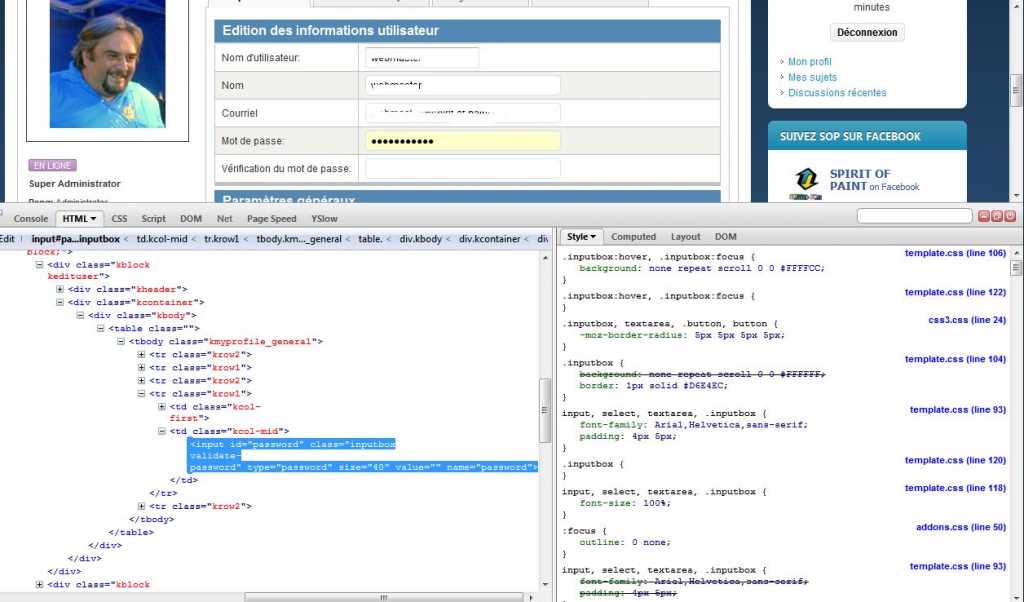
After applying the fix it is OK :
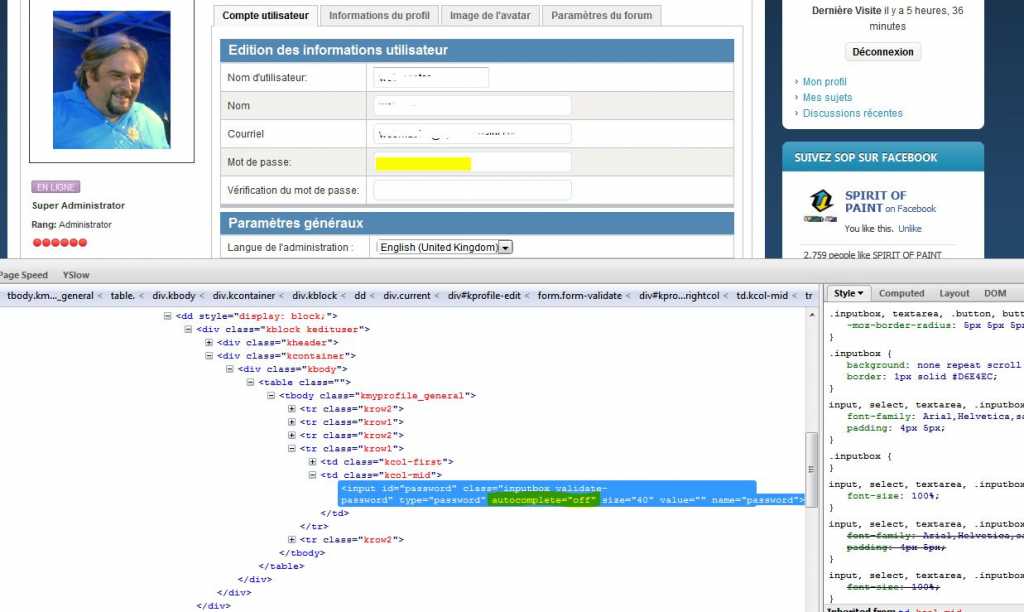
Also - there is still no error message if password doesn't match.
Hope this helps
Thank you
I just finished testing
I confirm that the problem persist with K1.6.1 after upgrade from K1.6.0 :
without the fix autocomplete="off" :
After applying the fix it is OK :
Also - there is still no error message if password doesn't match.
Hope this helps
Thank you
Last edit: 15 years 7 months ago by devwiz.
Please Log in or Create an account to join the conversation.
15 years 7 months ago #69815
by xillibit
I don't provide support by PM, because this can be useful for someone else.
Replied by xillibit on topic Re: Editing profile - autofiled password
the autocompleter="off" is working on Google Chrome ?
The autocompleter="off" is not valid in W3C, so you need to set autocompleter="off" with javascript
The autocompleter="off" is not valid in W3C, so you need to set autocompleter="off" with javascript
I don't provide support by PM, because this can be useful for someone else.
Please Log in or Create an account to join the conversation.
Time to create page: 0.269 seconds